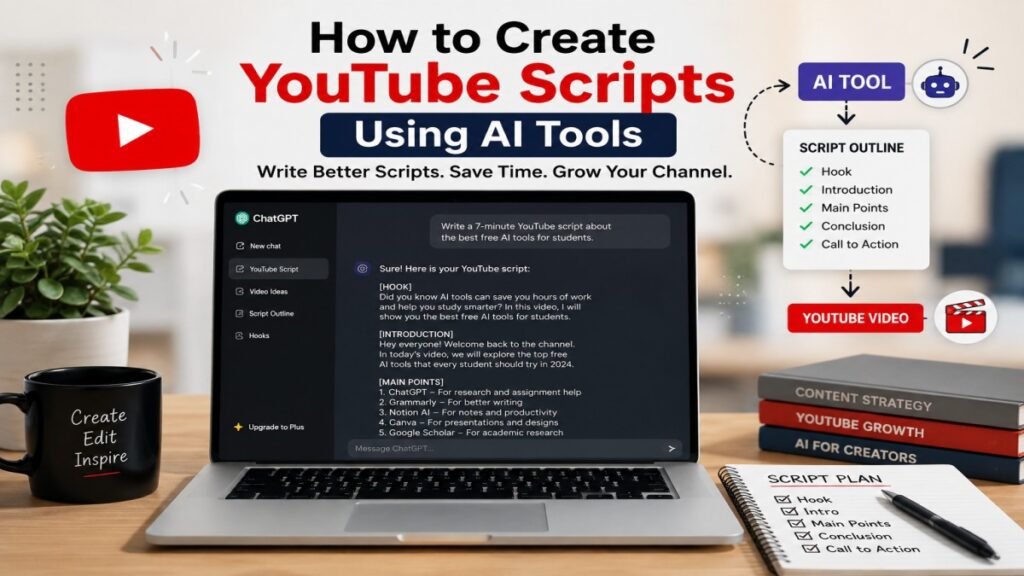
Did you know you can create a complete YouTube script in just a few minutes with AI tools? Today, many creators use AI to save time and create better scripts. The secret is not just using AI—it is knowing how to use it the right way. A clear script helps you speak with confidence, stay on topic, and keep your viewers interested from start to finish. But writing a script from scratch can take a lot of time, especially if you are a beginner.
That is why many creators now create YouTube scripts using AI tools. An AI YouTube script generator can help you find ideas, organize your content, and write a first draft in just a few minutes. Tools like ChatGPT, Gemini, and Claude make AI script writing easier, faster, and more enjoyable.
Wondering if AI can help you write a good YouTube script?
Quick Answer: Yes, an AI YouTube script generator helps creators write YouTube video scripts quickly using artificial intelligence. It can generate a hook, outline, introduction, and a complete first draft from a simple prompt.
In this beginner-friendly guide from UseAiLearn, you will learn how to create YouTube scripts using AI tools step by step. We will also share the best AI tools for YouTube scripts, useful tips, common mistakes to avoid, and simple ways to make your AI-generated scripts sound natural and human.
What Is an AI YouTube Script Generator?
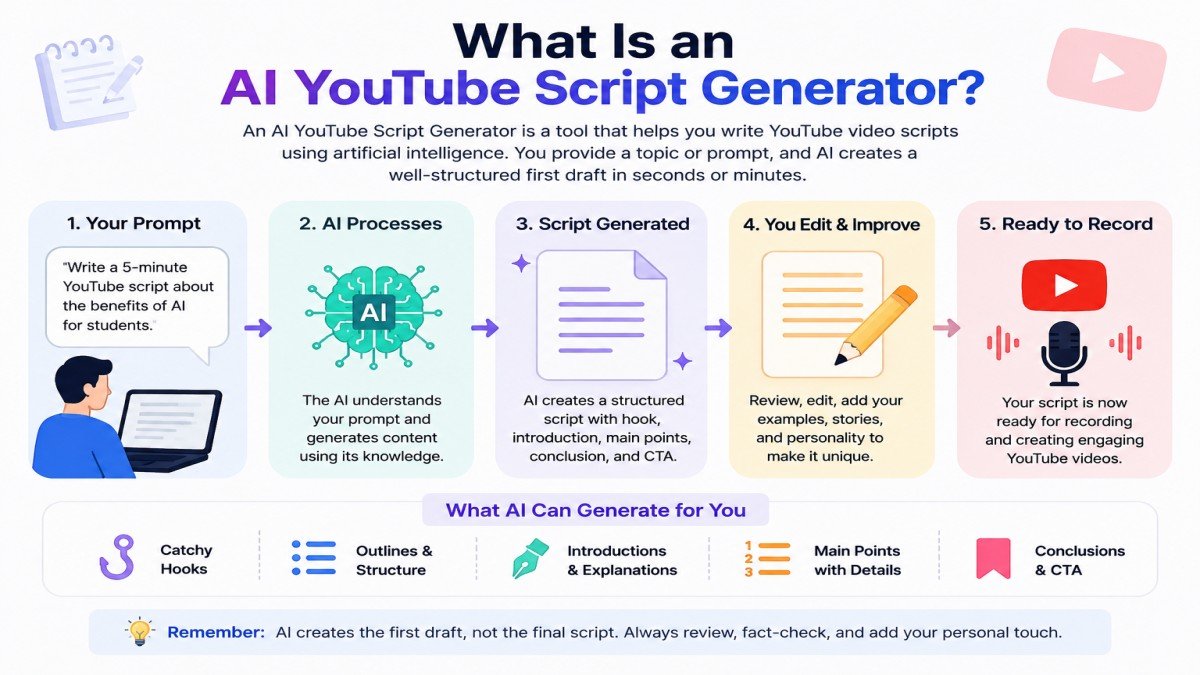
An AI YouTube Script Generator is a tool that helps you write YouTube video scripts using artificial intelligence (AI). You type your video topic or a simple prompt, and the AI can create a first draft in a few seconds or minutes, depending on the tool and the length of your prompt.
These tools are useful for beginners and experienced YouTubers. Instead of staring at a blank page, you can get a well-structured first draft quickly. You can then edit the script and add your own ideas, stories, and personality.
For example, if you type:
Prompt: “Write a 5-minute YouTube script about the benefits of AI for students.”
The AI may create:
- A catchy hook
- A short introduction
- Main points with simple explanations
- A conclusion
- A call to action
This gives you a strong starting point and saves a lot of time.
How Does an AI YouTube Script Generator Work?
Most AI tools work in a few simple steps:
- Enter your video topic or prompt.
- Choose the style or tone if the tool offers this option.
- Click the generate button.
- Read the script carefully.
- Edit it and add your own examples, opinions, and facts.
Example:
Imagine you want to create a YouTube video about “Make Money Using AI“
Instead of writing everything yourself, you can ask an AI tool:
“Write a beginner-friendly YouTube script about the Make Money Using AI,”
In most cases, the AI creates a complete draft within a few seconds. You can improve it by adding your own experience and making it sound more natural.
Popular AI YouTube Script Generators
Some popular AI tools that can help you write YouTube scripts are:
- ChatGPT
- Google Gemini
- Claude
- Jasper AI
- Copy.ai
Each tool has different features, but they all help you create scripts faster.
Remember
An AI YouTube Script Generator creates the first draft, not the final script. Always review the content, correct any mistakes, check the facts, and add your personal style. This makes your video more helpful, unique, and trustworthy.
Benefits of Creating YouTube Scripts Using AI
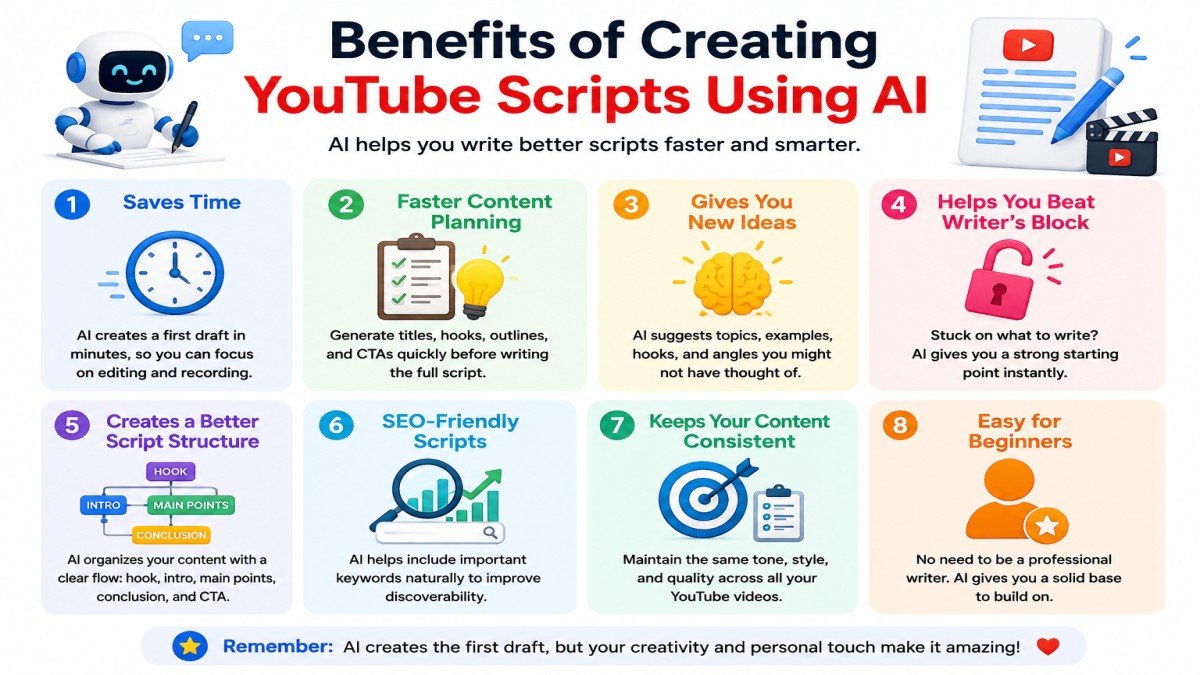
Using AI to write YouTube scripts has many benefits. It helps beginners and experienced creators save time and make better videos. AI does not replace your creativity, but it makes the writing process much easier.
1. Saves Time
Writing a script from the beginning can take hours. AI can create a first draft in just a few minutes. You only need to edit and improve it.
Example:
If you want to make a video about “Top 5 AI Tools for Students,” an AI tool can quickly create an introduction, main points, and conclusion. This saves you a lot of time.
2. Faster Content Planning
AI can also help you plan your entire video before you start writing. It can generate titles, hooks, outlines, and call-to-action ideas in just a few minutes.
Example:
If you want to create a video about AI tools for students, AI can suggest a title, an outline, a hook, and a CTA before writing the full script.
3. Gives You New Ideas
Sometimes you know your topic, but you do not know how to start. AI can suggest video titles, hooks, examples, and content ideas.
Example:
If your topic is “How to Learn English with AI,” AI can suggest tips, real-life examples, and interesting questions for your video.
4. Helps You Beat Writer’s Block
Many creators feel stuck because they cannot think of the right words. AI helps you start writing when you have no ideas.
Example:
You only need to type a simple prompt like, “Write a YouTube script for beginners about AI image generators,” and AI will create a draft for you.
5. Creates a Better Script Structure
A good YouTube script should have a strong hook, useful information, and a clear ending. AI helps organize your content in the right order.
Example:
Your script may include:
- Hook
- Introduction
- Main Tips
- Summary
- Call to Action
This makes your video easier to follow.
6. SEO-Friendly Scripts
AI can help you include important keywords naturally in your script. However, your video’s ranking also depends on factors like audience retention, watch time, title, thumbnail, and video quality.
7. Keeps Your Content Consistent
If you upload videos every week, writing scripts can become difficult. AI helps you keep the same writing style and quality across your videos.
Example:
A technology YouTube channel can use AI to create scripts with the same friendly tone in every video.
8. Easy for Beginners
You do not need to be an expert writer. AI gives you a strong starting point, and you can improve the script with your own ideas and personality.
Example:
A student starting a YouTube channel can use AI to write simple educational scripts without feeling confused.
Remember
AI is a helpful assistant, not a replacement for your creativity. Always read your script, check the facts, and add your own experience before recording your video. A personal touch makes your content more helpful and trustworthy.
Best AI Tools for Writing YouTube Scripts
Many AI tools can help you write YouTube scripts. Some are free, while others offer paid plans with more features. The best tool depends on your needs, budget, and writing style.
Here are some of the best AI tools for writing YouTube scripts.
1. ChatGPT
ChatGPT is one of the most popular AI writing tools. It can create YouTube scripts, video ideas, titles, hooks, and descriptions. You can also ask it to rewrite or improve your script.
Best for: Beginners and experienced creators
Free Plan: Yes
Example:
You can type:
“Write a 7-minute YouTube script about how to use AI for studying.”
ChatGPT will create a complete draft that you can edit and personalize.
2. Google Gemini
Google Gemini is another powerful AI assistant. It can help you write simple and informative YouTube scripts. It is useful for research, brainstorming, and content planning.
Best for: Research and educational videos
Free Plan: Yes
Example:
Ask Gemini:
“Create a beginner-friendly YouTube script about AI tools for teachers.”
It can organize the content into clear sections.
3. Claude
Claude is known for writing natural and easy-to-read content. It works well for long YouTube scripts and detailed explanations.
Best for: Long educational videos
Free Plan: Yes (with limits)
Example:
You can ask:
“Write a friendly YouTube script explaining how AI works.”
Claude usually writes in a smooth and human-like style.
4. Jasper AI
Jasper AI is a premium AI writing tool designed for marketers, businesses, and professional content creators. It offers templates that make script writing faster.
Best for: Marketing and business videos
Free Plan: No (Free trial may be available)
Example:
A business owner can use Jasper AI to create product review or promotional video scripts.
5. Copy.ai
Copy.ai helps you create content quickly. It can generate video scripts, social media posts, and marketing copy in just a few minutes.
Best for: Short promotional videos
Free Plan: Yes (with limits)
Example:
You can use Copy.ai to write a short script for a product launch or YouTube Shorts video.
Which AI Tool Should You Choose?
If you are just starting your YouTube journey, ChatGPT or Google Gemini are great choices because they are easy to use and offer free plans.
| Tool | Best For | Free Plan |
|---|---|---|
| ChatGPT | Beginners | Yes |
| Gemini | Research | Yes |
| Claude | Long Scripts | Yes |
| Jasper | Marketing | Paid |
| Copy.ai | Short Content | Yes |
If you create detailed educational videos, Claude is a good option.
If you run a business or create marketing videos, Jasper AI and Copy.ai offer useful professional features.
Remember
No AI tool can fully replace your creativity. AI can create a strong first draft, but you should always edit the script, check the facts, and add your own examples and experiences. This makes your YouTube videos more unique, helpful, and trustworthy.
Step-by-Step Guide to Create YouTube Scripts Using AI Tools
Creating a YouTube script with AI is easy if you follow the right steps. You do not need to be an expert writer. AI helps you create a strong first draft, and you can improve it with your own ideas.
Step 1: Choose Your Video Topic
First, decide what your video will be about. Pick a topic that is useful and interesting for your audience. A clear topic helps the AI create a better script.
Example:
- How to Learn English with AI
- Best Free AI Tools for Students
- How to Edit Videos for YouTube
Step 2: Know Your Audience
Think about who will watch your video. Your script should match their needs and knowledge.
Ask yourself:
- Are they beginners?
- Are they students?
- Are they business owners?
- What problem do they want to solve?
Example:
If your audience is beginners, use simple words and explain every step clearly.
Step 3: Write a Good AI Prompt
The quality of your prompt affects the quality of the script. Give the AI clear instructions.
Include:
- Video topic
- Target audience
- Tone
- Video length
- Important points
Example Prompt:
“Write a 7-minute YouTube script for beginners about “Top 10 AI Image Generator Tools”. Use simple English, include a catchy hook, step-by-step tips, examples, and a strong call to action.”
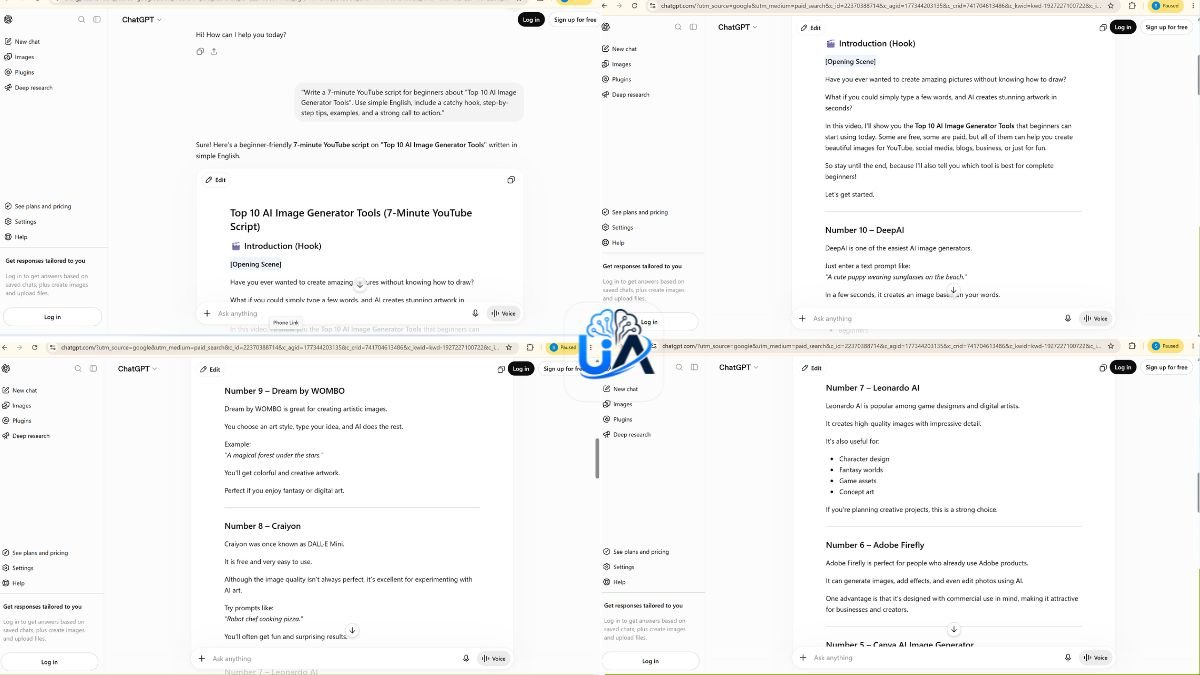
A detailed prompt usually gives better results than a short one.
Step 4: Generate the First Draft
Copy the prompt into your AI tool, such as ChatGPT, Google Gemini, or Claude.
Within a short time, the AI will generate a complete first draft with:
- A hook
- An introduction
- Main points
- A conclusion
- A call to action
This gives you a strong starting point.
Step 5: Edit and Improve the Script
This is one of the most important steps. Read the script carefully and improve it.
You should:
- Fix grammar and spelling mistakes.
- Remove repeated sentences.
- Add your own experience.
- Check all facts and information.
- Make the language sound natural.
Example:
Instead of only saying:
“AI saves time.”
You can improve it by saying:
“I use AI to create my first script draft. It saves me time, but I always edit it before recording.”
This makes your content more personal and trustworthy.
Pro Tip: AI can sometimes create incorrect or outdated information, so always verify important facts before publishing your video.
Many creators use AI to generate the first draft, but they always rewrite important parts in their own words. This makes the script sound more natural and helps build trust with viewers.
Step 6: Read the Script Before Recording
Read your script aloud before you record your video.
If a sentence sounds strange or difficult to say, change it. A natural script is easier for viewers to understand and enjoy.
Result Is
After editing, you will have a YouTube script that is:
- Easy to understand
- Helpful for your audience
- More natural and human
- Better organized
- Ready for recording
Pro Tip
Many successful YouTubers use AI only to create the first draft. They then rewrite parts of the script in their own words, add personal experiences, and check all important facts. This simple habit makes their videos more unique, trustworthy, and engaging for viewers.
Step 7: Add a Strong Hook and Call to Action
Start your video with an interesting hook to grab attention.
Example Hook:
“Did you know you can write a YouTube script in less than 10 minutes using AI?”
At the end of your script, tell viewers what to do next.
Example Call to Action:
“If this video helped you, please like, subscribe, and share it with your friends.”
A strong beginning and ending make your video more engaging.
Final Tip
AI can help you write faster, but your ideas, experience, and personality make the script unique. Always review the AI-generated content before recording your video.
My Experience: When I started using AI for YouTube scripts, my first drafts became much faster to write. However, I noticed that AI sometimes repeated ideas, so I always edited the script and added my own examples before recording.
Example AI Prompt for YouTube Script Writing
A good AI prompt helps you get a better YouTube script. If your prompt is clear, the AI can understand exactly what you need. A short or confusing prompt may give poor results.
Try to include these details in your prompt:
- Video topic
- Target audience
- Tone (friendly, professional, or simple)
- Video length
- Main points you want to cover
- Call to action
The more helpful details you provide, the better your script will be.
Example Prompt 1
Write a 7-minute YouTube script for beginners about How to Sell AI Generated Images Online. Use simple English, start with a strong hook, explain each step with examples, and end with a call to action. Make the script sound natural and friendly.
Example Prompt 2
Create a YouTube script about the “How to Sell AI Generated Images Online”. Compare ChatGPT, Google Gemini, Claude, Jasper AI, and Copy.ai. Explain their features, pros, and cons in simple language. Add a short conclusion and a call to action.
Example Prompt 3
Write a YouTube script for students about how AI can help with studying. Keep the language easy to understand, include real-life examples, and make the video around 5 minutes long.
Tips for Writing Better AI Prompts
- Be clear about your topic.
- Mention your target audience.
- Tell the AI how long the script should be.
- Ask for simple language if your audience is beginners.
- Request real-life examples.
- Ask the AI to add a hook and a conclusion.
Example of a Weak Prompt
Write a YouTube script.
This prompt is too short. The AI does not know your topic, audience, or goal.
Example of a Better Prompt
Write a 6-minute YouTube script for beginners about How to create AI images for free. Use simple English, explain the benefits with examples, compare two AI tools, and end with a call to action.
This prompt gives the AI clear instructions, so the result is usually much better.
Remember
A great AI prompt does not guarantee a perfect script. Always read the AI-generated content, correct mistakes, check the facts, and add your own ideas and experiences. This makes your script more unique, helpful, and trustworthy.
Tips to Make AI-Generated Scripts Sound Human
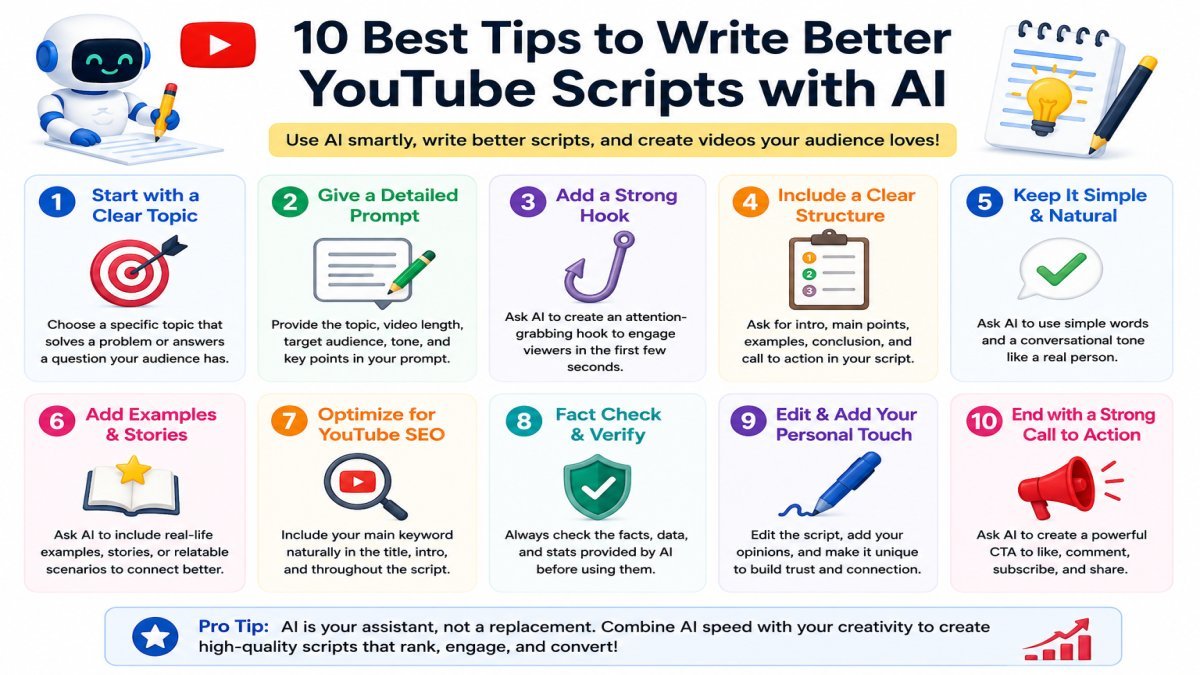
AI can create a good first draft, but it may not always sound natural. If you want your YouTube videos to connect with viewers, you should make the script sound like a real person is speaking.
Here are some simple tips to make your AI-generated scripts sound more human.
1. Add Your Personal Experience
Your own experience makes your script unique and trustworthy. Share what worked for you or what you learned.
Example:
Instead of saying:
AI helps save time.
Say:
I use AI to create my first script draft. It saves me time, but I always edit it before recording.
This makes your script feel more real.
2. Use Simple and Natural Language
Avoid difficult words and long sentences. Write the way you normally speak.
Example:
❌ Difficult:
Utilize AI applications to optimize your script creation process.
✅ Simple:
Use AI tools to write your script faster.
Simple language is easier for everyone to understand.
3. Use Short Sentences
Long sentences can confuse viewers. Short sentences are easier to read and easier to speak while recording.
Example:
Instead of writing one long paragraph, break it into two or three short sentences.
4. Talk Directly to Your Viewers
Use words like you, your, and let’s to make your script more friendly.
Example:
If you are starting a YouTube channel, this tip can help you save time.
This makes viewers feel that you are talking directly to them.
5. Add Real-Life Examples
Examples make your content easier to understand and remember.
Example:
Instead of saying:
AI writes scripts quickly.
Say:
If you want to make a video about AI tools for students, AI can create a complete draft in just a few minutes.
Real examples make your explanation stronger.
6. Read the Script Out Loud
Before recording, read your script aloud. If a sentence sounds strange, change it.
Example:
If you cannot say a sentence naturally, your viewers may also find it difficult to understand.
Reading aloud helps you improve the flow of your script.
7. Check Facts and Update Information
AI can sometimes give incorrect or outdated information. Always verify important facts before publishing your video.
Example:
If you mention the features or pricing of an AI tool, check the tool’s official website to make sure the information is correct.
8. Bonus Tip: Optimize Your Script for YouTube SEO
- Use your main keyword naturally.
- Say the keyword in the first 30 seconds.
- Add timestamps.
- Keep the introduction engaging.
- End with a strong CTA.
Final Tip
Think of AI as your writing assistant, not your replacement. Let AI create the first draft, but always add your own ideas, examples, and personality. This will make your YouTube scripts more natural, helpful, and enjoyable to watch.
Common Mistakes to Avoid
AI can help you write YouTube scripts quickly, but many people make simple mistakes that reduce the quality of their videos. If you avoid these mistakes, your script will be more useful, natural, and engaging.
1. Copying the AI Script Without Editing
One of the biggest mistakes is using the AI-generated script exactly as it is. AI can make mistakes or write content that sounds too robotic.
Example:
Instead of copying the script directly, read it carefully. Change the wording, add your own ideas, and make it sound like you.
2. Writing a Poor AI Prompt
A short or unclear prompt often gives poor results. AI needs clear instructions to create a good script.
Example:
❌ Poor Prompt:
Write a YouTube script.
✅ Better Prompt:
Write a 7-minute YouTube script for beginners about Future of AI in Blogging. Use simple English, real-life examples, and a friendly tone.
3. Starting Without a Strong Hook
If your video starts in a boring way, many viewers may stop watching in the first few seconds.
Example:
❌ Weak Hook:
Today I will talk about AI.
✅ Better Hook:
What if you could write a complete YouTube script in just 10 minutes using AI?
A good hook makes people want to keep watching.
4. Not Checking Facts
AI can sometimes give outdated or incorrect information. Always check important facts before publishing your video.
Example:
If AI mentions a tool’s features or pricing, visit the tool’s official website to make sure the information is correct.
5. Using Difficult Words
Many beginners use complicated words because they think it sounds more professional. Simple language is easier to understand.
Example:
Instead of saying:
Utilize artificial intelligence to optimize content generation.
Say:
Use AI to create better content faster.
Simple words help more people understand your message.
6. Forgetting to Add a Call to Action
Some creators end the video without telling viewers what to do next.
Example:
At the end of your video, say something like:
If you found this video helpful, please like, subscribe, and share it with your friends.
This can increase engagement on your channel.
Final Tip
AI is a great writing assistant, but it cannot replace your creativity and experience. Always review your script, make changes, and add your personal style. This will help you create YouTube videos that people enjoy watching.
Can AI Replace a Human Script Writer?
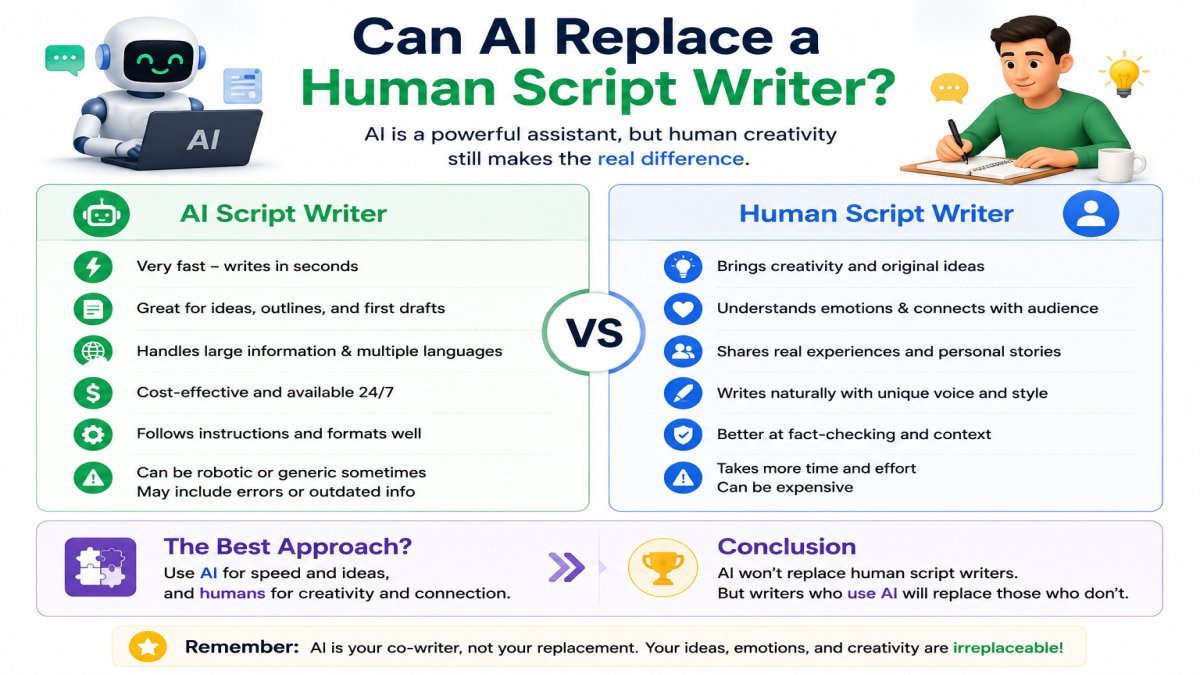
The short answer is no. AI is a powerful tool, but it cannot fully replace a human script writer. AI can write a fast first draft, suggest ideas, and organize information. However, it cannot think, feel, or share real personal experiences like a human.
A human writer understands emotions, storytelling, humor, and the audience better. These are important for creating YouTube videos that people enjoy watching.
What AI Does Well
AI can help you:
- Generate script ideas quickly.
- Create a first draft in minutes.
- Organize your content.
- Improve grammar and sentence structure.
- Save time during the writing process.
Example:
If you want to make a video about “Best AI Tools for Students,” AI can quickly create an introduction, main points, and a conclusion. This gives you a good starting point.
What AI Cannot Do Well
AI also has some limitations.
It may:
- Miss emotions and personal stories.
- Give incorrect or outdated information.
- Repeat the same ideas.
- Sound too robotic if you do not edit the script.
- Fail to understand your unique style.
Example:
AI can say:
“AI tools help students study better.”
A human writer can make it more personal:
“When I started using AI tools, I saved time while studying and understood difficult topics more easily.”
The second version feels more natural because it includes a real experience.
AI And Human Comparison
| Feature | AI | Human |
|---|---|---|
| Speed | ✅ Fast | ❌ Slower |
| Creativity | Limited | Excellent |
| Personal Experience | ❌ | ✅ |
| Fact Checking | Required | Required |
| Final Editing | Needed | Needed |
The Best Approach: AI + Human Editing
The best way to create YouTube scripts is to use AI as your writing assistant, not as your replacement.
Let AI create the first draft. Then:
- Add your own ideas.
- Share your experience.
- Check the facts.
- Improve the language.
- Make the script sound like you.
This combination helps you create high-quality and trustworthy content.
Final Tip
AI can make script writing faster and easier, but your creativity, knowledge, and personality make your videos unique. Use AI to save time, but always give the final script your personal touch before recording.
Frequently Asked Questions (FAQs)
1. Can I use AI-written scripts on YouTube?
Yes. You can use AI-written scripts on YouTube. However, you should always edit the script before publishing your video. Add your own ideas, check the facts, and make the script sound natural.
Example:
If AI writes a script about AI tools, you can add your own experience and examples to make it more useful for your viewers.
2. Which AI tool is best for YouTube scripts?
There is no single best AI tool for everyone. It depends on your needs.
- ChatGPT is great for beginners.
- Google Gemini is useful for research.
- Claude is good for long and natural scripts.
- Jasper AI is helpful for marketing content.
- Copy.ai is useful for short promotional scripts.
Example:
If you are starting your first YouTube channel, ChatGPT is a simple and beginner-friendly choice.
3. Is ChatGPT good for writing YouTube scripts?
Yes. ChatGPT is a good tool for writing YouTube scripts. It can help you create video ideas, titles, hooks, and complete script drafts.
But remember, always review and edit the script before recording your video.
Example:
You can ask ChatGPT:
“Write a 5-minute YouTube script about the benefits of AI for students.”
Then you can improve the draft by adding your own examples.
4. Are free AI script generators enough?
Yes, free AI tools are enough for many beginners. They can help you write good scripts without spending money.
As your YouTube channel grows, you may choose a paid plan if you need more advanced features.
Example:
Many new creators start with the free versions of ChatGPT or Google Gemini and later upgrade if needed.
5. Do I need to edit AI-generated scripts?
Yes. Editing is very important.
AI may make mistakes, repeat ideas, or miss important details. Editing helps make your script more accurate, natural, and engaging.
Example:
After AI creates a script, read it carefully. Fix any errors, remove repeated sentences, and add your personal experience.
Final Tip
AI is a great tool for writing YouTube scripts, but the best videos are created when you combine AI with your own knowledge and creativity. Always review your script before recording. This will help you create videos that your audience enjoys and trusts.
Conclusion
Creating YouTube scripts with AI is easier than ever. AI tools can help you save time, organize your ideas, and write a strong first draft. However, the best scripts are created when you add your own knowledge, creativity, and personal experience.
Start with a free AI tool, practice writing better prompts, and always edit your script before recording. Small improvements in every video can help you become a better content creator over time.
If you want to learn more about AI tools, practical guides, and beginner-friendly tutorials, visit UseAiLearn. Keep learning, keep creating, and let AI help you make better YouTube videos.