Being a student is not always easy. You may have an exam to prepare for, homework or an assignment to finish, research to do, notes to make, and a presentation to create. Sometimes, even after reading a topic several times, it can still feel difficult to understand.
This is where AI tools can become useful study assistants. The best AI tools for students can help you understand difficult topics and make your learning process easier. However, AI should support your learning, not replace your own thinking and effort.
In this guide, UseAiLearn will explore the best AI tools for school and college students in 2026, what each tool is useful for, and how to choose the right one for your studies.
Quick Answer: What Are the Best AI Tools for Students?
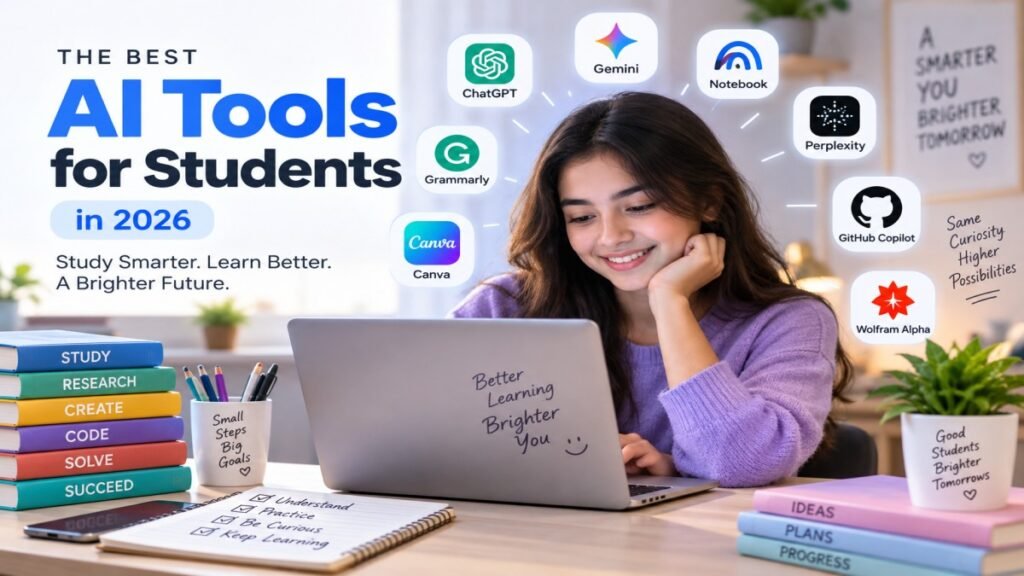
The best AI tools for students depend on what you need to do. For example, ChatGPT and Google Gemini are useful for general study help, Perplexity is useful for research, and Canva can help with presentations and projects.
| AI Tool | Best For | Free Option |
|---|---|---|
| ChatGPT | General study help | Yes |
| Google Gemini | Learning and study assistance | Yes / limits apply |
| Gemini Notebook | Notes and study materials | Yes / limits apply |
| Perplexity | Research | Yes |
| Grammarly | Writing and proofreading | Yes / limits apply |
| Canva | Presentations and projects | Yes / limits apply |
| GitHub Copilot | Coding | Student/free eligibility varies |
| Wolfram Alpha | Mathematics | Free features |
For example, if you do not understand a science topic, you can use ChatGPT or Gemini to ask for a simple explanation. If you need to research a topic for a college project, Perplexity can be a useful starting point. If you need to create a presentation, Canva can help you design it.
The right tool depends on your study task, so you do not need to use every tool on this list.
What Should Students Look for in an AI Tool?
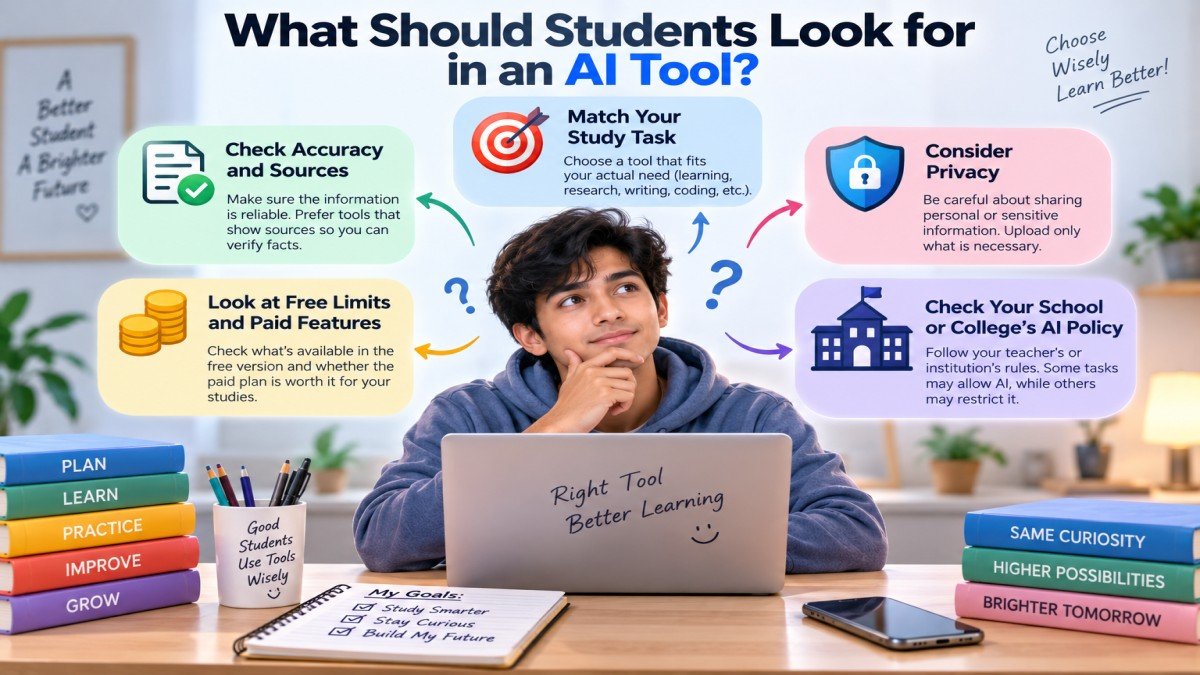
The word “best” does not mean the same thing for every student. A tool that is great for research may not be the best choice for making notes or learning math. Before choosing an AI tool, think about what you need, how accurate it is, what it costs, and how your school or college allows you to use it.
The Tool Should Match Your Study Task
First, choose a tool based on your actual study need.
For example:
- Need help understanding a difficult topic? Choose a general AI study assistant.
- Need to research a college project? A tool that provides sources can be more useful.
- Need to improve an essay? A writing assistant may be a better choice.
- Need help with coding? Look for a tool made for programming.
You do not need to use many AI tools. One suitable tool can be more useful than five tools that you do not really need.
Check Accuracy and Sources
AI can sometimes give wrong, incomplete, or outdated information. This is especially important when you are using AI for schoolwork, research, or exam preparation.
For example, if an AI gives you a historical date or a scientific fact, do not accept it blindly. Check important information with your textbook, teacher, official website, or other trusted source.
If you are doing research, a tool that shows sources can also make it easier to check where the information came from.
Look at Free Limits and Paid Features
Many AI tools offer a free version, but some features may have limits. You may get a limited number of uses, fewer advanced features, or access to only basic tools.
For example, a student may be able to use a tool for simple questions for free but need a paid plan for advanced features.
Before paying, check whether the free version is enough for your studies. Students should not pay for a feature they rarely use.
Consider Privacy
Think about what information you are giving to an AI tool.
Don’t upload documents containing your phone number, home address, student ID, passwords, financial information, or another person’s private information unless necessary and permitted.
For example, if you want AI to summarize your notes, remove personal information that the tool does not need before uploading them.
Check Your School or College’s AI Policy
Every school, college, teacher, or course may have different rules about AI. Some may allow AI for brainstorming or learning, while others may restrict its use for certain assignments.
For example, your teacher may allow you to use AI to understand a difficult topic but not allow you to submit an AI-written assignment as your own work.
Always check the rules before using AI for homework, assignments, exams, or academic projects.
Best AI Tools for School and College Students
There is no single AI tool that is perfect for every student. The right choice depends on what you are studying and what you need help with. Some tools are better for understanding lessons, some for research or writing, while others are designed for presentations, coding, or mathematics.
Below are some of the best AI tools for students in 2026. We will look at what each tool does, where it can be useful, its main limitations, and what type of student may benefit most from it.
These recommendations are based on common student use cases, ease of use, available features, and suitability for the task.
1. ChatGPT — Best Overall AI Tool for Students
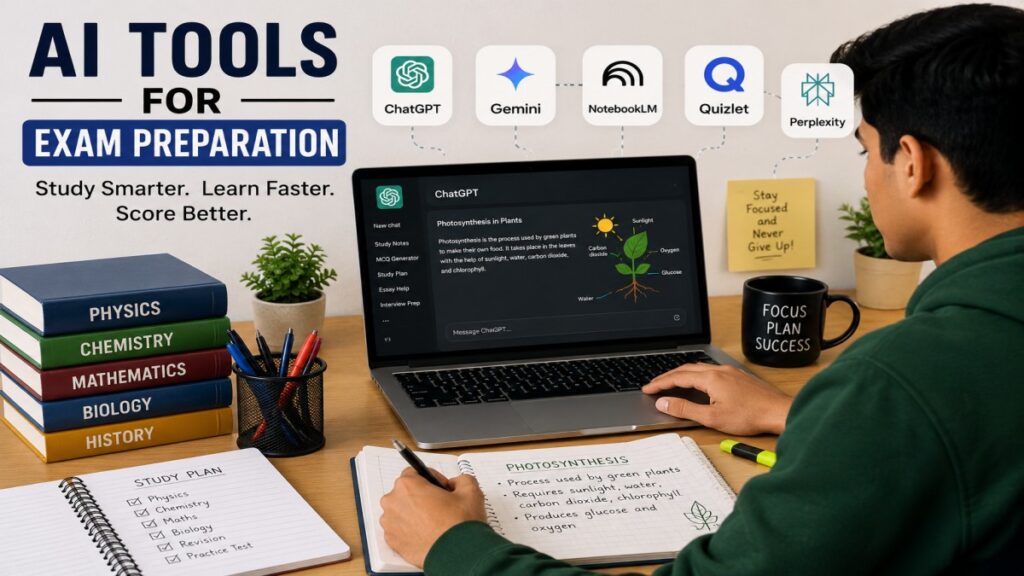
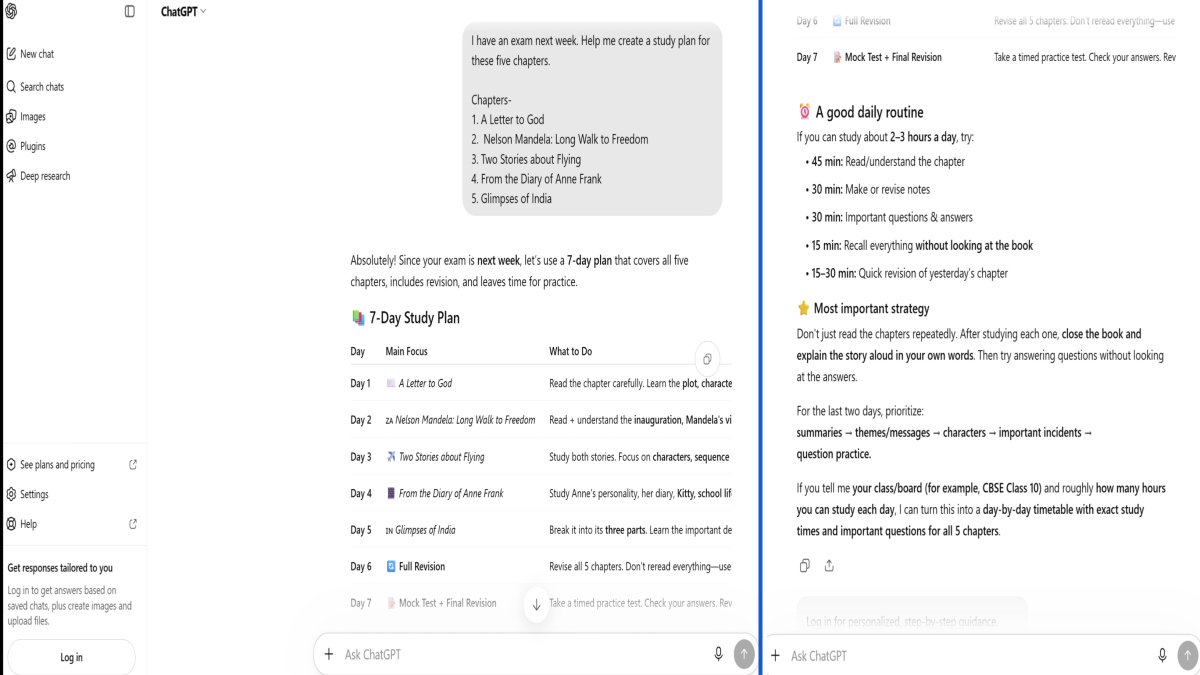
ChatGPT is a general-purpose AI assistant that can be useful for many different study tasks. Students can use it to understand difficult concepts, ask questions, practice problems, review notes, and prepare for tests.
One useful feature is Study Mode, which is designed to guide students through a topic step by step instead of simply giving them the final answer. It can ask questions, explain ideas, help with practice problems, and create practice questions or flashcard-style reviews.
For example, instead of asking:
“Give me the answer to this question.”
you could ask:
“Explain this question step by step and let me try each part before showing the answer.”
You can also use prompts such as:
“Explain photosynthesis in simple English for a school student.”
“Quiz me on the French Revolution with 10 questions. Give me one question at a time.”
“I have an exam next week. Help me create a study plan for these five chapters.”
Main strengths:
- Useful for many different subjects
- Can explain difficult topics in simple language
- Helpful for practice and revision
- Can guide students through problems step by step
Limitations:
- It can still make mistakes, so important information should be checked.
- The quality of the answer depends partly on how clearly you ask your question.
Best for: Students who want one flexible AI assistant for general learning, explanations, practice, and exam preparation.
Tips: ChatGPT is our best overall choice for students who want one flexible tool for general study help.
2. Google Gemini — Best for AI-Powered Study Help
Google Gemini is another general AI assistant that can support students with learning and study tasks. It can help explain concepts, answer questions, organize learning activities, and work with study materials.
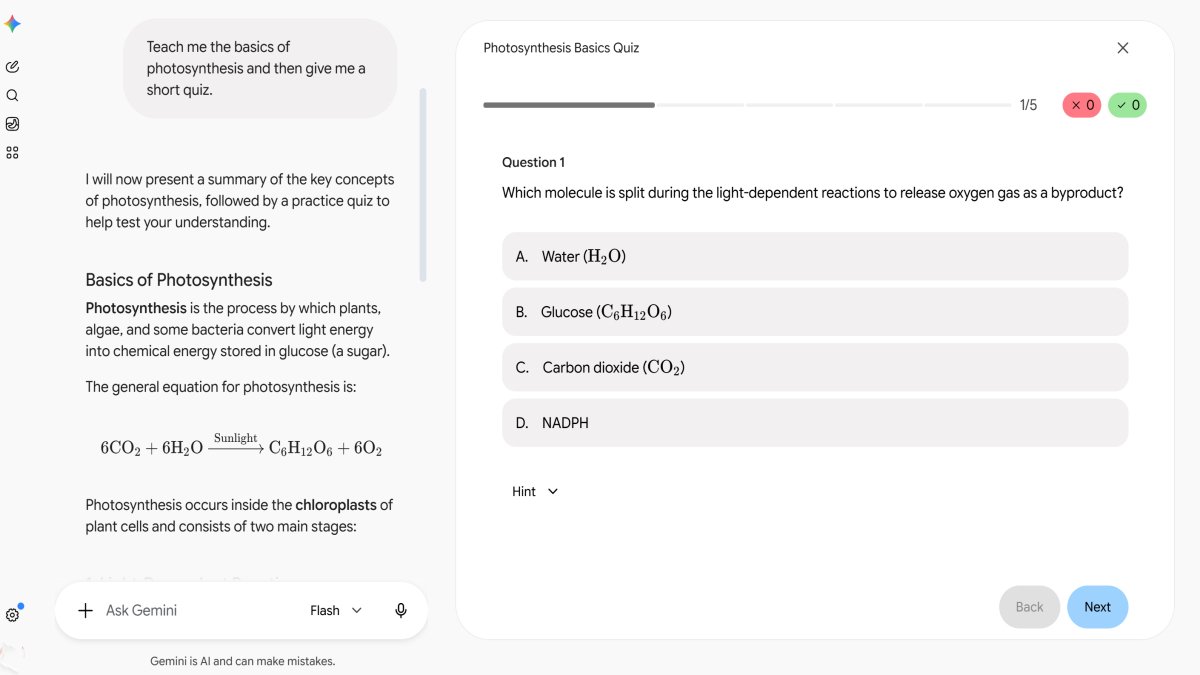
Gemini also has study-focused features such as Study notebooks, which can help students set learning goals, take diagnostic quizzes, identify knowledge gaps, and create personalized lessons. Study notebooks can also use uploaded course materials to support learning.
For example, you could ask Gemini:
“Teach me the basics of photosynthesis and then give me a short quiz.”
Or:
“Help me prepare for my mathematics exam by breaking these topics into a simple study plan.”
Main strengths:
- Useful for general study assistance
- Can support personalized learning activities
- Useful for explaining and reviewing topics
- Works well for students already using Google’s ecosystem
Limitations:
- Available features and usage limits can vary.
- Like other AI systems, its answers should be checked when accuracy is important.
Best for: Students who want an AI study assistant and already use Google services for their school or college work.
Note: Gemini’s study notebooks are a learning feature inside the Gemini app. Gemini Notebook is the standalone product formerly known as NotebookLM, designed around working with your own sources.
3. Gemini Notebook (formerly NotebookLM) — Best for Studying Your Own Notes and PDFs
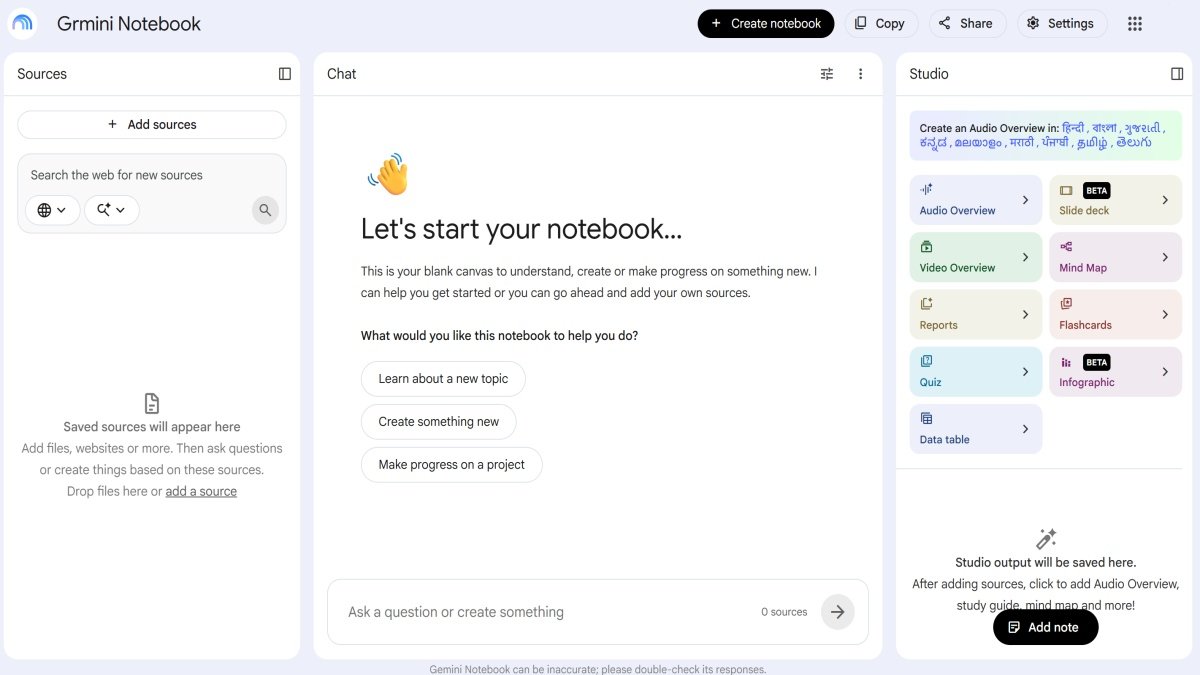
Gemini Notebook is especially useful when you want to study from your own learning materials rather than asking general questions.
You can add sources such as PDFs, Google Docs, web pages, YouTube videos, and other course materials. It can then use those sources to answer questions and create study materials such as summaries, study guides, and quizzes. Google says its responses are grounded in the information you provide and include inline citations to the original material.
For example, imagine your teacher gives you a 50-page PDF about biology. Instead of reading the whole document again and again, you could use your study material as a source and ask:
“Summarize this chapter in simple English.”
Then you could ask:
“Create 15 quiz questions from these notes.”
Or:
“What are the five most important topics I should revise before my exam?”
This can be especially helpful when you have a large amount of course material.
Main strengths:
- Works with your own study materials
- Useful for summaries and study guides
- Can create questions and quizzes from your sources
- Answers can be grounded in the materials you provide
Limitations:
- The quality of its answers depends on the quality and completeness of your sources.
- It should not be treated as a replacement for reading and understanding the original material.
Best for: School and college students who have PDFs, lecture notes, readings, or other course materials and want help studying them.
Note: Gemini Notebook was formerly known as NotebookLM. Google renamed NotebookLM to Gemini Notebook in July 2026.
4. Perplexity — Best AI Tool for Research
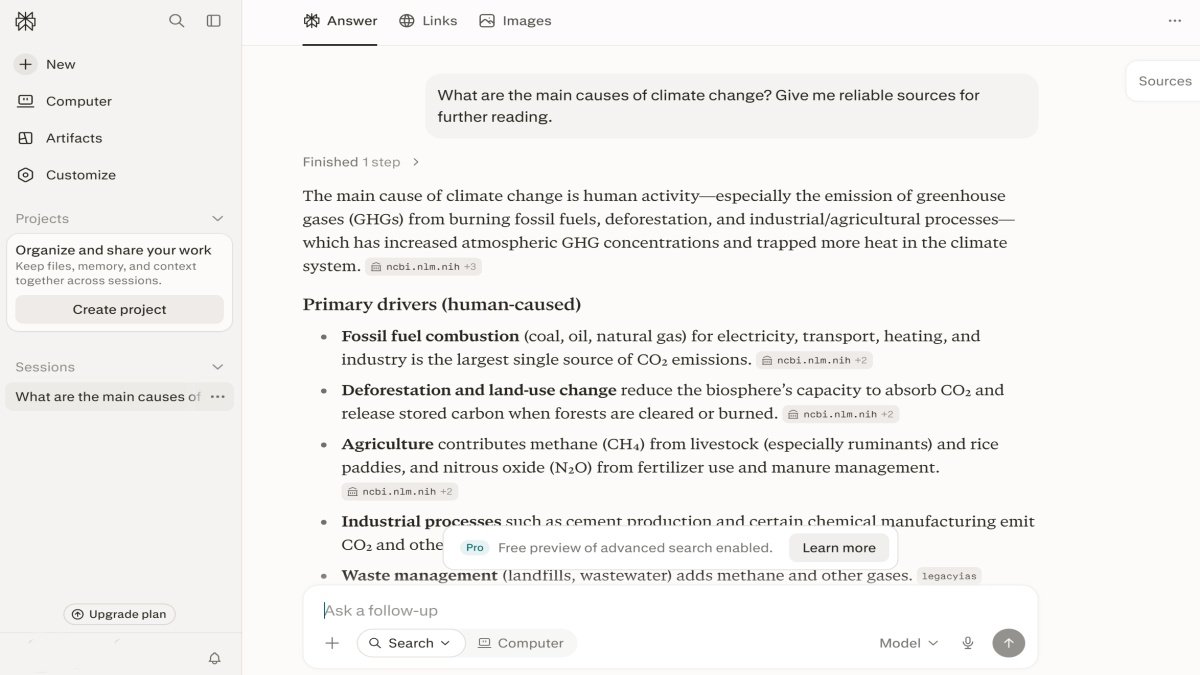
Perplexity is useful when you need to research a topic and find supporting information from the web. Instead of only giving a conversational answer, it can help you explore information and follow sources related to your question.
For example, if you are preparing a college project about climate change, you could start with:
“What are the main causes of climate change? Give me reliable sources for further reading.”
You can then ask follow-up questions to understand a specific part of the topic.
This makes it useful for students who need to move from a basic question to deeper research.
Main strengths:
- Useful for web-based research
- Helpful when you need sources to investigate further
- Makes it easy to ask follow-up questions
- Good for exploring unfamiliar topics
Limitations:
- You should still open and check the original sources.
- AI summaries can sometimes misunderstand or oversimplify information.
- Not every source is automatically suitable for academic work.
Best for: College students and school students who need to research topics and find sources for projects or further study.
5. Grammarly — Best for Writing and Proofreading
Grammarly is designed to help improve writing. It can be useful when students are writing essays, reports, emails, applications, or other academic work.
It can help identify problems with grammar, spelling, clarity, and writing style. Grammarly also provides student-focused writing support and works across tools such as Google Docs and Microsoft Word.
For example, after writing your own paragraph, you could use Grammarly to check whether the sentences are clear and grammatically correct.
The important point is to improve your own writing rather than simply replacing it with AI-generated text.
Main strengths:
- Helps improve grammar and spelling
- Makes writing clearer
- Useful for essays, reports, and emails
- Can help students improve their existing writing
Limitations:
- It may suggest changes that do not match your intended meaning.
- Some advanced features may require a paid plan.
Best for: Students who want help checking and improving their own writing.
6. Canva — Best for Presentations and Student Projects
Canva is a visual design platform that students can use to create presentations, posters, infographics, documents, and other school or college projects. It also includes AI-powered design features that can help with parts of the creative process.
For example, if you have to give a presentation about the solar system, you can use Canva to create slides with headings, images, diagrams, and other visual elements.
You can also use it for:
- School project posters
- College presentations
- Infographics
- Group projects
- Visual study materials
Main strengths:
- Easy to create attractive presentations
- Useful for many types of student projects
- Large selection of templates
- Supports collaboration on group projects
Limitations:
- A good-looking design does not automatically mean the information is correct.
- Some templates and advanced features may not be available in the free version.
Best for: Students who need to create presentations, posters, infographics, or other visual projects.
7. GitHub Copilot — Best for Coding Students
GitHub Copilot is an AI coding assistant that can help students while learning programming. It can provide code suggestions, explain code, help identify errors, and support programming projects.
For example, if you are learning Python and do not understand a piece of code, you could ask for an explanation of what each part does.
You might also ask:
“Explain why this Python code is giving an error and show me how to fix it.”
GitHub currently offers Copilot Student free to verified students through GitHub Education.
Main strengths:
- Useful for learning programming
- Helps with code suggestions
- Can help explain and debug code
- Useful for programming projects
Limitations:
- Generated code can contain errors or security problems.
- Students may learn less if they copy code without understanding it.
- Student access requires eligibility and verification.
Best for: Students learning programming, software development, or computer science.
8. Wolfram Alpha — Best for Mathematics
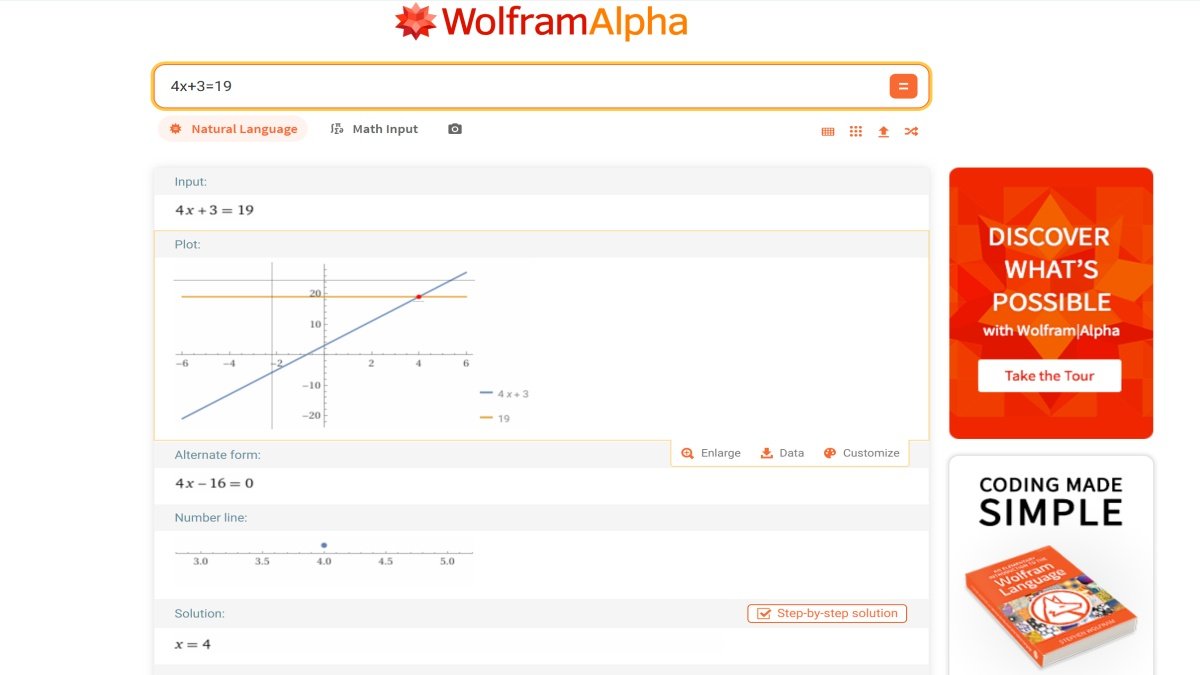
Wolfram Alpha is a computational tool that is particularly useful for mathematics. It can work with areas such as arithmetic, algebra, calculus, differential equations, and other mathematical problems.
For example, if you are learning algebra, you can enter an equation and use the available tools to explore how it can be solved.
It can also be useful for:
- Calculations
- Equations
- Graphs
- Algebra
- Calculus
- Trigonometry
Some step-by-step solution features are available through Wolfram Alpha Pro.
Main strengths:
- Strong mathematical and computational capabilities
- Useful across many areas of mathematics
- Helpful for checking calculations and exploring problems
Limitations:
- Some advanced step-by-step features require a paid plan.
- Students should focus on understanding the method, not only getting the final result.
Best for: Students who need help with mathematics, calculations, equations, or other computational problems.
Which AI Tool Is Best for Different Student Tasks?
The best AI tool depends on what you want to do. You do not need to use every tool. Choose the one that fits your study task.
| Student Task | Recommended Tool |
|---|---|
| Understand a difficult topic | ChatGPT / Gemini |
| Study from PDFs or notes | Gemini Notebook |
| Research a topic | Perplexity |
| Improve writing | Grammarly |
| Create presentations | Canva |
| Learn coding | GitHub Copilot |
| Solve or understand math | Wolfram Alpha |
| General study support | ChatGPT / Gemini |
| Create revision questions | ChatGPT / Gemini Notebook |
Simple Examples
- Difficult topic: If you do not understand a history or science topic, you can use ChatGPT or Gemini to get a simple explanation.
- PDF or notes: If you have a long lecture PDF, Gemini Notebook can help you study the information in it.
- Research: If you need information and sources for a college project, Perplexity can be a useful starting point.
- Writing: If you have written an essay but want to improve grammar and clarity, Grammarly can help.
- Presentation: If you need to make slides for a class project, Canva can help you create the presentation.
- Coding: If you are learning programming and need help understanding or fixing code, GitHub Copilot can assist you.
- Math: If you are working on equations or other math problems, Wolfram Alpha can help with calculations and solutions.
- Revision: Before an exam, you can ask ChatGPT or Gemini Notebook to create questions from your study material.
You do not need every tool on this list. Choose based on the task you are trying to complete. Using one or two tools well is often better than using many tools without a clear purpose.
Best Free AI Tools for Students
Many students want to use AI without paying for a subscription. The good news is that several popular AI tools offer free plans or free access for students. However, free plans may have usage limits, fewer features, or lower limits than paid plans.
Here is a quick comparison:
| AI Tool | Free Option | Best Free Use |
|---|---|---|
| ChatGPT | Yes | General study help |
| Google Gemini | Yes | Study assistance |
| Gemini Notebook | Yes, with limits | Studying notes and course materials |
| Perplexity | Yes | Basic research |
| Grammarly | Yes | Basic writing and grammar help |
| Canva | Yes | Basic presentations and designs |
| GitHub Copilot | Yes | Basic coding assistance |
| Wolfram Alpha | Yes | Basic mathematical calculations |
Are Free AI Tools Enough for Students?
For many students, a free plan is enough for basic study work. You can use free AI tools to understand topics, review notes, improve writing, make presentations, research a topic, or practice questions.
For example, a student preparing for an exam may use ChatGPT or Gemini for explanations and revision questions without paying for a premium plan.
However, free plans can have limits. Some tools may limit the number of requests, advanced models, file uploads, or other features. Gemini Notebook, for example, has usage limits that can change over time, and higher plans provide higher limits.
When Should You Consider a Paid Plan?
You usually do not need a paid AI plan just because you are a student. First, try the free version and see if it meets your needs.
A paid plan may be useful if you regularly need:
- Higher usage limits
- More advanced AI models
- Extra file or research features
- More powerful writing, design, or coding features
Some services also have special student access. For example, verified students can get GitHub Copilot Student for free through GitHub Education.
Canva also offers Canva Free for students. College and university students may be able to get Pro and premium features through their institution if it provides Canva for Campus. K–12 students can get Canva Education through their school or teacher.
Wolfram Alpha also has a free basic option, while its Pro plan adds features such as step-by-step solutions and other advanced tools.
A Simple Example
Suppose you are a college student working on a project.
You could start with:
ChatGPT or Gemini → understand the topic
Perplexity → find research and sources
Grammarly → improve your writing
Canva → create the presentation
You may be able to complete much of this work using free plans. You only need to consider a paid plan if the free limits become a problem.
Tip: Free plans and student offers can change. Always check the tool’s official website before paying for a subscription.
Which AI Tools Are Best for School Students and College Students?
The best AI tool can be different for a school student and a college student. School students may need more help with lessons, revision, homework, and basic projects. College students often need more help with research, academic writing, coding, and course materials.
Best AI Tools for School Students
School students can use AI tools mainly for understanding lessons, revision, homework guidance, notes, practice questions, and presentations.
Here are some useful choices:
- ChatGPT — Good for understanding difficult lessons, revision, homework guidance, and practice questions.
- Google Gemini — Useful for learning topics, revision, and general study support.
- Gemini Notebook — Helpful for studying from notes and other course materials.
- Canva — Useful for school presentations, posters, and visual projects.
Example:
If you are a school student and do not understand a science chapter, you can use ChatGPT or Gemini to explain it in simple language. Later, you can ask it to create practice questions for revision. If you need to present the topic in class, Canva can help you create the slides.
Best AI Tools for College Students
College students often have more complex study tasks. They may need help with research, academic writing, course materials, coding, presentations, and exam preparation.
Some useful choices are:
- ChatGPT — Good for learning difficult topics, exam preparation, and general study support.
- Gemini Notebook — Useful for studying course PDFs, notes, and other learning materials.
- Perplexity — A useful choice for research and finding information from online sources.
- Grammarly — Helpful for improving essays, reports, and other academic writing.
- Canva — Useful for college presentations and project work.
- GitHub Copilot — Helpful for students learning programming and coding.
- Wolfram Alpha — Useful for mathematics and technical subjects.
Example:
Suppose a college student is preparing a research project. They could use Perplexity to start their research, Gemini Notebook to study course materials, Grammarly to improve their writing, and Canva to prepare the final presentation.
School vs. College: Quick Choice
| Need | School Students | College Students |
|---|---|---|
| Understand lessons | ChatGPT / Gemini | ChatGPT / Gemini |
| Study notes or PDFs | Gemini Notebook | Gemini Notebook |
| Homework / study help | ChatGPT / Gemini | ChatGPT / Gemini |
| Research | Perplexity | Perplexity |
| Writing | Grammarly | Grammarly |
| Presentations | Canva | Canva |
| Coding | — | GitHub Copilot |
| Mathematics | Wolfram Alpha | Wolfram Alpha |
| Exam preparation | ChatGPT / Gemini | ChatGPT / Gemini |
The important point is that you do not need a different AI tool for every subject. Choose tools based on the type of work you need to do and use them to support your own learning.
How to Use AI Tools for Studying Without Becoming Dependent on Them
AI can make studying easier, but it should not do all the thinking for you. The goal is to use AI as a study assistant, not as a replacement for your own learning.
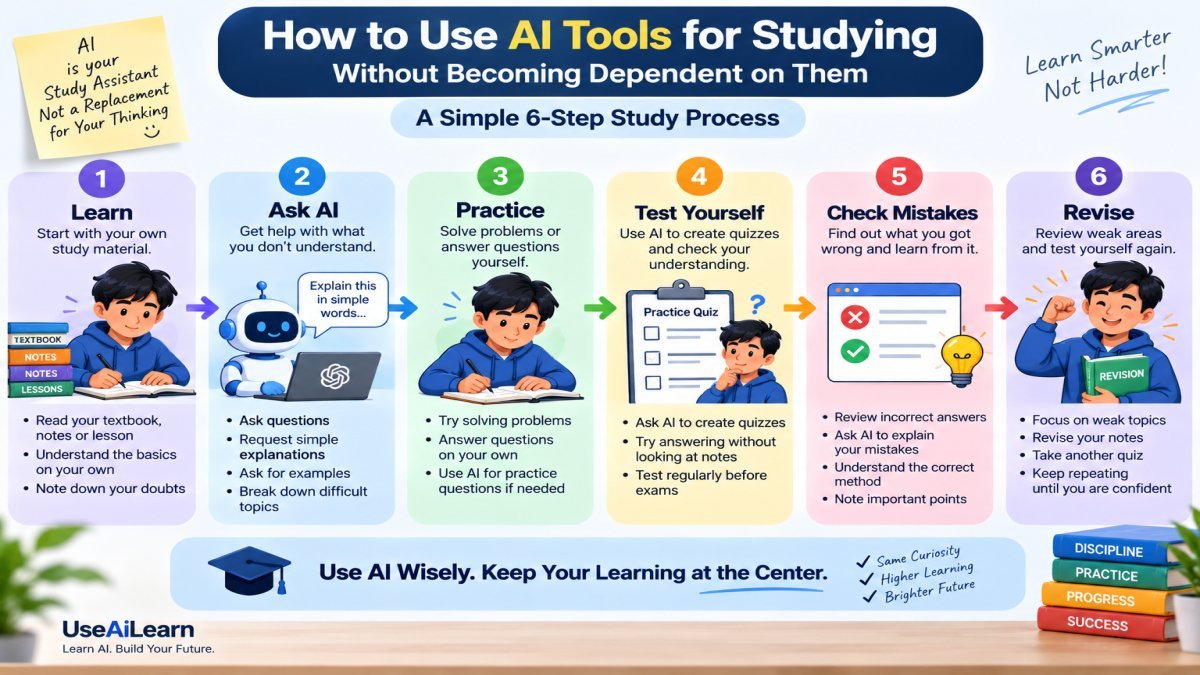
A simple study process is:
Learn → Ask AI → Practice → Test yourself → Check mistakes → Revise
Here are some simple ways to follow this process.
Use AI to Understand, Not to Copy
When you do not understand something, ask AI to explain it instead of asking for an answer that you can simply copy.
For example, instead of asking:
“Write my homework about photosynthesis.”
Try:
“Explain photosynthesis in simple English and give me three questions to check my understanding.”
This helps you learn the topic before doing your own work.
Ask AI to Explain Difficult Topics
AI can be useful when a lesson feels confusing. You can ask it to explain the same topic in simpler words, give an example, or explain it step by step.
For example:
“Explain the French Revolution like I am a beginner. Use simple English and give me a real-life example.”
If you still do not understand it, ask a follow-up question rather than moving on.
Turn Your Notes Into Questions and Quizzes
Instead of only reading your notes again and again, use AI to turn them into questions.
For example:
“Create 10 questions from these notes. Ask me one question at a time and do not show the answer until I try.”
This can make revision more active and help you remember what you studied.
Use AI for Active Recall and Revision
Active recall means trying to remember information without looking at your notes first.
You can ask AI to quiz you on a chapter and then answer the questions yourself. After answering, compare your answers with the correct information.
For example:
“Quiz me on Class 10 biology. Ask one question at a time and tell me what I got wrong after each answer.”
The important part is you should try to answer first. Do not ask AI to give you every answer immediately.
Ask AI to Find Gaps in Your Knowledge
Sometimes you may think you understand a topic, but you may have missed an important part.
AI can help you find these gaps by asking questions or checking your explanation.
For example:
“I will explain the causes of World War I in my own words. Check my explanation and tell me which important points I missed.”
This is more useful than simply asking AI to explain the whole topic again.
Verify Important Information
AI can sometimes give incorrect, incomplete, or outdated information. Therefore, do not blindly trust an AI answer.
For important facts, dates, statistics, formulas, or research information, check reliable sources such as your textbook, teacher’s material, official websites, or trusted academic sources.
For example, if AI gives you an important historical date for an assignment, check the date in your textbook or another reliable source before using it.
Keep Your Own Thinking and Writing
Your final understanding, ideas, and answers should come from you.
You can use AI to explain, practice, organize, or improve your work, but do not let it do everything for you.
For example, if you have to write an essay, first make your own points and write a draft. You can then use AI to find unclear sentences or suggest ways to improve your structure.
This helps you build your own knowledge and writing skills instead of becoming dependent on AI.
A Simple AI Study Workflow
You can use this workflow for almost any subject:
1. Learn → Read your textbook, notes, or lesson.
2. Ask AI → Ask about anything you do not understand.
3. Practice → Solve problems or answer questions yourself.
4. Test yourself → Ask AI to create a quiz.
5. Check mistakes → Find out what you got wrong and why.
6. Revise → Review the weak areas and test yourself again.
The goal is not to use AI as much as possible. The goal is to learn better with the help of AI while keeping your own thinking at the center.
Can Students Use AI for Homework and Assignments?
Yes, students can use AI for homework and assignments, but how they use it matters. Some teachers and colleges allow AI for learning and support, while others may restrict or completely prohibit it for certain tasks.
Before using AI for an assignment, always check the rules for that particular class or course.
Can AI Help With Homework?
AI can be useful as a study helper when you are stuck on a question or do not understand a topic.
For example, instead of asking:
“Give me the answer to this homework question.”
You can ask:
“Explain how to solve this question step by step and let me try it myself.”
You can also use AI to:
- Explain a difficult lesson
- Give examples
- Create practice questions
- Help you understand your mistakes
- Check your understanding of a topic
This way, AI helps you learn the answer instead of simply giving you an answer to copy.
Can Students Use AI for College Assignments?
College students can also use AI, but the rules can be different for each college, teacher, or course.
For example, a professor may allow you to use AI for brainstorming or improving grammar but may not allow you to submit AI-generated text as your own work.
Another professor may have completely different rules.
So, do not assume that AI use is allowed just because the tool is available.
If AI is allowed, use it according to the instructions given by your teacher or institution.
What Should Students Check Before Using AI?
Before using AI for homework or an assignment, check these things:
1. Teacher or institution policy
Read your teacher’s instructions or your school’s or college’s AI policy.
2. Course-specific rules
A college may allow AI in one course but restrict it in another. Always check the rules for the specific assignment.
3. What AI use is allowed
Some assignments may allow AI for brainstorming, explanations, research support, or proofreading.
4. What AI use is prohibited
Some assignments may not allow AI-generated answers, essays, code, or other work to be submitted as your own.
5. Whether you need to disclose AI use
Some teachers or institutions may ask students to mention or document how they used AI.
Why Should You Avoid Submitting AI Work as Your Own?
Copying an AI-generated answer and submitting it as your own can create academic-integrity problems. It can also make it harder for you to learn the subject and develop your own skills.
For example, imagine your teacher asks you to write a 1,000-word essay about the causes of World War I. If you ask AI to write the complete essay and submit it without doing the work yourself, you may not be able to explain the ideas when your teacher asks you questions about them.
A better approach, when your course rules allow AI, is to use it as a tutor or assistant:
Understand the topic → Make your own ideas → Write your own work → Use AI only where allowed → Check and improve your work
The safest rule is simple: follow your teacher’s or institution’s AI policy and be honest about how you use AI.
What Are the Pros and Cons of AI Tools for Students?
AI tools can make studying easier and more convenient. They can help students understand difficult topics, organize their study work, practice for exams, and improve their writing. However, AI also has some risks if students use it without checking the information or thinking for themselves.
Pros of AI Tools for Students
- Personalized explanations: AI can explain a topic in simpler words or at a level that matches your understanding.
- Faster learning support: You can get help with a difficult question without waiting for the next class.
- Study organization: AI can help create study plans, revision questions, and other study materials.
- Research assistance: AI can help you find information and explore a topic.
- Writing support: AI can help find grammar and clarity problems in your writing.
- Practice and revision: You can use AI to create quizzes and practice questions before an exam.
Example: A student preparing for an exam can use AI to understand a difficult chapter, create practice questions, and find areas that need more revision.
Cons of AI Tools for Students
- Incorrect information: AI can sometimes give wrong or incomplete answers.
- Overdependence: Using AI for every small task can make students dependent on it.
- Privacy concerns: Students should be careful about sharing personal or private information with AI tools.
- Academic-integrity issues: Using AI-generated work when it is not allowed can break school or college rules.
- Less independent thinking: If students let AI do all the thinking, they may not develop their own problem-solving and writing skills.
Example: If a student always asks AI to solve homework questions instead of trying them first, the student may get answers but learn less.
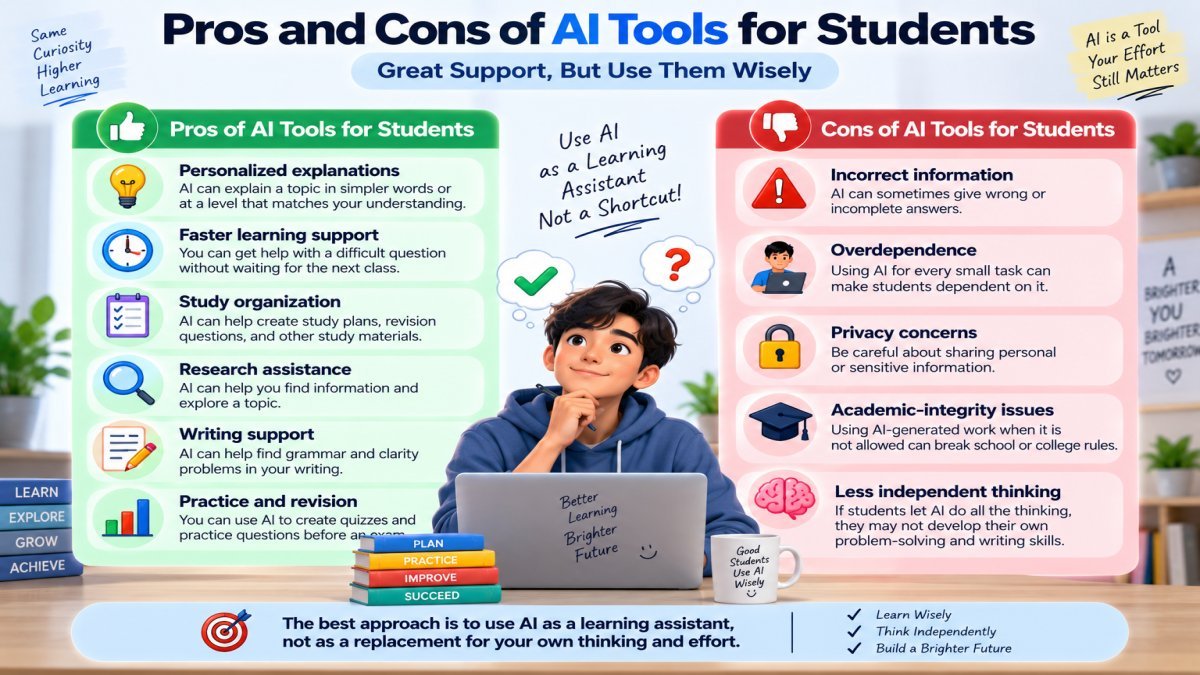
The best approach is to use AI as a learning assistant, not as a replacement for your own thinking and effort.
Frequently Asked Questions About AI Tools for Students
What is the best AI tool for students?
ChatGPT is a strong choice for general study help. It can help students understand difficult topics, practice questions, revise lessons, and prepare for exams. However, the best tool depends on the student’s specific task.
What is the best free AI tool for students?
ChatGPT and Google Gemini are good free options for general study help. However, free plans can have usage limits, so the best choice depends on what you need to do.
Which AI tool is best for research?
Perplexity is a useful choice for research because it can help you explore topics and find online sources. Always check important information against reliable original sources.
Which AI tool is best for making study notes?
Gemini Notebook is a good choice when you want to study from your own PDFs, notes, or other course materials. It can help organize the information and create study materials from it.
Can AI tools help students with homework?
Yes. AI can help explain questions, teach concepts, and create practice questions. Students should use it to understand and learn rather than simply copy answers.
Are AI tools safe for students?
AI tools can be useful, but students should use them carefully. Avoid sharing sensitive personal information, and always check important information because AI can sometimes make mistakes.
Can AI replace teachers?
No. AI can support learning, but it cannot fully replace a teacher. Teachers provide human guidance, classroom interaction, feedback, and an understanding of a student’s learning needs.
Is it okay to use AI for college assignments?
It depends on the rules of your college, teacher, and course. Some assignments may allow limited AI use, while others may not allow AI-generated work. Always check the specific assignment rules before using AI.
Can students use ChatGPT for studying?
Yes. Students can use ChatGPT to understand difficult topics, create practice questions, revise lessons, and prepare for exams. The best approach is to use it as a study assistant while doing the actual thinking and learning yourself.
Final Verdict: Which AI Tool Should You Choose?
After comparing these AI tools, there is no single tool that is perfect for every student. The right choice depends on what you want to do.
Here is a simple final recommendation:
| Study Need | Best Choice |
|---|---|
| Best Overall | ChatGPT |
| Best for Study Materials | Gemini Notebook |
| Best for Research | Perplexity |
| Best for Writing | Grammarly |
| Best for Presentations | Canva |
| Best for Coding | GitHub Copilot |
| Best for Mathematics | Wolfram Alpha |
There is no single AI tool that is best for every student. Choose the tool that matches your actual study need, and use it to support your learning rather than replace your own thinking and effort.
Final Thoughts
The best AI tools for students can make learning easier, but the tool you choose is only part of the process. Use AI to understand difficult topics, practice what you learn, and improve your study process—not to do all the work for you.
A simple rule to remember is:
Choose the right tool → Use AI to understand → Practice yourself → Verify information → Follow academic rules → Keep your own thinking at the center.
Start with one or two AI tools that match your actual study needs. Use them wisely, check important information, and keep learning on your own.
For more simple guides on AI tools, AI for students, and practical ways to use AI, keep exploring UseAiLearn.