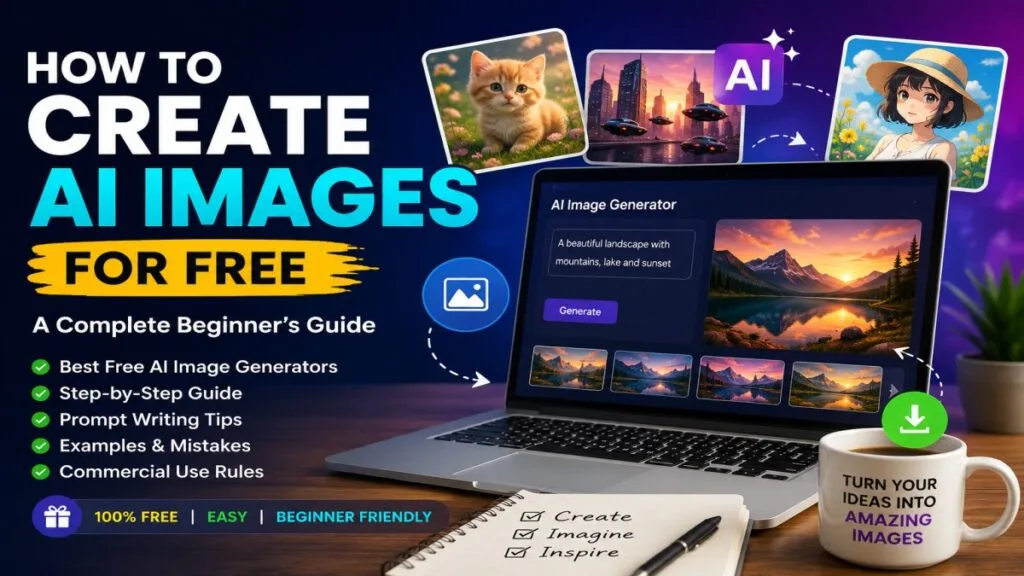
If you are wondering how to create AI images for free, you are in the right place. At UseAiLearn, we make AI easy for beginners. In this guide, you will learn how to create AI images for free using the best free AI image generators available online. You will also learn how to write better prompts, generate high-quality images, and choose the right AI image generator free for your needs. Whether you are a student, blogger, content creator, or business owner, UseAiLearn will help you create professional AI images without paying anything.
Table of Contents
ToggleWhat Are AI Images?
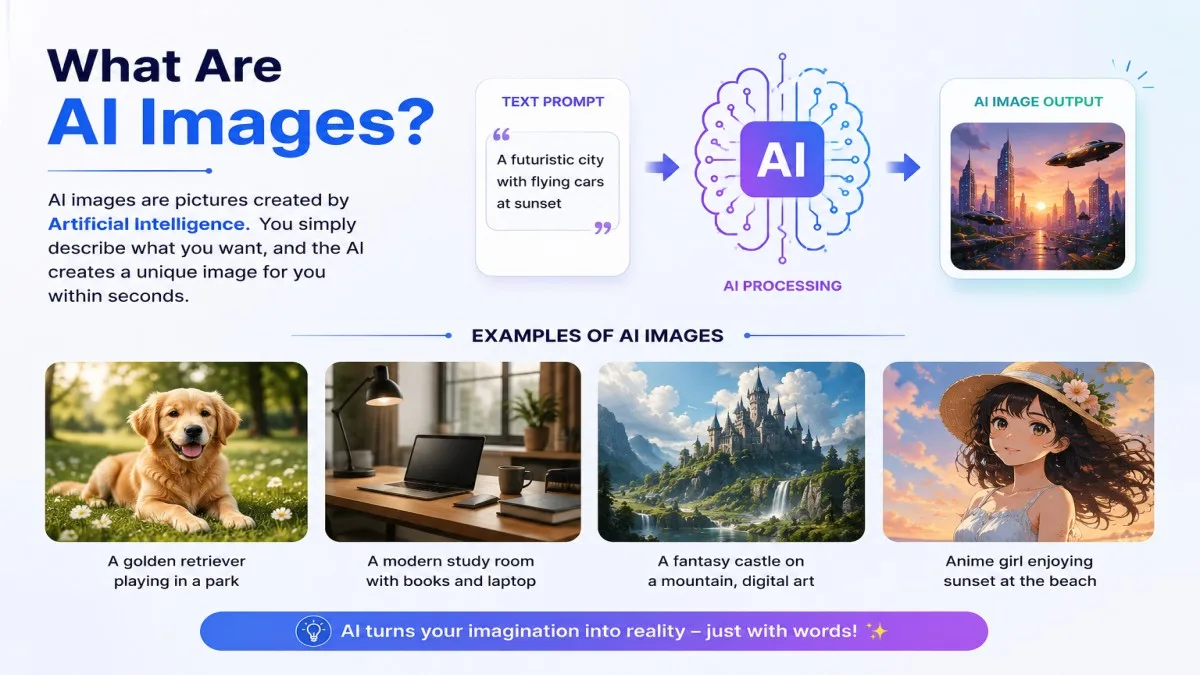
AI images are pictures created by Artificial Intelligence (AI) instead of a human artist or photographer. You do not need to draw or edit the image yourself. You simply describe what you want, and the AI creates it for you.
For example, if you type:
- “A golden retriever playing in a park on a sunny day.”
- “A modern study room with a laptop, books, and a cup of coffee.”
- “A futuristic city with flying cars at sunset.”
The AI understands your description and creates a new image based on your words. Every image is unique because it is generated by AI, not copied from the internet.
How Does AI Image Generation Work?
AI image generation is simple. First, you write a text description, also called a prompt. Then, the AI reads your prompt and understands what you want to create. After that, it combines different visual elements like colors, objects, lighting, and styles to generate a completely new image.
For example, if your prompt is:
“A white cat wearing a red hat, sitting in a flower garden, cartoon style.”
The AI understands the subject (white cat), the object (red hat), the place (flower garden), and the style (cartoon). Within a few seconds, it creates an image that matches your prompt.
What Is Text-to-Image Technology?
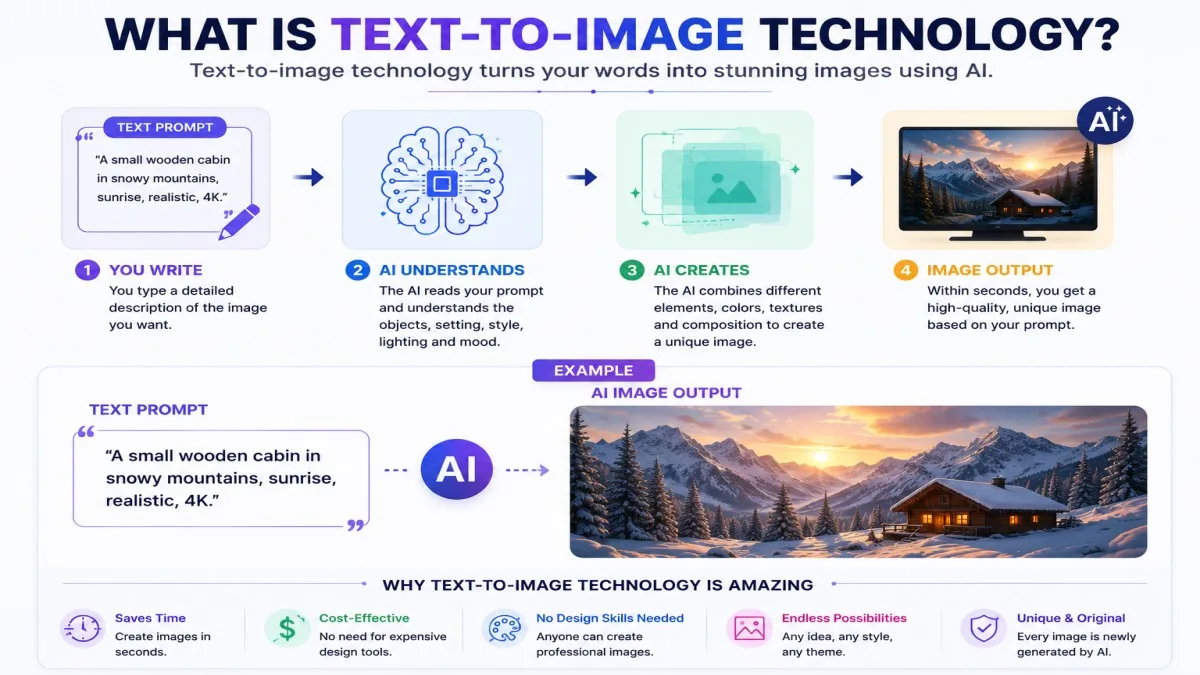
Text-to-image technology is the process of turning written words into images. Instead of uploading a photo, you only need to type a description. The AI reads your text and converts it into a picture.
For example:
Text Prompt:
“A small wooden cabin in snowy mountains, sunrise, realistic, 4K.”
AI Output:
A realistic image of a wooden cabin surrounded by snow-covered mountains during sunrise.
This technology makes image creation fast and easy, even if you have no design experience.
Why Are AI-Generated Images So Popular?
AI-generated images have become popular because they save time, reduce costs, and help people create unique visuals without any design skills.
People use AI images for many purposes, such as:
- Blog featured images
- YouTube thumbnails
- Instagram and Facebook posts
- Website banners
- Business marketing
- School and college projects
- Presentations
- Digital art and illustrations
For example, if you are a blogger and need a featured image for your article, you can create one in less than a minute instead of searching for stock photos online.
AI image generators also allow you to create images in different styles, such as realistic, cartoon, anime, watercolor, 3D, or digital painting. This is why millions of people now use AI image generators every day.
Can You Create AI Images for Free?
Yes, you can create AI images for free. Today, many AI tools offer free plans that allow you to generate beautiful images without paying any money. These tools are perfect for beginners, students, bloggers, content creators, and small businesses.
For example, if you want a featured image for your blog or a thumbnail for your YouTube video, you can simply write a text prompt like:
“A modern office desk with a laptop, notebook, and coffee cup, realistic style.”
The AI will create a unique image in a few seconds. You do not need graphic design skills or expensive software.
However, it is important to understand the difference between free AI tools and paid AI tools before choosing one.
Free AI Tools vs Paid AI Tools
Both free and paid AI image generators can create amazing images, but they offer different features.
Free AI image generators are great for learning and everyday use. They let you create images without paying, making them a good choice for beginners.
Paid AI image generators are designed for professionals and businesses. They usually provide more image credits, higher image quality, faster generation, advanced editing tools, and commercial features.
Here is a simple comparison:
| Feature | Free AI Tools | Paid AI Tools |
|---|---|---|
| Cost | Free | Monthly or yearly subscription |
| Image Credits | Limited | More or unlimited |
| Image Quality | Good | Higher quality |
| Speed | Normal | Faster |
| Editing Features | Basic | Advanced |
| Best For | Beginners and students | Professionals and businesses |
Example:
If you only need a few blog images every week, a free AI image generator is usually enough. But if you create hundreds of images for clients or business marketing, a paid plan may be a better choice.
Features Available in Free Plans
Even though free plans have some limits, they still include many useful features.
Most free AI image generators allow you to:
- Create images from text prompts.
- Choose different image styles, such as realistic, cartoon, anime, or digital art.
- Download your generated images.
- Generate multiple image variations.
- Use AI without any graphic design experience.
Example:
A student can create images for a school presentation.
A blogger can create a featured image for a new article.
A content creator can design social media posts without hiring a designer.
These features are enough for most beginners who want to learn how to create AI images for free.
Common Limitations of Free AI Image Generators
Free AI tools are useful, but they also have some limitations.
Some common limitations include:
- A limited number of image generations each day or month.
- You may need to create a free account before using the tool.
- Some tools generate images at lower resolution.
- Advanced editing features are available only in paid plans.
- During busy times, image generation may take longer.
- Commercial use may have different rules depending on the AI tool.
Example:
If a free tool allows only 20 image generations per day, you will need to wait until the next day after reaching the limit. In a paid plan, you usually get many more image credits.
Even with these limitations, free AI image generators are an excellent way to learn, practice, and create high-quality images without spending money.
Best Free AI Image Generators
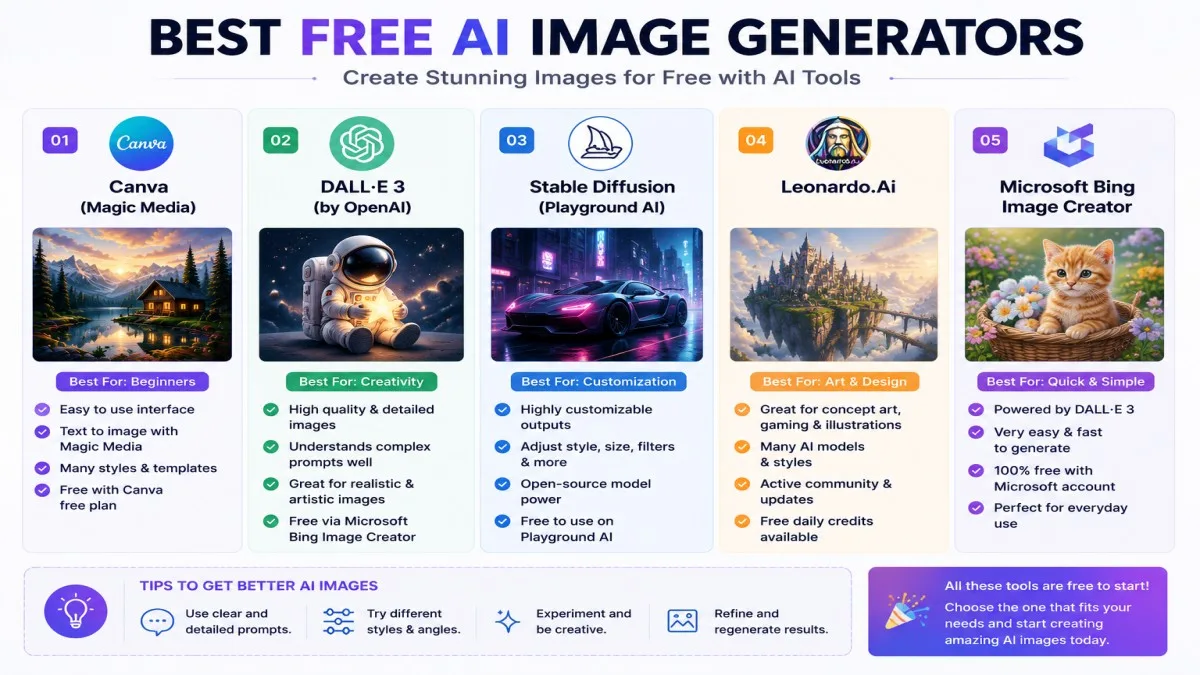
If you want to create AI images for free, choosing the right AI tool is very important. Some tools are best for beginners, while others are better for designers or content creators. The good news is that many popular AI image generators offer a free plan, so you can try them before paying.
Below are some of the best free AI image generators that you can use today.
| AI Tool | Free Plan | Ease of Use | Best For | Image Quality |
|---|---|---|---|---|
| ChatGPT | ✅ Yes (Limited) | ⭐⭐⭐⭐⭐ Very Easy | Beginners, Blog Images, Social Media | ⭐⭐⭐⭐⭐ Excellent |
| Microsoft Designer | ✅ Yes | ⭐⭐⭐⭐⭐ Very Easy | Posters, Banners, Social Media Graphics | ⭐⭐⭐⭐ Very Good |
| Adobe Firefly | ✅ Yes (Limited Credits) | ⭐⭐⭐⭐ Easy | Professional Designs | ⭐⭐⭐⭐⭐ Excellent |
| Leonardo AI | ✅ Yes (Daily Tokens) | ⭐⭐⭐⭐ Easy | Game Art, Realistic Images | ⭐⭐⭐⭐⭐ Excellent |
| Ideogram | ✅ Yes | ⭐⭐⭐⭐ Easy | Logos, Posters, Text Images | ⭐⭐⭐⭐⭐ Excellent |
| Canva AI | ✅ Yes (Limited Features) | ⭐⭐⭐⭐⭐ Very Easy | Presentations, Marketing Graphics | ⭐⭐⭐⭐ Very Good |
| Playground AI | ✅ Yes | ⭐⭐⭐⭐ Easy | Digital Art, Creative Projects | ⭐⭐⭐⭐⭐ Excellent |
1. ChatGPT
ChatGPT is one of the easiest tools for beginners. You simply describe the image you want, and it generates an AI image from your prompt. It is a great choice for blog images, social media posts, website banners, and creative ideas.
Example Prompt:
“A modern home office with a laptop, green plants, and natural sunlight, realistic style.”
Best For: Beginners, bloggers, students, and content creators.
2. Microsoft Designer
Microsoft Designer helps you create AI images, posters, banners, invitations, and social media graphics. Its simple interface makes it easy for anyone to use.
Example Prompt:
“A colorful birthday party invitation with balloons and confetti.”
Best For: Social media graphics and marketing designs.
3. Adobe Firefly
Adobe Firefly is a powerful AI image generator created by Adobe. It produces high-quality images and creative artwork. It is popular among designers and professionals.
Example Prompt:
“A futuristic city at sunset with flying cars, cinematic lighting.”
Best For: Professional graphics and digital artwork.
4. Leonardo AI
Leonardo AI is perfect for creating realistic images, fantasy art, game characters, and illustrations. It provides daily free tokens, so beginners can try it without paying.
Example Prompt:
“A brave knight standing in front of a magical castle, fantasy style.”
Best For: Game art, concept art, and illustrations.
5. Ideogram
Ideogram is known for creating AI images with clear and accurate text. It is an excellent choice for posters, logos, advertisements, and social media graphics.
Example Prompt:
“A coffee shop logo with the text ‘Coffee House’, modern flat design.”
Best For: Posters, logos, and text-based images.
6. Canva AI
Canva AI combines AI image generation with Canva’s popular design tools. You can easily create presentations, Instagram posts, YouTube thumbnails, and business graphics.
Example Prompt:
“A clean business presentation cover with blue and white colors.”
Best For: Presentations, marketing, and social media.
7. Playground AI
Playground AI is a great choice for creating realistic photos, digital art, wallpapers, and creative illustrations. It offers a free plan that is useful for beginners.
Example Prompt:
“A peaceful lake surrounded by mountains during sunrise, ultra realistic.”
Best For: Realistic images and creative projects.
Which AI Image Generator Should You Choose?
If you are a beginner, ChatGPT, Microsoft Designer, and Canva AI are the easiest options to start with.
If you want professional-quality artwork, Adobe Firefly, Leonardo AI, and Playground AI are excellent choices.
If your image needs clear text, such as a logo or poster, Ideogram is one of the best options.
The best way to find your favorite AI image generator is to try a few free tools and see which one matches your needs.
How to Create AI Images for Free (Step-by-Step)
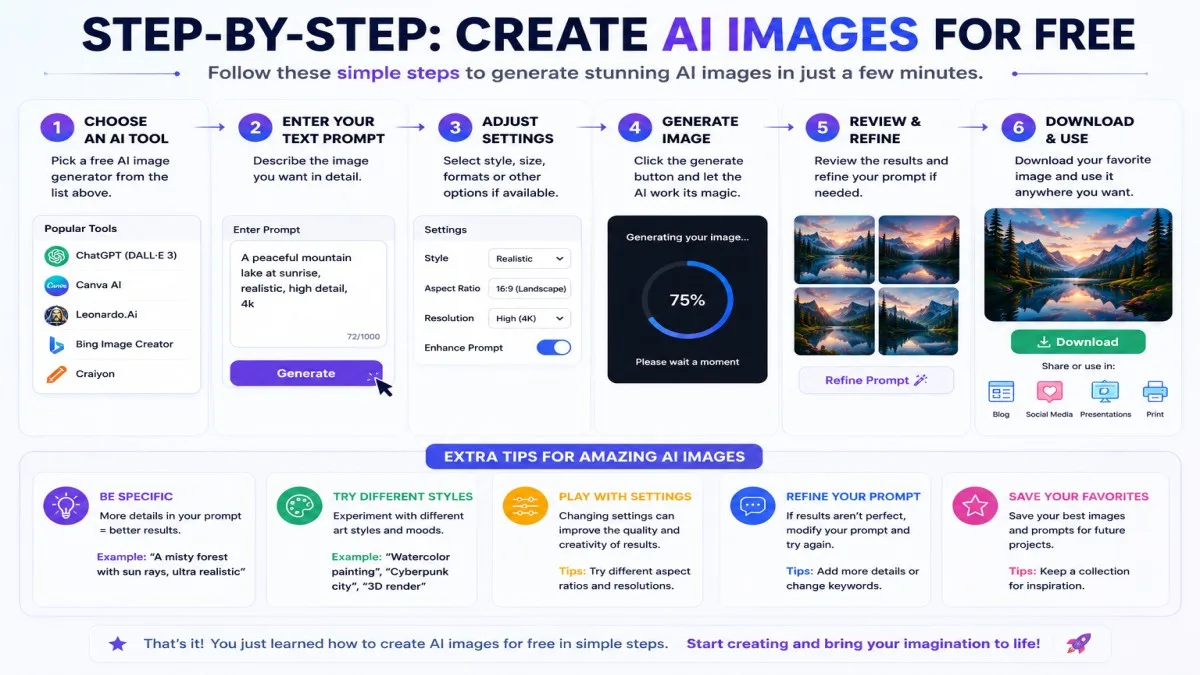
Creating AI images is easier than you might think. You do not need to be a graphic designer or learn any complicated software. Just follow these simple steps, and you can create AI images for free in only a few minutes.
Step 1: Choose an AI Image Generator
The first step is to choose a free AI image generator. There are many AI tools available online, but each one has different features. Some are made for beginners, while others are better for professional designers.
Popular free AI image generators include:
- ChatGPT
- Microsoft Designer
- Adobe Firefly
- Leonardo AI
- Ideogram
- Canva AI
- Playground AI
If you are new to AI, choose a tool with a simple interface. It will help you learn faster.
Example:
If you want to create a blog image, you can use ChatGPT or Microsoft Designer because they are easy to use.
Step 2: Sign In (If Required)
Some AI image generators allow you to use the tool without creating an account. However, many tools ask you to sign in before you can generate images.
You can usually sign in with:
- Google Account
- Microsoft Account
- Apple ID
- Email Address
Creating an account is free on most AI image generators.
Example:
If you use Leonardo AI, you may need to sign in first before you can start creating images.
Step 3: Write a Detailed Prompt
This is the most important step.
A prompt is the text description that tells the AI what image you want to create. The more details you provide, the better your image will be.
Instead of writing:
“A dog”
Write something like:
“A happy golden retriever playing in a green park on a sunny day, realistic style, high quality.”
A good prompt should include:
- Subject
- Background
- Colors
- Lighting
- Style
- Quality
Example:
“A modern study room with a laptop, books, wooden desk, warm lighting, realistic style, 4K.”
Step 4: Select Style and Aspect Ratio
Many AI image generators let you choose an image style before generating the image.
Some popular styles are:
- Realistic
- Cartoon
- Anime
- Watercolor
- Digital Art
- 3D Illustration
You can also choose the aspect ratio, which decides the shape of your image.
Common aspect ratios include:
- 1:1 – Instagram posts
- 16:9 – YouTube thumbnails
- 9:16 – Instagram Stories and Shorts
- 4:5 – Social media posts
Example:
If you want a YouTube thumbnail, choose 16:9 before generating the image.
Step 5: Generate the Image
After writing your prompt and selecting the settings, click the Generate button.
The AI will read your prompt and create one or more images. This usually takes only a few seconds.
If you do not like the first result, you can:
- Edit the prompt.
- Change the style.
- Generate another version.
Example:
If the image background looks too dark, change your prompt to include:
“Bright natural lighting.”
Then generate the image again.
Step 6: Download the Image
When you are happy with the image, click the Download button to save it on your device.
Before using the image, always check the AI tool’s license and usage policy. Some tools allow commercial use, while others may have restrictions on free plans.
You can use your AI-generated images for:
- Blog posts
- YouTube thumbnails
- Social media
- Presentations
- School projects
- Website banners
- Marketing materials
Example:
If you create a featured image for your blog, simply download it and upload it to your website.
How to Write Better AI Image Prompts
A good AI image starts with a good prompt. A prompt is the text you write to tell the AI what kind of image you want. The AI reads your prompt and creates an image based on your instructions.
If your prompt is short or unclear, the AI may create an image that does not match your idea. But if your prompt is detailed and specific, you will usually get a much better result.
For example, look at these two prompts:
Simple Prompt
“A dog in a park.”
This prompt is too short. The AI does not know what type of dog, what style, or what the park looks like.
Better Prompt
“A happy golden retriever playing in a green park, realistic style, bright morning sunlight, vibrant colors, highly detailed, 16:9 aspect ratio.”
This prompt gives the AI much more information, so it can create a better image.
Let’s understand the most important parts of a good AI image prompt.
Subject
The subject is the main thing you want in the image. It can be a person, animal, object, place, or anything else.
Examples:
- A white cat
- A modern office
- A mountain landscape
- A young student using a laptop
- A red sports car
Example Prompt:
“A young woman reading a book in a library.”
Style
The style tells the AI how the image should look.
Popular styles include:
- Realistic
- Cartoon
- Anime
- Watercolor
- 3D Render
- Digital Art
- Oil Painting
- Pencil Sketch
Example Prompt:
“A cute panda eating bamboo, cartoon style.”
Lighting
Lighting makes your image look brighter, darker, warmer, or more dramatic.
Popular lighting examples:
- Bright sunlight
- Golden hour
- Soft light
- Cinematic lighting
- Neon lighting
- Studio lighting
Example Prompt:
“A luxury car on a road, golden hour lighting.”
Camera Angle
The camera angle changes the view of the image.
Common camera angles:
- Front view
- Side view
- Top view
- Close-up
- Wide angle
- Bird’s-eye view
- Low angle
Example Prompt:
“A tiger walking in a forest, low-angle shot.”
Background
The background tells the AI where your subject should be.
Examples:
- Beach
- Forest
- Office
- Classroom
- Mountains
- City street
- Space
Example Prompt:
“A businessman working on a laptop in a modern office.”
Colors
Adding colors helps the AI create a more attractive image.
Examples:
- Vibrant colors
- Soft pastel colors
- Blue and white
- Black and gold
- Warm colors
Example Prompt:
“A tropical beach with vibrant blue water and golden sand.”
Quality
You can also tell the AI what quality you want.
Common quality words:
- High quality
- Ultra realistic
- 4K
- 8K
- Highly detailed
- Sharp focus
Example Prompt:
“A modern house, ultra realistic, highly detailed, 8K.”
Aspect Ratio
The aspect ratio decides the shape of your image.
Common aspect ratios:
- 1:1 – Instagram posts
- 16:9 – YouTube thumbnails
- 9:16 – Shorts and Stories
- 4:5 – Social media posts
Example Prompt:
“A travel vlog thumbnail, realistic style, 16:9 aspect ratio.”
Complete AI Image Prompt Example
Now, let’s combine everything into one detailed prompt.
Example Prompt:
A futuristic city at sunset, ultra-realistic, cinematic lighting, wide-angle view, flying cars, glass skyscrapers, vibrant colors, highly detailed, 8K quality, 16:9 aspect ratio.
This prompt includes:
- Subject: Futuristic city
- Style: Ultra-realistic
- Lighting: Cinematic lighting
- Camera Angle: Wide-angle view
- Background: City with flying cars and skyscrapers
- Colors: Vibrant colors
- Quality: Highly detailed, 8K
- Aspect Ratio: 16:9
The more clear and detailed your prompt is, the better your AI-generated image will be.
Best AI Image Prompt Examples
Writing a good prompt is the key to creating amazing AI images. A clear and detailed prompt helps the AI understand exactly what you want. Whether you need an image for your blog, YouTube channel, business, or social media, using the right prompt can save time and give you better results.
Below are some of the best AI image prompt examples that you can copy, edit, and use in your favorite free AI image generator.
AI Prompt for Blog Images
A good blog image should match your article and attract readers. It should be clean, professional, and easy to understand.
Example Prompt:
A modern workspace with a laptop, notebook, coffee cup, green plants, soft natural lighting, realistic style, highly detailed, 16:9 aspect ratio.
Best For: Blog featured images, tutorials, and educational websites.
AI Prompt for YouTube Thumbnails
A YouTube thumbnail should be bright, eye-catching, and easy to understand. It should grab attention quickly.
Example Prompt:
A young content creator pointing at a glowing AI robot, colorful background, dramatic lighting, bold style, highly detailed, 16:9 aspect ratio.
Best For: YouTube videos, tutorials, and tech channels.
AI Prompt for Logos
A logo should be simple, clean, and easy to remember. Avoid adding too many objects.
Example Prompt:
A modern AI technology logo with a blue brain icon, minimal design, white background, flat vector style.
Best For: Business logos, startup brands, and websites.
AI Prompt for Social Media Posts
Social media images should be colorful and attractive because they compete with many other posts.
Example Prompt:
A happy student using AI on a laptop, bright colors, modern workspace, clean background, realistic style, square 1:1 aspect ratio.
Best For: Instagram, Facebook, LinkedIn, and X posts.
AI Prompt for Product Photos
AI can create beautiful product photos without using a camera.
Example Prompt:
A luxury wristwatch on a black marble table, soft studio lighting, premium look, ultra realistic, 8K quality.
Best For: E-commerce websites and online stores.
AI Prompt for Anime Art
Anime style is very popular among artists and social media users.
Example Prompt:
A young anime girl with blue hair, standing under cherry blossom trees, soft sunset lighting, vibrant colors, highly detailed, anime style.
Best For: Anime lovers, wallpapers, and creative artwork.
AI Prompt for Fantasy Art
Fantasy art allows you to create magical worlds and imaginary characters.
Example Prompt:
A powerful wizard standing in front of a magical castle, glowing staff, flying dragons, cinematic lighting, fantasy art, ultra detailed.
Best For: Storybooks, games, and creative projects.
AI Prompt for Realistic Portraits
Realistic portraits look like real photographs.
Example Prompt:
A smiling young woman wearing a white shirt, soft natural lighting, blurred park background, ultra realistic, DSLR photography, 8K quality.
Best For: Profile pictures, advertisements, and creative projects.
AI Prompt for Business Graphics
Business graphics should look clean, modern, and professional.
Example Prompt:
A professional business presentation cover with blue and white colors, modern office background, clean layout, minimal design, high quality, 16:9 aspect ratio.
Best For: Business presentations, reports, and marketing materials.
Quick Tips for Better AI Prompts
- Be clear about what you want.
- Add the image style.
- Mention the lighting.
- Describe the background.
- Include colors if needed.
- Ask for high quality or 4K/8K.
- Choose the correct aspect ratio.
The more details you add, the better your AI-generated image will be.
Tips to Get Better AI Images
Creating AI images is easy, but creating high-quality AI images takes a little practice. A small change in your prompt can make a big difference in the final result. If you want better images, follow these simple tips.
Be Specific
Always tell the AI exactly what you want. Avoid writing very short or unclear prompts.
Bad Prompt
“A house.”
Better Prompt
“A modern white house with a swimming pool, green garden, blue sky, realistic style, high quality.”
The more details you give, the better the AI understands your idea.
Add Style Keywords
Style keywords tell the AI how the image should look.
Some popular style keywords are:
- Realistic
- Cartoon
- Anime
- 3D Render
- Watercolor
- Oil Painting
- Digital Art
- Minimalist
Example Prompt
“A cute panda eating bamboo, cartoon style, colorful.”
Mention Lighting
Lighting makes your image look more realistic and attractive.
Popular lighting keywords include:
- Soft lighting
- Golden hour
- Cinematic lighting
- Bright sunlight
- Studio lighting
- Neon lighting
Example Prompt
“A luxury sports car, cinematic lighting, realistic style.”
Good lighting can completely change the look of an image.
Specify Aspect Ratio
The aspect ratio decides the shape of your image. Choosing the correct size helps you create images for different platforms.
Common aspect ratios:
- 1:1 – Instagram posts
- 16:9 – YouTube thumbnails
- 9:16 – Reels and Shorts
- 4:5 – Facebook and Instagram feed
Example Prompt
“A travel vlog thumbnail, realistic style, 16:9 aspect ratio.”
Generate Multiple Versions
Do not stop after creating the first image. Generate two, three, or even five versions of the same prompt.
Sometimes the second or third image looks much better than the first one.
Example
If your first image is not perfect, click Generate Again or Create Variations to see different results.
This helps you choose the best image.
Refine Your Prompt
If you do not like the result, do not change the AI tool immediately. Instead, improve your prompt.
You can add more details like:
- Better background
- Different lighting
- New colors
- Camera angle
- Higher quality
- Different style
Example
Before
“A coffee shop.”
After
“A modern coffee shop with wooden furniture, warm lighting, smiling customers, realistic style, highly detailed, 8K quality.”
Small improvements in your prompt often produce much better AI images.
Tip
There is no perfect prompt on the first try. The best AI images are created by testing, improving, and trying different prompts. Keep experimenting with different words, styles, and settings until you get the image you want.
Common Mistakes to Avoid
Many beginners think that AI will create the perfect image on the first try. However, this is not always true. Even the best AI image generators need clear instructions to create high-quality images.
If you avoid the common mistakes below, you can create AI images for free that look more professional and match your ideas.
Using Vague Prompts
One of the biggest mistakes is writing a prompt that is too short or unclear. If your prompt does not include enough details, the AI has to guess what you want.
Bad Prompt
“A bird.”
Better Prompt
“A colorful parrot sitting on a tree branch in a tropical forest, realistic style, bright morning sunlight, highly detailed.”
A detailed prompt helps the AI create a more accurate image.
Overloading Prompts with Too Many Ideas
Another common mistake is adding too many ideas in one prompt. When you ask the AI to create too many things at the same time, the final image may look confusing.
Bad Prompt
“A lion, a spaceship, a beach, a castle, snow, rain, fireworks, robots, dinosaurs, and a rainbow in one image.”
Better Prompt
“A majestic lion standing in front of an ancient castle during sunset, realistic style, cinematic lighting.”
Keep your prompt focused on one main idea.
Ignoring Image Dimensions
Many beginners forget to choose the correct image size or aspect ratio. As a result, the image may not fit the platform where they want to use it.
For example:
- 1:1 → Instagram Post
- 16:9 → YouTube Thumbnail
- 9:16 → Instagram Reels and YouTube Shorts
- 4:5 → Facebook and Instagram Feed
Example
If you create a YouTube thumbnail using a square (1:1) image, it may not look correct on YouTube.
Always choose the right aspect ratio before generating the image.
Forgetting Licensing Terms
Not every AI-generated image can be used in the same way. Different AI tools have different rules for personal and commercial use.
Before using an AI image on your website, YouTube channel, or business, always check the tool’s license and terms of use.
Example
If you want to use an AI image in your business advertisement, first check whether the AI tool allows commercial use under its free plan.
Reading the license takes only a few minutes but can help you avoid problems later.
Expecting Perfect Results on the First Try
Many beginners expect the AI to create the perfect image on the first attempt. In reality, creating great AI images often takes a few tries.
You may need to:
- Change your prompt.
- Add more details.
- Try a different style.
- Change the lighting.
- Generate another version.
Example
Your first image may look good, but after improving the prompt and generating it again, the second or third version may look much better.
Do not give up after the first result. Keep improving your prompt until you get the image you want.
Tips- Avoiding these common mistakes will help you create better AI images. Write clear prompts, focus on one idea, choose the correct aspect ratio, check the licensing terms, and do not be afraid to improve your prompt. With regular practice, you will create high-quality AI images that look professional and match your needs.
Are AI Images Free to Use Commercially?
The answer is it depends on the AI tool you use.
Many people think that every AI-generated image is free to use for business, but this is not always true. Every AI image generator has its own license and terms of service. These rules explain how you can use the images created with that tool.
Some AI tools allow you to use AI-generated images for commercial purposes, such as:
- Business websites
- Blog posts
- YouTube videos
- Social media marketing
- Online stores
- Advertisements
Other AI tools may have restrictions. For example, they may allow personal use for free but require a paid plan for commercial use.
Why Should You Check the License?
Before you publish or sell an AI-generated image, always read the tool’s license and terms of service.
This helps you understand:
- Whether commercial use is allowed.
- Whether you need a paid plan.
- Whether there are any usage restrictions.
- Whether you need to give credit to the AI tool.
Reading these rules only takes a few minutes, but it can help you avoid future problems.
Example 1
Imagine you create a featured image for your blog using a free AI image generator.
Before publishing the article, check the tool’s license to make sure the image can be used on your website.
Example 2
Suppose you create an AI-generated logo for your business.
Before using it on your products, website, or advertisements, confirm that the AI tool allows commercial use under your plan.
Best Practice
A good habit is to check the license and terms of service every time you use a new AI image generator. Different tools have different rules, and those rules may also change over time.
By checking the license first, you can use AI-generated images with more confidence.
Frequently Asked Questions (FAQs)
Below are some of the most common questions people ask about how to create AI images for free. These simple answers will help beginners understand AI image generation more easily.
1. What is the best free AI image generator?
There is no single best AI image generator because each tool has different features.
Some popular free AI image generators are:
- ChatGPT
- Microsoft Designer
- Adobe Firefly
- Leonardo AI
- Ideogram
- Canva AI
- Playground AI
If you are a beginner, ChatGPT, Microsoft Designer, and Canva AI are easy to use.
Example:
If you want to create a simple blog image, ChatGPT is a good choice. If you want to design a social media post, Canva AI can be a better option.
2. Can I create AI images without paying?
Yes. Many AI image generators offer free plans that let you create AI images without paying.
Some tools may have daily or monthly limits, but they are enough for beginners.
Example:
A student can create images for a school project without buying a paid plan.
3. Do I need coding skills?
No. You do not need any coding or programming skills to create AI images.
You only need to write a simple text prompt describing the image you want.
Example:
You can type:
“A modern classroom with students using laptops, realistic style.”
The AI will create the image for you.
4. Can I use AI images commercially?
It depends on the AI tool you use.
Some AI image generators allow commercial use, while others have different rules. Always read the tool’s license and terms of service before using AI-generated images for your business, website, or products.
Example:
If you create an image for your online store, first check whether your AI tool allows commercial use under your plan.
5. Which AI image generator is best for beginners?
If you are just starting, choose an AI tool with a simple interface.
Good options for beginners include:
- ChatGPT
- Microsoft Designer
- Canva AI
These tools are easy to learn and help you create images quickly.
6. Can AI generate realistic photos?
Yes. Modern AI image generators can create very realistic images when you write a clear and detailed prompt.
Example Prompt:
“A smiling young woman in a green park, natural sunlight, DSLR photography, ultra realistic, 8K.”
The better your prompt, the more realistic the image can be.
7. How long does it take to generate an image?
Most AI image generators create an image within a few seconds.
Sometimes it may take a little longer if many people are using the tool at the same time.
Example:
A simple image may be ready in 10–30 seconds, while a detailed image may take a little longer.
8. Are AI-generated images copyright-free?
The answer depends on the AI tool and its license.
Different AI image generators have different copyright and usage rules. Before publishing, selling, or sharing an AI-generated image, always check the tool’s license and terms of service.
Example:
If you plan to sell an AI-generated image on a marketplace, first make sure your AI tool allows that type of use.
AI image generators make it easy for anyone to create amazing images. Start with a free AI tool, write clear prompts, and keep practicing. The more you experiment, the better your AI images will become.
Related Articles
Do you want to know all this?
Conclusion
Creating AI images is easier than ever. With the right free AI image generator and a well-written prompt, you can create amazing images in just a few minutes. Start with a free tool, try different prompts, and keep improving your results through practice.
Remember, great AI images come from clear ideas and detailed prompts. Do not be afraid to experiment with different styles, lighting, colors, and aspect ratios until you get the image you want.
At UseAiLearn, our goal is to help you learn AI in the easiest way possible. Keep exploring our AI tutorials, tips, and guides to improve your skills and make the most of AI tools.
Happy creating!