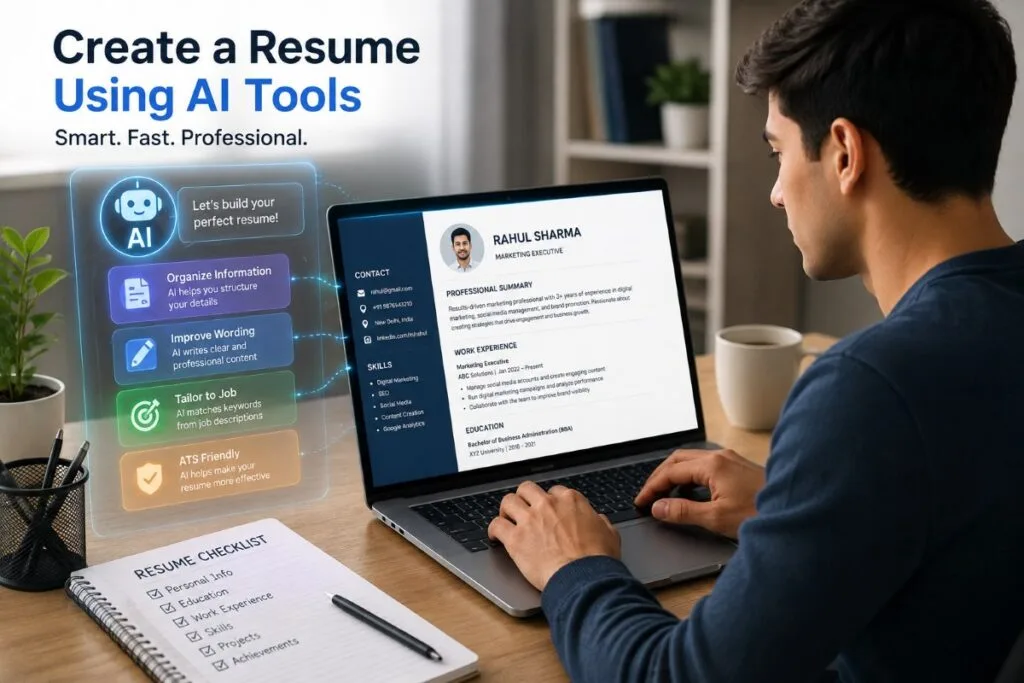
Creating a resume can be difficult, especially when you are applying for your first job or changing your career. You may know your skills and experience, but putting them into a clear and professional resume can take a lot of time.
AI tools can make this process easier. They can help you organize your information, improve your wording, create different resume sections, and tailor your resume to a specific job. You can even use AI to find important keywords from a job description and make your resume more relevant.
In this guide, UseAiLearn will show you how to create a resume using AI tools step by step. You will learn how to prepare your information, create each important resume section, write better work experience, use AI prompts, improve your resume for ATS, and avoid common mistakes.
However, AI should be your assistant, not a replacement for your real experience. Always check the AI-generated content and make sure every detail is true before you send your resume to an employer.
Quick Answer
Yes, you can create a resume using AI tools. The best approach is to give AI your real education, experience, skills, projects, and career goals, then ask it to organize and improve the information. You can also use AI to tailor your resume to a job description and check relevant keywords. However, always review the final resume yourself and never allow AI to create fake information.
Can AI Really Create a Resume?
Yes, AI can help you create a resume, but it should not create your career story by itself. AI tools can turn your real information into clear, well-written resume content. They can also help you improve the language and make your resume more suitable for a specific job.
For example, you can give an AI tool information like:
“I worked as a sales assistant for two years. I helped customers, handled billing, and managed product displays.”
The AI can turn this into a stronger resume bullet:
“Assisted customers, handled billing tasks, and maintained product displays to support daily store operations.”
The important point is that the AI improved the wording, but the experience still came from you.
AI-Generated Resume vs. AI-Assisted Resume
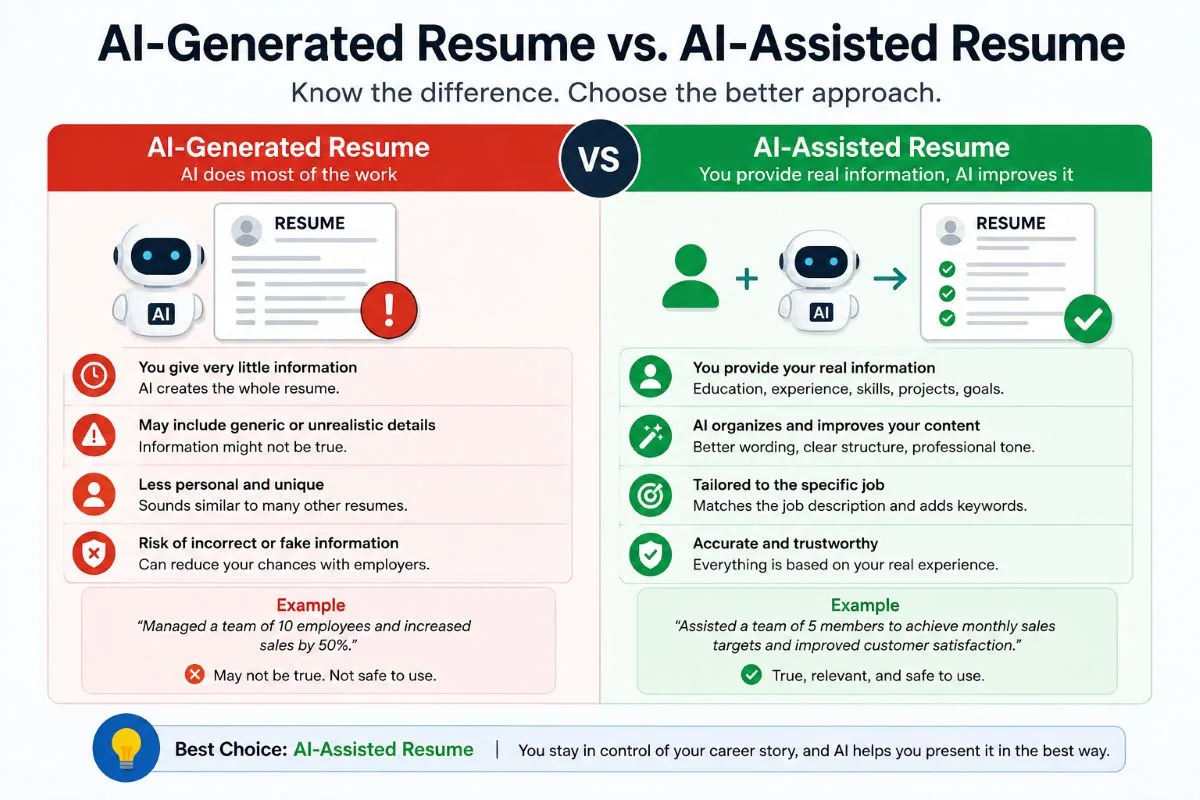
There is a useful difference between these two approaches.
An AI-generated resume is created mostly by AI. You may give the tool very little information and ask it to create the entire resume. This can produce a quick draft, but the result may sound generic or contain information that is not true.
An AI-assisted resume starts with your real information. You give the AI your education, work experience, skills, projects, and career goals. The AI then helps you organize, improve, and tailor that information.
For most job seekers, an AI-assisted resume is the better approach because you stay in control of your career information.
What AI Can Help You With
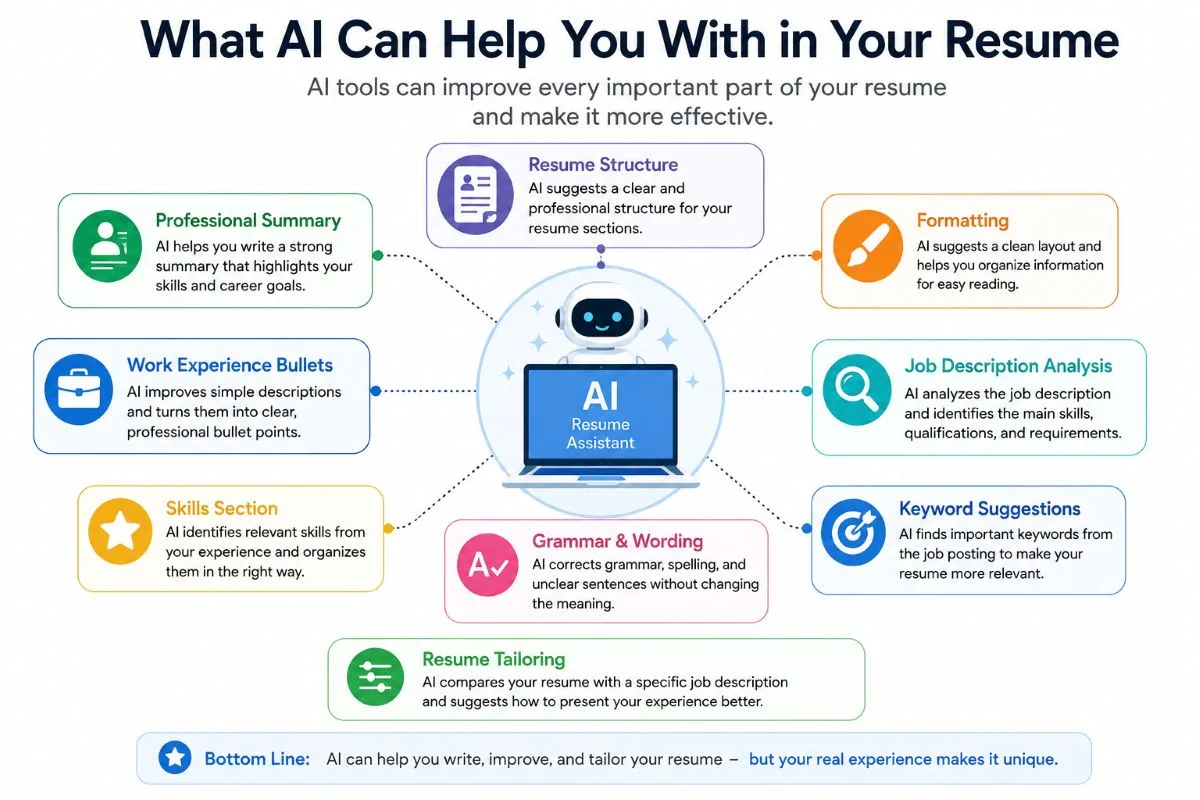
AI can help with many parts of the resume-writing process.
Resume structure:
AI can suggest a clear order for your resume sections, such as a professional summary, work experience, skills, and education.
Professional summary:
You can give AI your background and ask it to create a short summary that explains your main skills and career goals.
Work experience bullets:
AI can improve simple descriptions and make them more professional.
For example:
Basic:
“I answered customer questions.”
Improved:
“Answered customer questions and provided helpful information about products and services.”
Skills section:
AI can help you identify relevant skills from your real experience and organize them clearly.
Grammar and wording:
If your English is not strong, AI can correct grammar, spelling, and unclear sentences without changing the meaning.
Formatting:
AI can suggest a clean resume structure and tell you how to organize information for easier reading.
Job-description analysis:
You can give AI a job description and ask it to identify the main skills, qualifications, and keywords the employer is looking for.
Keyword suggestions:
AI can help you find relevant words from a job posting that may be useful when tailoring your resume.
Resume tailoring:
AI can compare your resume with a specific job description and suggest where your real experience can be presented more clearly for that role.
So, AI can help with both writing and improving your resume.
Tip: Experienced professionals can use a professional summary to highlight relevant experience and strengths. Students and career starters may focus more on education, projects, skills, and career goals.
What AI Should Not Do
AI should never be used to create information that is not true.
For example, if you have never worked as a manager, do not ask AI to add:
“Managed a team of 10 employees.”
If you do not know a particular software, do not add it to your skills section just because AI recommends it.
AI should also not:
- Invent jobs or companies you never worked for.
- Add skills you do not have.
- Create fake achievements or results.
- Change your actual employment or education dates.
- Add degrees, certificates, or qualifications you never earned.
For example, if you helped a company increase sales by 15%, you can tell AI about that real result and ask it to write it professionally. But if you do not know the actual number, AI should not invent “15%” just to make your resume look stronger.
Your resume represents your real experience. AI can help you present that experience better, but the facts must always come from you.
Why Your Real Information Matters
AI does not know your career history unless you provide it. The quality of the final resume depends heavily on the information you give the tool.
Instead of saying:
“Write me a good resume.”
Give useful information such as:
“I completed a Bachelor’s degree in Commerce in 2025. I worked as a sales assistant for two years. My main responsibilities included helping customers, handling billing, and maintaining product displays. I am applying for a customer service position.”
With real information like this, AI has something useful to work with.
Think of AI as a resume assistant: you provide the facts, and AI helps organize and improve them.
This approach can save time while keeping your resume honest, personal, and relevant to the job you want.
What You Need Before Creating a Resume With AI
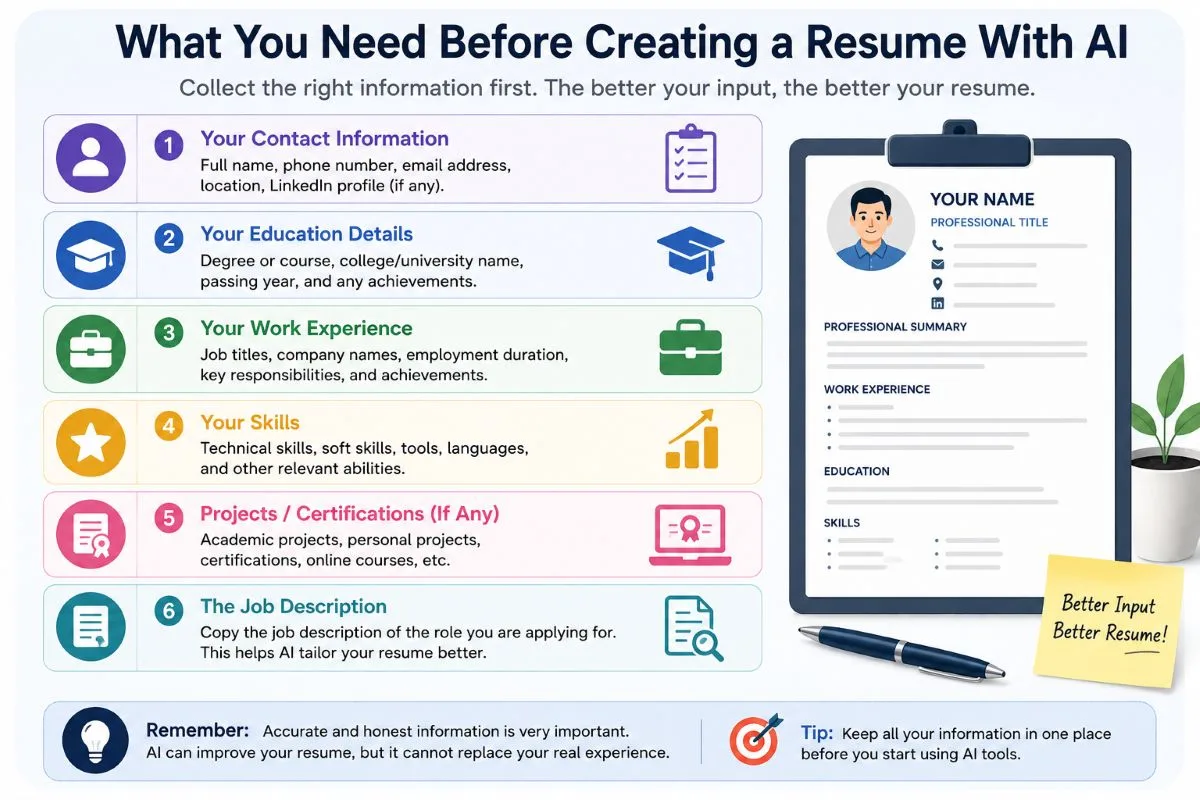
Before you ask an AI tool to create your resume, it is helpful to collect your important information first. AI can organize and improve the information you provide, but it cannot know your real education, experience, and skills unless you tell it.
You do not need to write everything in perfect English. You can simply collect the facts and give them to the AI tool later.
Your Personal Information
Start with basic information that employers may need to contact you.
Include:
- Your full name
- Phone number
- Professional email address
- City and country
- LinkedIn profile or portfolio link, if relevant
Example:
Name: Rahul Sharma
Email: rahul.sharma@email.com
Location: Delhi, India
LinkedIn: linkedin.com/in/rahulsharma
Avoid adding unnecessary personal information such as your full home address, date of birth, marital status, or other details unless they are specifically required for the job or country.
Your Education
Collect the main details about your education.
Include:
- Degree or qualification
- School, college, or university
- Graduation year
- Relevant certifications
Example:
Bachelor of Computer Applications (BCA)
ABC College, Delhi
Graduated: 2025
Certification: Google Data Analytics Certificate
Only include qualifications and certifications that you actually completed.
Your Work Experience
If you have work experience, collect the details for each job.
Include:
- Company name
- Job title
- Employment dates
- Main responsibilities
- Important achievements
- Real numbers or results, when available
For example:
Company: ABC Retail
Job title: Sales Assistant
Dates: June 2023 – May 2025
Responsibilities: Helped customers, handled billing, and maintained product displays.
Achievement: Helped increase monthly sales by 10%.
Numbers can make achievements clearer, but only use numbers that are true. If you do not know an exact result, do not ask AI to invent one.
If you are a student or have no formal work experience, you can collect information about internships, projects, freelance work, volunteer activities, or other relevant experience. We will discuss this in more detail later.
Your Skills
Make a list of skills that you actually have and that are relevant to the job.
You can include:
- Technical skills
- Software and tools
- Industry-specific skills
- Relevant soft skills
Example:
Technical: Basic data analysis, Excel
Tools: Microsoft Excel, Google Sheets
Industry skill: Customer service
Soft skills: Communication, teamwork, problem-solving
Do not add a skill just because it appears in an AI suggestion. If you cannot honestly say that you have the skill, leave it out.
The Job Description
The job description is one of the most useful things to have before creating an AI-assisted resume.
It tells you what the employer is looking for, such as required skills, qualifications, responsibilities, and experience.
For example, imagine a job description says:
“We are looking for a customer service representative with strong communication skills, experience with CRM software, and the ability to solve customer problems.”
You can give this job description to an AI tool along with your real experience. The AI can then help you identify which parts of your background are most relevant to the position.
For example, if you have used a CRM tool and regularly solved customer problems, your resume can highlight those real experiences instead of focusing on unrelated information.
This is called tailoring your resume. Instead of sending the same resume to every employer, you adjust the relevant parts to match each job.
A Simple Preparation List
Before creating your resume with AI, make sure you have:
- Your contact information
- Education details
- Work experience
- Skills
- Projects, internships, or certifications, if relevant
- The job description for the position you want
Once you have these details ready, you can give the information to an AI tool and start building your resume.
Be Careful With Personal Information
Before pasting your resume into an AI tool, check the tool’s privacy and data-use settings. You do not always need to provide highly sensitive personal information while asking AI to improve your resume.
For example, if you only want AI to improve a work-experience section, you can remove your phone number, email address, and home address before pasting it.
Important: Is section mein kisi specific AI company’s privacy policy ka claim mat karna unless you link to its official documentation.
How to Create a Resume Using AI Tools
Now that you have your information ready, you can start creating your resume with AI. The process is simple: give the AI your real information, ask it to organize and improve that information, and then review the result yourself.
You do not need to create the whole resume with one prompt. Working on each part step by step can give you more control over the final result.
Step 1: Choose an AI Tool
First, choose an AI tool that can help with writing and organizing information.
There are two main types of tools you can use.
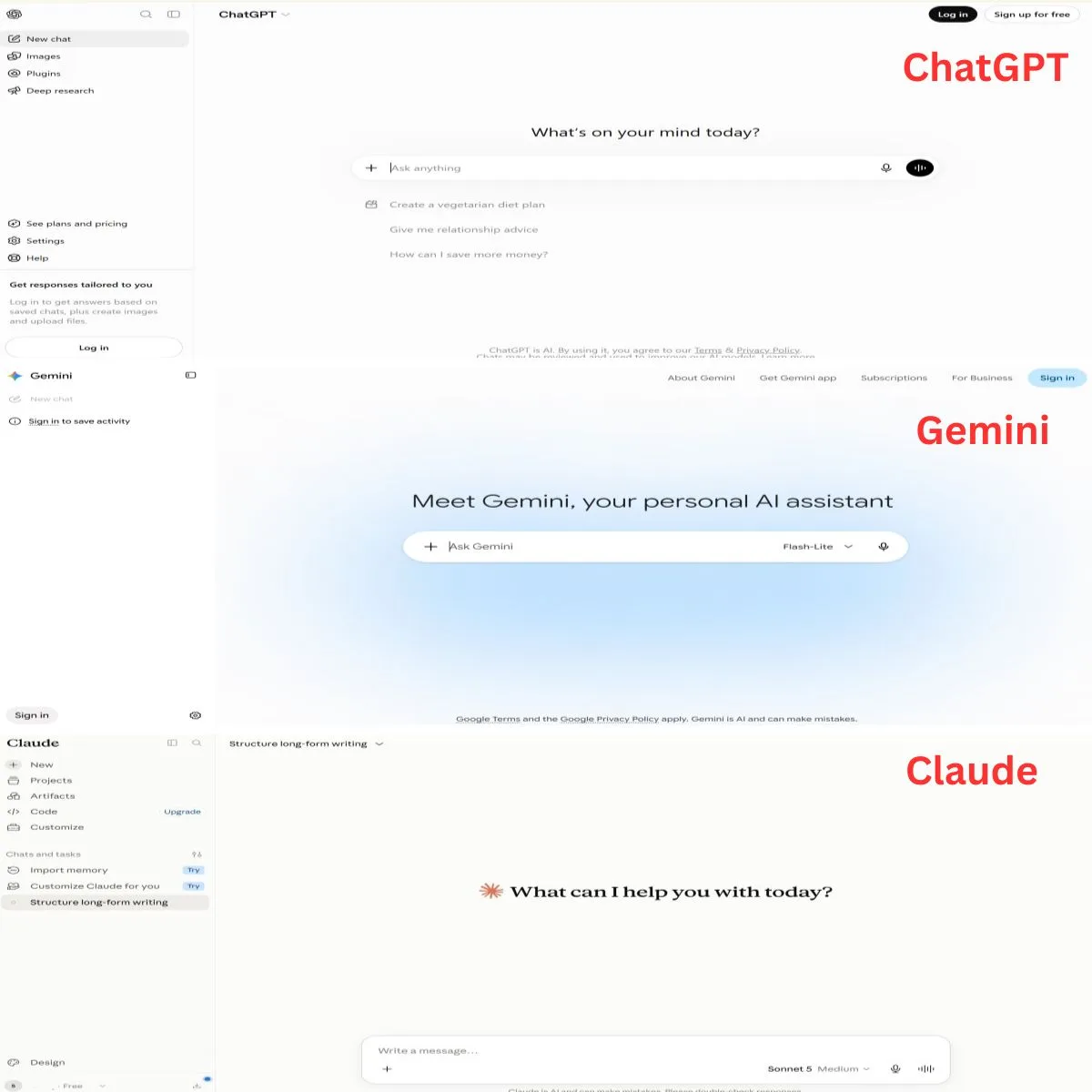
General AI tools can help with many writing tasks, including resumes. Examples include:
- ChatGPT
- Claude
- Gemini
You can give these tools your information and ask them to create or improve different parts of your resume.
Dedicated AI resume tools are designed specifically for resumes. They may provide resume templates, AI writing features, keyword suggestions, or resume optimization features.
You do not need to use many tools at the same time. Start with one tool that you understand and use it to build your resume.
Step 2: Give the AI Your Real Information
After choosing a tool, give it the information you collected earlier.
You can include:
- Education
- Work experience
- Skills
- Projects
- Achievements
- Certifications
- Career goals
Try to give clear and useful information instead of asking the AI to create everything from nothing.
Weak input:
“Write a good resume for me.”
This gives the AI very little information.
Useful input:
“I completed a Bachelor’s degree in Business Administration in 2025. I worked as a sales assistant from 2023 to 2025. I helped customers, handled billing, and maintained product displays. I also trained two new employees. I am applying for a customer service position.”
The second example gives the AI real information that it can organize and improve.
You can also tell the AI what type of job you want. This helps it focus on the experience and skills that are most relevant to your career goal.
Step 3: Ask AI to Create Your Resume Structure
Once the AI has your information, ask it to organize your resume into clear sections.
A simple resume may include:
- Contact information
- Professional summary
- Work experience
- Skills
- Education
- Certifications or projects, when relevant
For example, you can ask:
“Organize my information into a professional resume structure. Use clear headings and keep the format simple and easy to read.”
The exact structure can change depending on your experience and the type of job you want. For example, a student may give more space to education, projects, and internships, while an experienced professional may focus more on work experience.
Step 4: Create a Professional Resume Summary With AI
A resume summary is a short section near the top of your resume. It gives the employer a quick idea of who you are, what you can do, and what type of role you want.
AI can turn your basic information into a short and professional summary.
For example, you might give AI this information:
“I have two years of customer service experience. I am good at helping customers, solving basic problems, and communicating with people. I want to work as a customer service representative.”
AI could turn it into:
“Customer service professional with two years of experience helping customers, solving problems, and providing clear support. Strong communication and teamwork skills with an interest in customer service roles.”
The final summary should still describe your real experience. Do not allow AI to add skills or experience that you do not have.
Step 5: Use AI to Improve Your Work Experience
Your work experience is one of the most important parts of your resume. Instead of simply listing daily tasks, try to explain your work in a clear and useful way.
For example:
Weak:
Managed social media accounts.
This sentence is not necessarily wrong, but it does not tell the employer much about what you actually did.
A stronger version could be:
Managed social media content and improved audience engagement through a consistent content schedule.
However, the stronger version should only be used if it is true.
If you have real numbers, they can make your achievements clearer.
For example:
Managed social media content for three platforms and increased monthly engagement by 20%.
Only use the 20% figure if you actually achieved it.
You can ask AI:
“Rewrite these work experience points using clear action verbs. Keep all facts and numbers unchanged. Do not add any information that I did not provide.”
This tells the AI to improve the wording without changing your actual experience.
Step 6: Create a Skills Section With AI
AI can also help you organize your skills.
Give the AI your actual experience and ask:
“Based on the experience I provided, identify the relevant skills I can honestly include on my resume. Do not suggest skills that my experience does not support.”
For example, if you have worked with customers, handled billing software, and solved customer problems, AI may help you organize relevant skills such as customer service, communication, problem-solving, and billing software.
But do not add every skill that AI suggests.
Your resume should be accurate and honest.
Step 7: Use AI to Match Your Resume With a Job Description
One of the most useful ways to use AI is to compare your resume with a specific job description.
You can follow this simple process:
Job description → Find requirements → Compare with your resume → Identify gaps → Improve relevant sections
For example, suppose a job description asks for:
- Customer service experience
- CRM software knowledge
- Strong communication
- Problem-solving skills
You can give the job description and your resume to AI and ask:
“Compare my resume with this job description. Identify the important requirements I already meet, the relevant keywords I can use naturally, and any areas where my resume could be clearer. Do not add skills or experience that I do not have.”
AI can then help you see which parts of your real experience should receive more attention.
For example, if you already have CRM experience but it is hidden in a long work-experience paragraph, AI may suggest making that experience clearer.
This process is called tailoring your resume. It helps you highlight the experience most relevant to each job.
Step 8: Make Your Resume ATS-Friendly
Many employers use an Applicant Tracking System (ATS) to help manage and filter job applications. An ATS may scan resumes for information such as skills, qualifications, job titles, and keywords.
You can use AI to help make your resume easier for these systems to understand.
Some useful practices include:
- Use clear section headings such as “Work Experience,” “Education,” and “Skills.”
- Include relevant keywords from the job description when they honestly match your experience.
- Use simple and readable formatting.
- Avoid unnecessary graphics, complex layouts, and decorative elements that may make the text harder to read.
- Keep important information in normal text instead of hiding it inside images.
For example, if a job description asks for “customer relationship management (CRM)” and you have real CRM experience, you can use that relevant term in your resume.
However, do not add keywords just to make the resume look optimized.
Also, an AI tool cannot guarantee that your resume will pass every ATS. Different employers may use different systems and settings, so focus on making your resume clear, relevant, accurate, and easy to read.
Tips: A simple single-column resume is often a safer choice when you want your resume to be easy for an ATS to read. Avoid putting important information inside tables, text boxes, images, headers, or footers.
For example, keep your name, email, phone number, experience, and skills as normal text instead of placing them inside graphic elements.
Step 9: Ask AI to Proofread and Improve Your Resume
After creating your resume, use AI as an editor.
Ask it to check for:
- Grammar mistakes
- Spelling errors
- Repeated words
- Unclear sentences
- Weak wording
- Very long sentences
- Inconsistent formatting or wording
For example, you can use this prompt:
“Proofread my resume for grammar, spelling, clarity, and repetition. Keep my facts, dates, job titles, and achievements unchanged. Do not add new information.”
This is safer than simply asking AI to “make my resume better,” because it clearly tells the tool what it can and cannot change.
Step 10: Review the Final Resume Yourself
Never send an AI-assisted resume without reading it yourself.
AI can sometimes misunderstand your information, change the meaning of a sentence, or generate details that you never provided. A final human review helps catch these problems.
Check:
- Your name
- Contact details
- Education
- Job titles
- Employment dates
- Skills
- Achievements
- Numbers and results
- Certifications
- Job-specific keywords
For example, if you told AI that you worked from June 2023 to May 2025, make sure it did not accidentally change the dates.
Also check that every achievement is real and every skill listed is something you can actually use.
Finally, read the resume as if you were the employer. Ask yourself:
“Does this resume clearly show why I am a good match for this job?”
If the answer is yes and all the information is accurate, your AI-assisted resume is ready for the next step.
Best AI Prompts for Creating a Resume
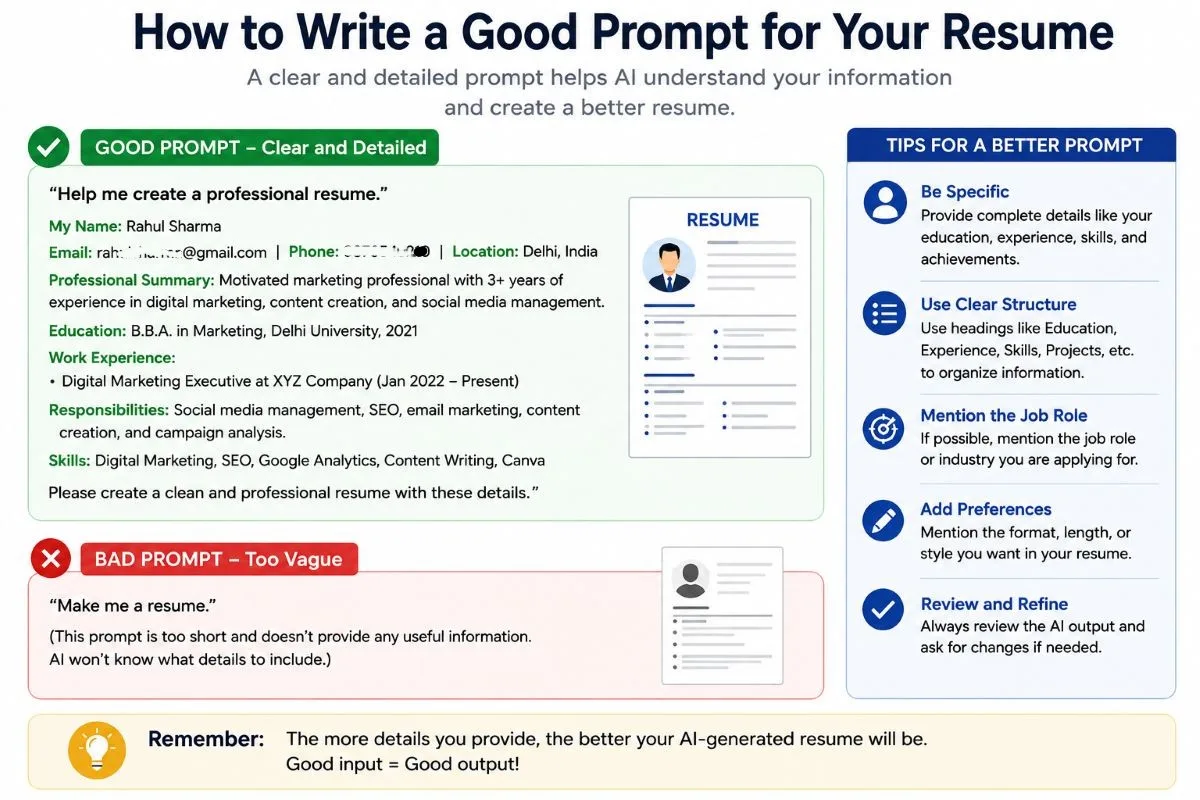
A good AI prompt can help you get a more useful resume than a very short request such as “Write my resume.” The more clear and specific your instructions are, the easier it is for the AI tool to understand what you need.
You can copy the prompts below and replace the example information with your own details.
Prompt to Create a Resume
Use this prompt when you want AI to create a complete first draft from your information.
Copy and use:
Create a professional, clear, and ATS-friendly resume using the information below.
Name: [Your name]
Education: [Your education]
Work experience: [Your experience]
Skills: [Your skills]
Projects: [Your projects]
Certifications: [Your certifications]
Achievements: [Your achievements]
Target job: [Job title]Use simple and professional language. Organize the resume with clear sections. Focus on information that is relevant to the target job. Do not invent, change, or assume any information that I have not provided.
Example:
If you are applying for a customer service job, you could add:
Target job: Customer Service Representative
Then add your real education, experience, skills, and other details.
Prompt to Write a Professional Summary
If your resume summary sounds too basic, ask AI to improve it without adding new information.
Copy and use:
Write a short professional resume summary using the information below. Keep it clear, natural, and suitable for a [job title] position. Highlight my most relevant experience and skills. Do not add any skills, achievements, or experience that I have not provided. Keep the summary between 40 and 60 words.
My information:
[Add your real information here]
Example:
You could provide:
“I have two years of customer service experience. I help customers, solve basic problems, and handle billing. I am good at communication and teamwork.”
The AI can use these facts to create a concise summary without changing your actual background.
Prompt to Improve Work Experience
This prompt can help turn simple job duties into stronger resume bullet points.
Copy and use:
Rewrite my work experience into clear and professional resume bullet points. Start each bullet with a strong action verb. Focus on responsibilities, contributions, and real results. Keep all facts, dates, and numbers exactly as provided. Do not create fake achievements or add information.
My current work experience:
[Paste your experience here]
Example:
You might give AI:
“I answered customer questions and helped them choose products.”
AI could improve it to:
“Assisted customers with product selection by answering questions and providing clear product information.”
The improved sentence is useful because it presents the same real experience in a clearer way.
Prompt to Find Resume Keywords
Use this prompt when you want to understand which keywords are important for a specific job.
Copy and use:
Analyze the job description below and identify the most important skills, qualifications, job-related terms, and keywords. Group them into technical skills, soft skills, qualifications, and important job terms. Then tell me which of these keywords naturally match my existing experience. Do not suggest that I add a skill unless my experience supports it.
Job description:
[Paste the job description here]My experience:
[Paste your relevant experience here]
This can help you understand what the employer is looking for before you edit your resume.
Prompt to Tailor a Resume to a Job Description
You can use AI to compare your existing resume with a specific job posting.
Copy and use:
Compare my resume with the job description below. Identify the most important requirements I already meet and suggest specific improvements to my resume. Show me which sections could be changed and explain why. Use relevant keywords naturally. Do not add or invent skills, qualifications, experience, or achievements. Keep all facts accurate.
Job description:
[Paste the job description]My resume:
[Paste your resume]
For example, if the job description asks for CRM experience and your resume already mentions CRM software, AI may suggest making that experience easier to notice.
If you do not have CRM experience, the AI should not add it just because the employer wants it.
Prompt for Students With No Work Experience
Students often have useful skills but may not know how to present them without formal work experience.
Copy and use:
Create a professional entry-level resume using my education, academic projects, internships, certifications, volunteer work, skills, and other relevant experience. I do not have formal full-time work experience. Focus on skills and experiences that are relevant to the target job. Do not create fake work experience or achievements. Use simple, professional language and keep the resume ATS-friendly.
Target job: [Job title]
Education: [Your education]
Projects: [Your projects]
Internships: [Your internships]
Skills: [Your skills]
Certifications: [Your certifications]
Other relevant experience: [Add information]
For example, a student applying for a junior web development job can provide details about a real college project, such as building a simple website. AI can help present that project professionally instead of pretending the student worked for a company.
Prompt to Proofread a Resume
After finishing your resume, use AI to check the writing.
Copy and use:
Proofread my resume for grammar, spelling, clarity, repetition, and consistency. Point out any unclear or weak sentences and suggest improvements. Do not change my names, dates, job titles, skills, qualifications, or achievements. Do not add new information. Keep the writing natural and professional.
My resume:
[Paste your resume here]
You can then review the suggestions yourself and decide which changes are useful.
A Simple Tip for Better AI Resume Prompts
You do not need to use one huge prompt for everything. In many cases, it is better to work on your resume section by section.
For example:
Step 1: Create the resume structure.
Step 2: Improve the professional summary.
Step 3: Rewrite work experience.
Step 4: Review relevant skills.
Step 5: Compare the resume with the job description.
Step 6: Proofread the final version.
This gives you more control and makes it easier to check whether AI has changed any important information.
The best AI resume prompt is not the one that makes the AI do everything. It is the one that gives the AI enough information and clear instructions while keeping you in control of the final resume.
How to Create a Resume With AI If You Have No Work Experience
You do not need years of work experience to create a useful resume. If you are a student, recent graduate, or applying for your first job, you can use your education, projects, internships, and other real experiences to show what you can do.
AI can help you present these experiences in a clear and professional way. However, it should never create a job, achievement, or skill that you do not actually have.
Education
If you have little or no work experience, your education can be an important part of your resume.
Include:
- Degree or course
- School, college, or university
- Graduation year or expected graduation year
- Relevant subjects or coursework, when useful
- Academic achievements, if they are real
Example:
Bachelor of Business Administration
ABC University, Delhi
Expected Graduation: 2026
Relevant Coursework: Marketing, Business Communication, and Management
You can ask AI to turn your education details into a clean resume section without adding anything you did not provide.
Projects
Real academic or personal projects can show practical skills even when you have not worked for a company.
For example, a computer science student may have created a simple website as a college project.
Instead of writing:
“Made a website for college.”
You could use AI to improve it to:
“Created a responsive website as part of a college project using HTML, CSS, and JavaScript.”
The second version gives the employer more useful information, but it should only mention technologies that you actually used.
Internships
An internship can provide valuable experience, even if it was short or unpaid.
Include:
- Organization name
- Internship role
- Dates
- Main responsibilities
- Skills you used
- Real results or achievements
Example:
Marketing Intern — ABC Company
June 2025 – August 2025
- Helped prepare social media content.
- Assisted with basic market research.
- Created weekly reports using Google Sheets.
AI can help improve the wording and structure while keeping your actual internship experience unchanged.
Volunteer Work
Volunteer work can also show useful skills.
For example, if you helped organize a local event, you may have gained experience in communication, teamwork, planning, or customer support.
Example:
Volunteer — Community Event
Helped organize a local community event and assisted visitors with registration and basic questions.
This can be valuable when it is relevant to the job you want.
Freelance Work
Freelance work can be included even if you did not work as a full-time employee.
For example, if you created websites for clients, designed social media posts, edited videos, or wrote articles, you can present that work as relevant experience.
Example:
Freelance Content Writer
- Wrote blog articles for small business websites.
- Researched topics and created easy-to-read content.
- Edited articles for grammar and clarity.
Only include work you actually completed.
Coursework
Some courses can provide useful evidence of your knowledge, especially for students and recent graduates.
For example, a student applying for a data-related position may have completed coursework in:
- Data analysis
- Statistics
- Excel
- Database management
You do not need to list every subject you studied. Choose coursework that is relevant to the position you are applying for.
Certifications
Relevant certifications can help show that you have learned a specific skill.
For example:
Google Data Analytics Certificate
Completed: 2026
Or:
Microsoft Excel Certification
Completed: 2026
Only list certifications that you actually earned or completed.
Relevant Skills
Your skills can become more important when you have limited work experience.
For example, a student applying for a junior graphic design position may list real skills such as:
- Adobe Photoshop
- Canva
- Basic graphic design
- Typography
- Communication
You can ask AI to identify which of your existing skills are most relevant to a job description.
For example:
“Review my skills and this job description. Tell me which of my existing skills are most relevant. Do not suggest skills that I do not have.”
This helps you focus your resume on skills that matter for the position.
Use AI to Present Your Experience, Not Create It
When you have no formal work experience, it may be tempting to ask AI to make your resume look more impressive. Avoid doing this.
AI should help you present your real experience better, not create experience for you.
For example, if you completed a college project, AI can improve:
“Made a website for my college project.”
to:
“Developed a responsive website as part of an academic project using HTML and CSS.”
But AI should not turn it into:
“Worked as a professional web developer for two years.”
That would be false information.
A good entry-level resume does not need to pretend that you have experience you do not have. Instead, it should clearly show your education, projects, internships, skills, certifications, and other real experience.
The goal is to help an employer understand what you can already do and what you may be able to learn in the role.
How to Create an ATS-Friendly Resume With AI
An ATS (Applicant Tracking System) is software that some employers use to collect, organize, and screen job applications. An ATS may look for information such as job titles, skills, qualifications, and keywords that match a job posting.
AI can help you make your resume easier to understand and more relevant to a job. However, there is no single format that guarantees your resume will pass every ATS. Different companies may use different systems and settings.
An ATS may help employers organize and filter applications, but the exact way resumes are processed depends on the employer’s software and hiring process.
The goal should be to create a resume that is clear, relevant, simple, and easy for both ATS software and people to read.
Use Keywords From the Job Description
Job descriptions often contain important words related to the skills, qualifications, and responsibilities required for a position.
For example, a job posting might say:
“We are looking for a customer service representative with experience in CRM software, customer support, communication, and problem-solving.”
If you have these skills, you can naturally include relevant terms in your resume.
For example:
Skills: Customer Support, CRM Software, Communication, Problem-Solving
You can also mention relevant skills in your work experience:
“Used CRM software to manage customer requests and provide timely support.”
AI can help you identify important keywords from a job description. You can ask:
“Find the important job-related keywords in this job description and tell me which ones match my existing experience.”
The important part is to use only keywords that honestly describe your skills or experience.
Use Clear Resume Sections
ATS software and recruiters need to understand the different parts of your resume quickly.
Use simple and familiar headings such as:
- Professional Summary
- Work Experience
- Skills
- Education
- Certifications
- Projects
For example, use:
Work Experience
instead of a creative heading such as:
My Career Journey
A simple heading makes the purpose of the section clear.
AI can help you organize your resume using standard headings, but you should still review the final structure yourself.
Keep Formatting Simple
A simple resume is usually easier to read.
Try to:
- Use a clean and readable font.
- Keep headings clear.
- Use consistent spacing.
- Use bullet points for work experience.
- Keep the layout organized.
- Follow the file format requested by the employer.
Avoid using too many design elements that can make the text difficult to read or process.
For example, a resume with several text boxes, unusual graphics, multiple columns, and important information placed inside images may be harder for some systems to interpret.
This does not mean every designed resume will fail an ATS. It simply means that simple formatting can reduce unnecessary problems.
Avoid Keyword Stuffing
Using relevant keywords is useful, but adding the same keyword many times is not a good strategy.
For example, this is keyword stuffing:
Customer service, customer service skills, customer service experience, customer service support, customer service professional.
It looks unnatural and does not provide useful information.
Instead, use the keyword naturally where it makes sense:
“Provided customer support, answered customer questions, and resolved basic service issues.”
The goal is to show your real experience, not to fill the resume with keywords.
Check the Resume After AI Optimization
After using AI to improve your resume for ATS, do not submit it immediately.
Read the complete resume and check whether AI changed anything incorrectly.
Look for:
- Incorrect dates
- Wrong job titles
- Incorrect company names
- Added skills you do not have
- Fake achievements
- Changed numbers
- Unnatural keywords
- Repeated phrases
- Formatting problems
For example, if your original resume says:
“Used Excel for basic reports.”
and AI changes it to:
“Advanced Excel expert with extensive data analysis experience.”
do not use the new version unless it is actually true.
You should also compare the final resume with the job description one more time. Make sure the important requirements that genuinely match your background are easy to find.
Save Your Resume in the Right File Format
Before submitting your resume, check the job application instructions. If the employer asks for a specific file format, follow those instructions.
If no format is specified, a text-based PDF or Word document may be suitable for many applications. Avoid submitting a scanned image of your resume because the text may not be easy for software to read.
Example:
Good:
Rahul-Sharma-Resume.pdfRahul-Sharma-Resume.docx
Avoid:
resume123finalnew2.pdfmyresumeimage.jpg
A Simple ATS Resume Workflow
You can use this process:
Job description → Find relevant keywords → Compare with your real experience → Add matching keywords naturally → Use clear sections → Keep formatting simple → Review the final resume
Important: There is no universal “ATS-proof” resume. ATS software can work differently from one employer to another. The goal is to create a resume that is clear, relevant, simple, and easy to read—not to trick the system.
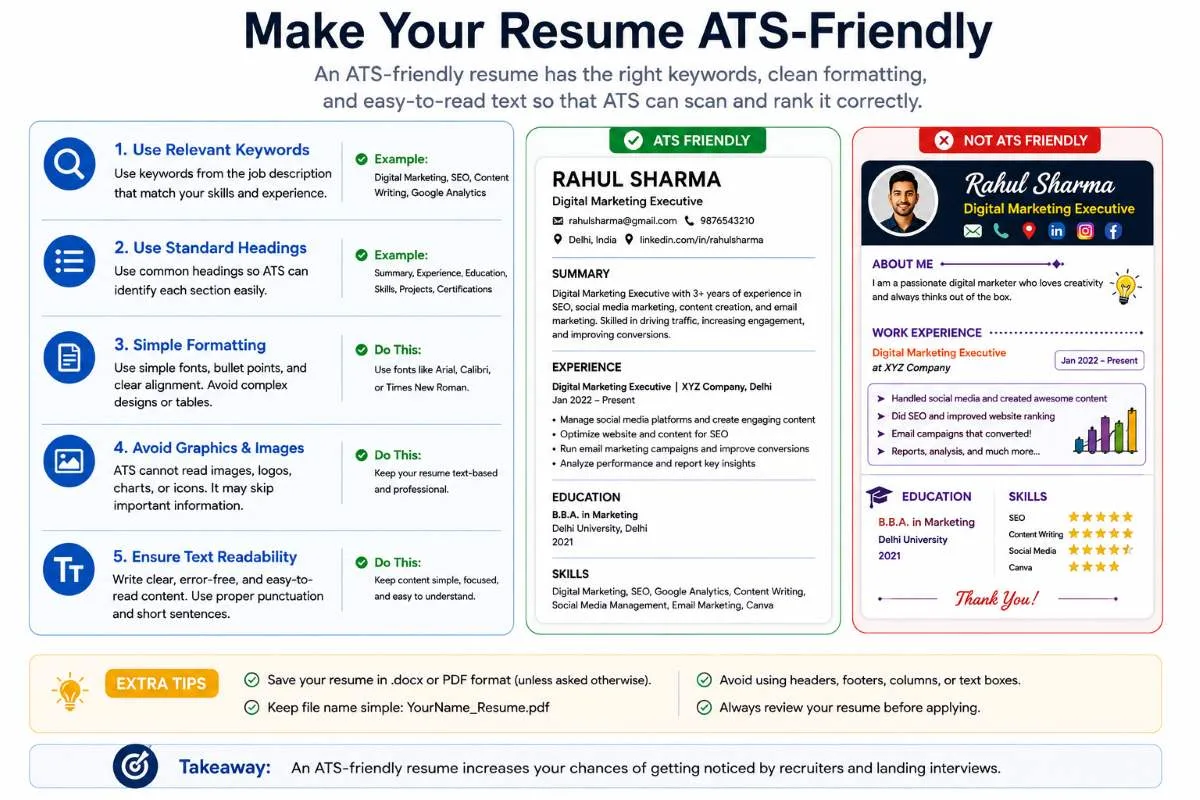
AI can make this process faster, but it cannot guarantee that your resume will be accepted by an ATS or selected by an employer. Your goal is to make your resume accurate, relevant, readable, and easy to understand.
AI Resume vs Traditional Resume Writing
Creating a resume can be done without AI, but AI can make some parts of the process faster and easier. The main difference is how much of the writing and research is done manually.
With traditional resume writing, you usually write, edit, research keywords, and tailor your resume yourself. With AI-assisted resume writing, AI can help with these tasks while you remain responsible for the information and final decisions.
| Feature | Traditional Method | AI-Assisted Method |
|---|---|---|
| First draft | Manual | AI-assisted |
| Editing | Manual | AI + human |
| Keyword research | Manual | AI-assisted |
| Job tailoring | Time-consuming | Faster |
| Fact checking | Human | Human required |
| Final review | Human | Human required |
The main difference is not who writes the resume. It is who controls the final result. AI can make writing, editing, and tailoring faster, but the candidate must still provide the facts and review the final resume.
Pros and Cons of Using AI for Resume Writing
AI can make resume writing faster and easier, especially when you are not sure how to start. But it also has some limitations. Understanding both the benefits and risks can help you use AI more effectively.
Pros of Using AI for Resume Writing
Saves time
AI can help you create a first draft or improve several resume sections quickly.
For example, instead of spending a long time trying to rewrite five work experience points, you can give them to AI and ask it to make them clearer and more professional.
Helps overcome writer’s block
Sometimes you know what you have done but do not know how to write it.
For example, you may think:
“I helped customers every day, but I don’t know how to describe it on my resume.”
AI can give you different ways to express the same real experience.
Improves wording
AI can help correct grammar, spelling, and unclear sentences.
For example:
“I was doing customer support and solve customer problems.”
can be improved to:
“Provided customer support and helped resolve customer problems.”
The meaning stays the same, but the sentence sounds more professional.
Helps organize information
If you have education, skills, projects, and work experience written in different places, AI can help organize the information into clear resume sections.
Makes job tailoring easier
AI can compare your resume with a specific job description and help you identify which parts of your real experience are most relevant.
This can save time when you need to adjust your resume for different jobs.
Helps identify relevant keywords
AI can analyze a job description and highlight important terms related to skills, qualifications, and responsibilities.
You can then use the relevant keywords naturally if they match your real background.
Cons of Using AI for Resume Writing
AI content can sound generic
AI often uses common phrases such as “hard-working professional,” “results-driven,” or “excellent team player.”
If every resume uses the same language, your resume may not feel personal.
For example, instead of writing:
“Results-driven professional with excellent communication skills.”
it may be better to describe a real experience that shows your communication skills.
AI can create inaccurate information
AI may misunderstand your input or sometimes generate information that you never provided.
For example, if you tell AI that you used Excel for basic reports, it should not change this to:
“Advanced Excel expert.”
Always check AI-generated content before using it.
AI may overuse buzzwords
AI can add too many professional-sounding words that do not provide much meaning.
Words such as “dynamic,” “strategic,” “innovative,” and “results-oriented” may be useful in some situations, but using too many can make your resume sound unnatural.
Every resume can start to look similar
If many people use AI with similar prompts, their resumes may have similar structures and phrases.
To avoid this, give AI your real experiences and use your own achievements and specific details. Edit the final wording so the resume sounds like you.
AI still requires human review
AI can help with writing, but it does not know your career better than you do.
You should always check your:
- Name
- Dates
- Job titles
- Skills
- Qualifications
- Achievements
- Numbers
- Contact details
The Best Way to Use AI
The best approach is not to let AI write everything without checking it. Use AI for the parts where it can save time, then use your own judgment to review and improve the result.
AI helps with the process. You remain responsible for the final resume.
Common Mistakes When Creating a Resume With AI
AI can make resume writing easier, but using it without care can create new problems. A good AI-assisted resume should be accurate, relevant, and personal. Avoiding these common mistakes can help you create a resume that is more useful to both employers and ATS software.
Asking AI to “Write My Resume” With No Information
One of the biggest mistakes is giving AI almost no information and expecting it to create a complete resume.
For example:
“Write a professional resume for me.”
The AI does not know your real education, work experience, skills, or achievements. It may create a generic resume that does not represent you.
Instead, provide useful information:
“I completed a Bachelor’s degree in Business Administration in 2025. I worked as a sales assistant for two years and handled customer questions, billing, and product displays. I am applying for a customer service position.”
The more useful your real information is, the more useful the AI’s draft can be.
Copying the AI Output Without Editing
AI-generated content may look professional, but that does not mean it is ready to send.
AI may use words that do not sound like you, repeat common phrases, or misunderstand your experience.
For example, AI might write:
“A highly dynamic and results-driven professional with exceptional expertise.”
If this does not accurately describe you, rewrite it in a more natural way.
Always read the complete resume and make changes where needed.
Adding Fake Achievements
Never ask AI to make your achievements sound bigger by creating false results.
For example, if you helped with social media posts, AI should not write:
“Increased company revenue by 50% through social media marketing.”
unless you actually achieved and can support that result.
If you do not have a measurable result, simply describe your real contribution.
For example:
“Created and scheduled social media posts for the company’s weekly content plan.”
A truthful resume is better than an impressive-looking resume with false claims.
Adding Skills You Don’t Have
AI may suggest skills based on a job description. That does not mean you should add every suggested skill to your resume.
For example, a job may require:
“Advanced Excel skills.”
If you only know basic Excel, do not write:
“Advanced Excel expert.”
You can mention your actual level instead, or improve the skill before claiming it professionally.
Your resume should represent what you can actually do.
Using the Same Resume for Every Job
Sending exactly the same resume to every employer can make it harder to highlight why you are a good match for a particular position.
For example, a customer service job may focus on:
Customer support, communication, CRM, and problem-solving.
A marketing job may focus more on:
Content creation, social media, market research, and analytics.
Your basic resume information can remain the same, but relevant sections and wording can be adjusted for each important job.
AI can help you make these changes faster by comparing your resume with the job description.
Overloading the Resume With Keywords
Keywords can help make your resume relevant, but using too many keywords can make it difficult to read.
For example, this sounds unnatural:
“Customer service professional with customer service skills, customer service experience, customer service support, and customer service communication.”
A better version is:
“Provided customer support, answered questions, and resolved basic customer issues.”
Use keywords where they naturally describe your real experience.
Using Complicated Formatting
A visually attractive resume is not always the best resume.
Too many graphics, text boxes, unusual fonts, icons, or complex columns can make the resume harder to read. Some ATS software may also have difficulty processing certain layouts.
For example, instead of putting your contact details inside a large graphic, use normal text at the top of the resume.
A clean structure with clear headings, readable text, and simple bullet points is usually a safer choice.
A Simple Rule to Remember
Before sending an AI-assisted resume, ask yourself:
“Is everything in this resume true, relevant, clear, and easy to understand?”
If the answer is yes, you are much closer to having a strong resume. AI should help you present your real experience better, not create a version of your career that does not exist.
Best Practices for Using AI to Create a Resume
AI can make resume writing faster, but it works best when you use it as a helper, not as a replacement for your own judgment. Career guidance from Harvard and current resume guidance from Indeed also recommend starting with your real experience, tailoring the resume to the job, and carefully reviewing AI-generated text for accuracy and authenticity.
Here are some simple best practices to follow.
1. Start with your real information.
Give AI your actual education, experience, skills, projects, and achievements.
2. Provide the target job description.
This helps AI focus on the experience and keywords that are relevant to the position.
3. Work section by section.
Improve your summary, work experience, skills, and other sections separately instead of asking AI to do everything at once.
4. Use real achievements.
Add measurable results when you have reliable numbers.
5. Keep your own voice.
Replace generic AI phrases with specific details from your real experience.
6. Tailor important applications.
Adjust relevant parts of your core resume for each job.
7. Review the final resume.
Make sure the content is accurate, relevant, natural, and easy to read.
A Simple Rule to Remember
Think of AI as your resume assistant:
You provide the facts → AI helps improve them → You check the result → You approve the final resume.
This approach can save time while keeping your resume accurate, personal, and relevant.
Frequently Asked Questions About Creating a Resume With AI
Can I create a resume using AI for free?
Yes. Some AI tools offer free plans or free features that can help you create and improve a resume. The exact features and limits depend on the tool.
For example, you can use a free AI tool to improve your professional summary, rewrite work experience, or compare your resume with a job description.
Can ChatGPT create my resume?
Yes. ChatGPT can help create a resume from the information you provide.
For example, you can give it your education, work experience, skills, projects, and target job and ask it to organize them into a professional resume.
However, you should review the result and correct any mistakes before using it.
Is it okay to use AI to write a resume?
Yes. Using AI as a writing and editing assistant is generally fine. The important thing is that the information in your resume is truthful and represents your real experience.
AI can improve your wording, but it should not create fake jobs, skills, or achievements.
Can AI make an ATS-friendly resume?
AI can help you make a resume more ATS-friendly by identifying relevant keywords, using clear section headings, and suggesting simple formatting.
However, AI cannot guarantee that your resume will pass every ATS because different employers may use different systems and settings.
Can AI create a resume for someone with no experience?
Yes. AI can help students and beginners create a resume using their education, projects, internships, volunteer work, freelance work, coursework, certifications, and relevant skills.
For example, a student can use a college project to show practical skills instead of inventing work experience.
Should I tell employers that I used AI to create my resume?
If an employer specifically asks applicants not to use AI or asks you to disclose AI assistance, follow those instructions.However, you should follow any specific instructions given by the employer or application process.
More importantly, make sure the final resume is accurate, personal, and written in a way you can honestly support.
Can recruiters tell if a resume was written by AI?
There is no reliable way to assume that a recruiter can identify every AI-assisted resume just by reading it.
However, generic language, unusual wording, inconsistent details, or claims you cannot explain may make your resume look less authentic.
The safest approach is to edit AI-generated text, add your real experience and specific achievements, and make sure the final resume sounds natural.
Can AI add fake information to a resume?
Yes, it can sometimes generate inaccurate or unsupported information, especially when you give it very little context.
For example, AI might turn basic Excel experience into “advanced Excel expertise.”
This is why you should check every important fact before submitting your resume.
Should I submit an AI-generated resume without editing it?
No. You should always review and edit the resume before sending it.
Check your name, dates, job titles, skills, achievements, numbers, contact information, and job-specific keywords.
AI should help you create the resume, but you should approve the final version.
What is the best AI tool for creating a resume?
There is no single best AI resume tool for everyone. General AI tools such as ChatGPT, Claude, and Gemini can help with writing and editing, while dedicated resume tools may offer templates and resume-specific features.
The best choice depends on what you need, your budget, and how much control you want over the final resume.
Final Checklist Before Sending Your AI-Assisted Resume
Before you send your AI-assisted resume to an employer, take a few minutes to review it carefully. AI can help you write and improve your resume, but you are responsible for the final version.
Use this checklist before submitting your application.
Personal Information Is Correct
Check your:
- Full name
- Phone number
- Email address
- Location
- LinkedIn or portfolio link, if included
Example: Make sure your email is not written as rahulsharma@gmial.com instead of rahulsharma@gmail.com.
Education Details Are Correct
Check your:
- Degree or qualification
- College or university
- Graduation year
- Certifications
Make sure AI has not changed your degree name or graduation date.
Work Dates Are Correct
Check the starting and ending dates for every job, internship, or other experience.
Example:
If you worked from June 2023 to May 2025, make sure the final resume does not show a different date.
Job Titles Are Correct
Make sure your job titles are accurate.
For example, if your actual title was Sales Assistant, do not allow AI to change it to Sales Manager just to make your resume sound more impressive.
There Is No Fake Information
Read every section and ask:
“Did I really do this?”
Remove anything that AI added without your confirmation.
Do not include fake jobs, qualifications, achievements, clients, or results.
Your Skills Are Genuine
Make sure every skill listed is something you actually know or can reasonably demonstrate.
For example, if you only have basic Excel knowledge, do not claim to be an advanced Excel expert.
Your Achievements Are Genuine
Check every number and result.
For example, if your resume says:
“Increased sales by 25%.”
make sure you actually achieved that result and can explain it if an employer asks.
Your Resume Matches the Target Job
Compare your final resume with the job description.
Ask:
- Does my resume highlight the experience that matters for this job?
- Are my relevant skills easy to find?
- Does my professional summary fit the position?
You do not need to change your entire resume. Focus on making your most relevant real experience easy to notice.
Important Keywords Are Used Naturally
Check whether important terms from the job description appear naturally where they match your experience.
For example, if you have real CRM experience, you can mention CRM in your skills or work experience.
Do not repeat the same keyword many times just to make the resume look optimized.
Formatting Is Easy to Read
Look at the resume as a whole.
Check that:
- Headings are clear.
- Font is readable.
- Spacing is consistent.
- Bullet points are easy to scan.
- Important information is easy to find.
- The layout is not unnecessarily complicated.
If the employer asks for a specific file format, follow their instructions.
Grammar Is Correct
Read the resume once more for:
- Spelling mistakes
- Grammar errors
- Repeated words
- Unclear sentences
- Inconsistent wording
AI can help with proofreading, but your own final review is still important.
You Have Reviewed the Final Resume
The final step is simple: read the entire resume yourself.
Do not submit it just because an AI tool says it is ready.
Ask yourself:
“Does this resume accurately represent me and explain why I am a good match for this job?”
If everything is accurate, relevant, clear, and easy to read, your AI-assisted resume is ready to send.
Quick Final Checklist
Before clicking Apply, check:
- ☑ Personal information is correct
- ☑ Education details are correct
- ☑ Work dates are correct
- ☑ Job titles are correct
- ☑ There is no fake information
- ☑ Skills are genuine
- ☑ Achievements are genuine
- ☑ Resume matches the target job
- ☑ Keywords are used naturally
- ☑ Formatting is easy to read
- ☑ Grammar is correct
- ☑ You have reviewed the final resume yourself
Conclusion
Creating a resume with AI can save time and make the writing process easier, but AI should only be your assistant. Do not let AI create your career story. Let AI help you present your real career story better.
Before sending your resume, give AI your real information, tailor the resume to the job, check important keywords, and carefully review every detail. Make sure your skills, experience, dates, and achievements are accurate.
Your next steps are simple: collect your information → choose an AI tool → create your resume → tailor it to the job → review every detail → submit it with confidence.
For more simple and practical AI tutorials, visit UseAiLearn and learn how to use AI tools effectively in your everyday work and learning.