What Is ChatGPT and How Does It Work? Beginner’s Guide (2026)

What Is ChatGPT and How Does It Work? | UseAiLearn

Artificial Intelligence is changing the way we work, learn, and create content. One of the most popular AI tools today is ChatGPT. But many people still ask, what is ChatGPT and how does it work?

At UseAiLearn, our goal is to make AI easy for everyone. Whether you are a student, blogger, freelancer, or business owner, we explain AI topics in simple English that anyone can understand.

In simple words, ChatGPT is an AI chatbot created by OpenAI. It can understand your questions and give human-like answers in seconds. You can use ChatGPT to write articles, answer questions, learn new skills, translate languages, create emails, and even generate computer code.

In this beginner-friendly guide from UseAiLearn, you will learn what is ChatGPT, how does ChatGPT work, what it can do, its benefits and limitations, and how to start using it with confidence.

Why Trust This Guide?

At UseAiLearn, we research AI tools, test their features, and explain them in simple English so beginners can learn with confidence.


What Is ChatGPT?
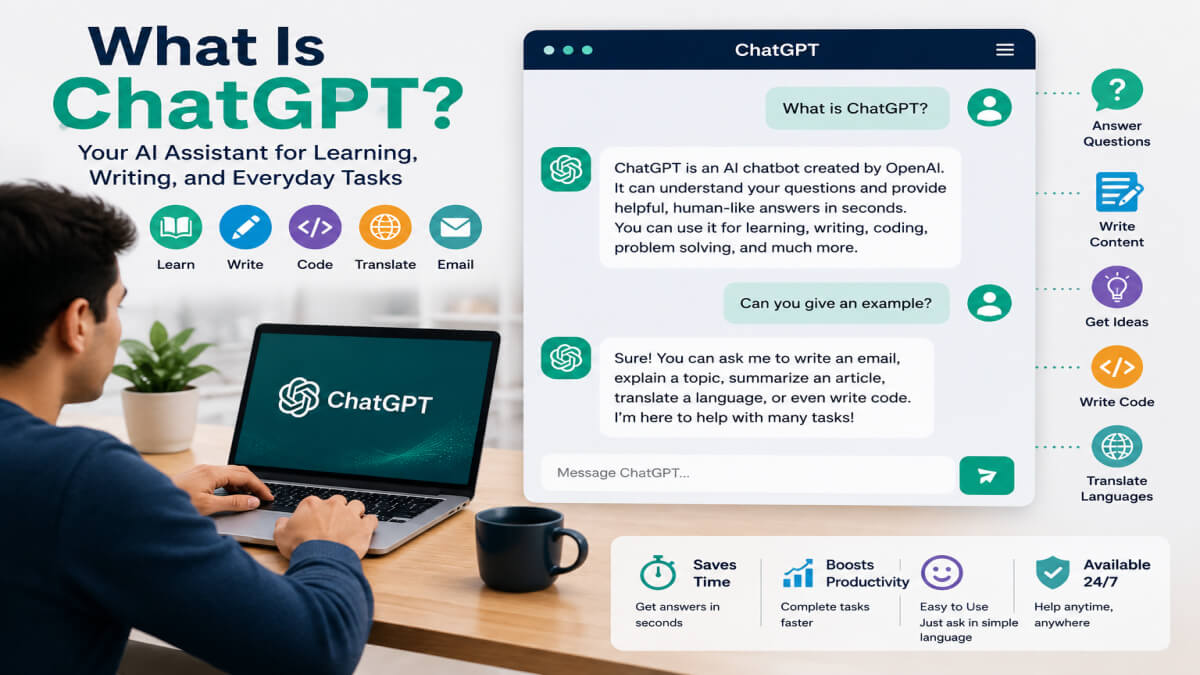
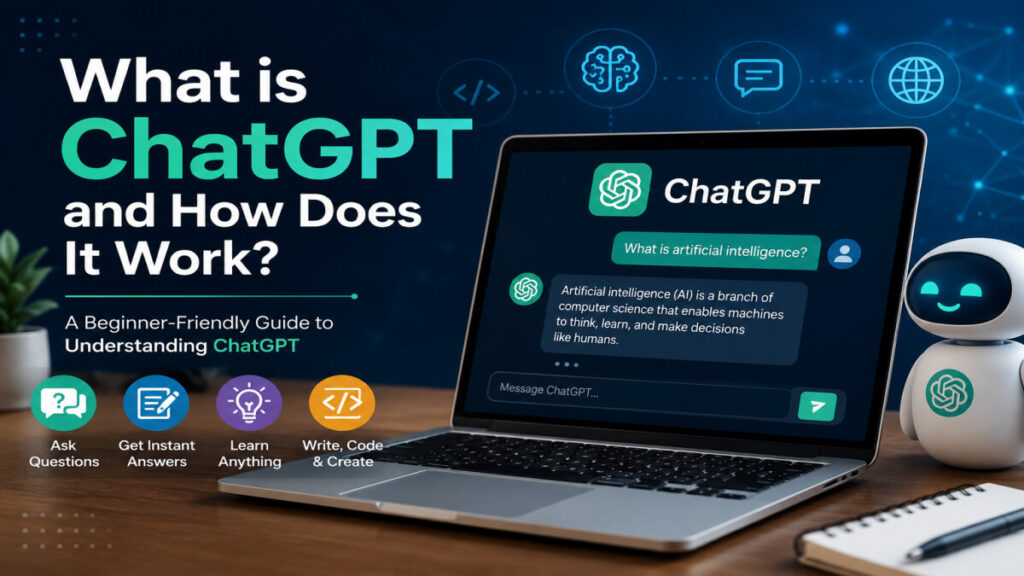
Illustration of a person chatting with ChatGPT, an AI chatbot that answers questions and helps with writing, learning, coding, and everyday tasks.

ChatGPT is an AI chatbot created by OpenAI. It can understand your questions and reply in simple, human-like language. You can chat with ChatGPT just like you chat with a friend online.

ChatGPT is powered by Artificial Intelligence (AI). It learns from a large amount of text and uses that knowledge to answer questions, explain topics, write content, and solve problems. It does not think like a human, but it can predict the best answer based on your prompt. This is why many people use ChatGPT every day for learning, writing, coding, and solving problems.

People use ChatGPT for many daily tasks. It can help students with homework, bloggers write articles, programmers write code, and business owners create emails or marketing ideas. It can also translate languages, summarize long text, and give creative suggestions.

Example 1

A student asks:

“Explain photosynthesis in simple words.”

ChatGPT gives an easy-to-understand answer with examples.

Example 2

A blogger asks:

“Write an introduction for a blog about AI.”

ChatGPT creates a simple and well-written introduction in seconds.

Example 3

A business owner asks:

“Write a professional email to a customer.”

ChatGPT writes a polite and professional email that can be edited and sent.

These examples show that ChatGPT is a helpful AI assistant for learning, writing, and everyday work.


What Does ChatGPT Stand For?

Many people know the name ChatGPT, but they do not know what GPT means. GPT stands for Generative Pre-trained Transformer. These three words explain how ChatGPT works.
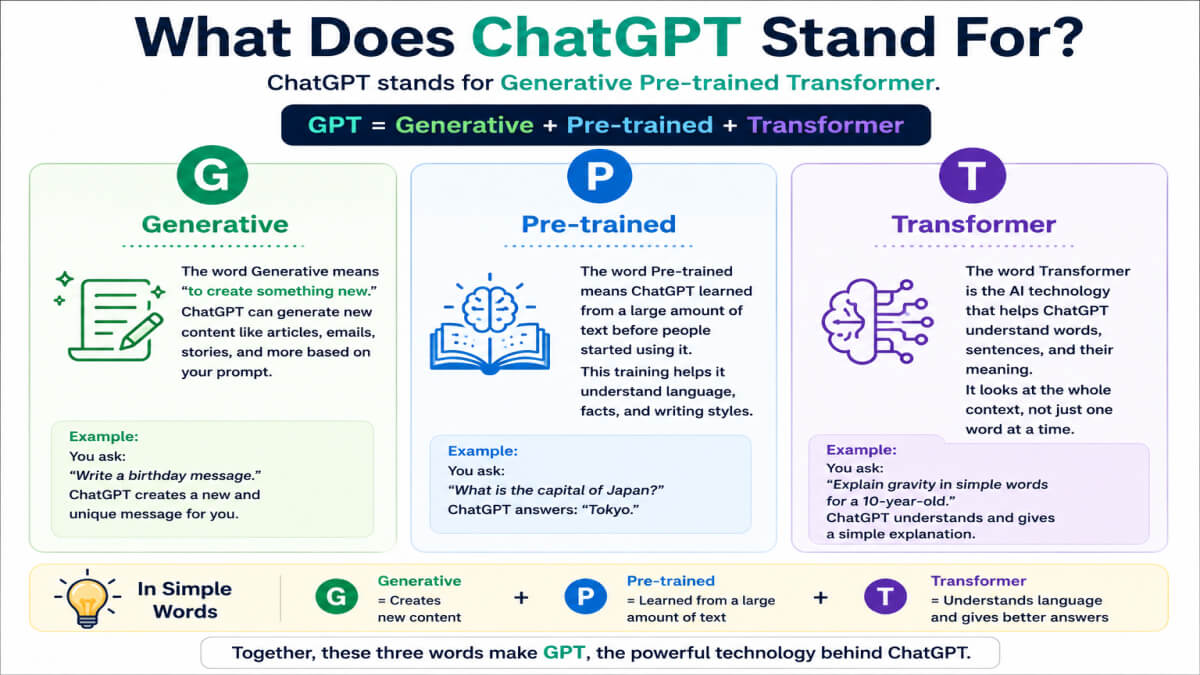
Infographic explaining the meaning of GPT in ChatGPT: Generative, Pre-trained, and Transformer with simple icons and descriptions.

Generative

The word Generative means “to create something new.”

ChatGPT can create new content instead of copying text from one website. It can write stories, articles, emails, poems, and many other types of content based on your prompt.

Example:

You ask:

“Write a birthday message for my friend.”

ChatGPT creates a new birthday message just for you.


Pre-trained

The word Pre-trained means ChatGPT learned from a large amount of text before people started using it.

This training helps ChatGPT understand language, grammar, facts, and different writing styles. It does not search the internet every time you ask a question. Instead, it uses what it learned during training to generate a response.

Example:

You ask:

“What is the capital of Japan?”

ChatGPT answers:

“Tokyo.”


Transformer

The word Transformer is the name of the AI technology that helps ChatGPT understand words, sentences, and their meaning.

It looks at the whole sentence instead of reading one word at a time. This helps ChatGPT give better and more natural answers.

Example:

You ask:

“Can you explain gravity in simple words for a 10-year-old?”

ChatGPT understands that you want an easy explanation and gives a simple answer that matches your request.


In Simple Words

  • Generative = Creates new content.
  • Pre-trained = Learned from a large amount of text before you use it.
  • Transformer = Understands language and gives human-like answers.

Together, these three words make GPT, the technology behind ChatGPT.


How Does ChatGPT Work?

Many people ask, how does ChatGPT work? The answer is simple. ChatGPT reads your message, understands what you want, and then creates a helpful reply in a few seconds.
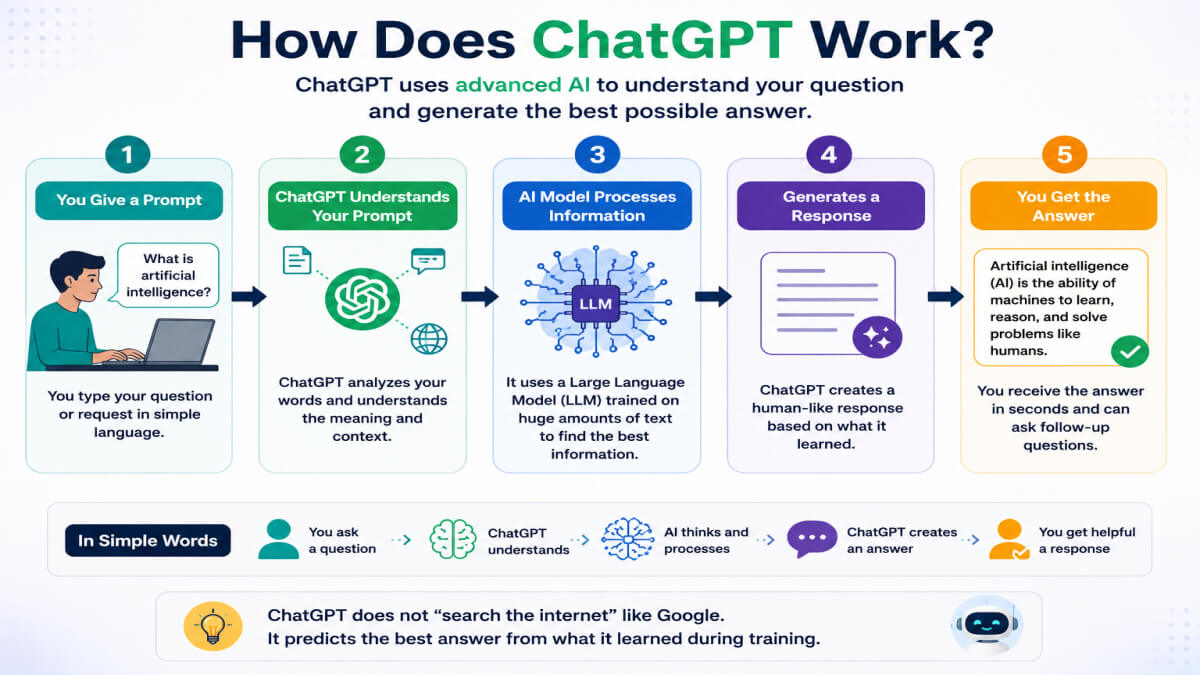
Flowchart showing how ChatGPT works: user prompt, large language model (LLM), understanding the prompt, predicting the next words, and generating a human-like response.

It does not think like a human. Instead, it uses Artificial Intelligence (AI) and a Large Language Model (LLM) to understand language and generate answers.

Let’s understand this step by step.


Training with Large Language Models (LLMs)

Before ChatGPT was released, it was trained using a Large Language Model (LLM). During training, it learned from a large amount of text, such as books, articles, websites, and other public information.

This training helps ChatGPT understand words, grammar, facts, and different writing styles.

Example:

Because of its training, ChatGPT can answer questions like:

“What is the largest planet in our solar system?”

It replies:

“Jupiter is the largest planet in our solar system.”


Understanding Your Prompt

A prompt is the message or question that you type into ChatGPT.

ChatGPT reads your prompt carefully and tries to understand what you need. The clearer your prompt is, the better the answer will be.

Example:

Prompt:

“Write a short email to my teacher for one day’s leave.”

ChatGPT understands your request and writes a polite leave email.


Predicting the Next Word

ChatGPT does not search for ready-made answers. Instead, it predicts the most likely next word, then the next one, and continues until it creates a complete response.

This happens very quickly, so you get an answer in just a few seconds.

Example:

If you type:

“The sun rises in the…”

ChatGPT predicts the next word:

“east.”

Then it continues to complete the sentence naturally.


Generating Human-Like Responses

After understanding your prompt and predicting the next words, ChatGPT creates a response that sounds natural and easy to read.

It can change its writing style based on your request. For example, it can write for beginners, students, professionals, or children.

Example:

You ask:

“Explain photosynthesis for a 10-year-old.”

ChatGPT gives a simple explanation with easy words instead of using difficult science terms.


In Simple Words

ChatGPT works in four simple steps:

  1. It learns from a Large Language Model (LLM).
  2. It understands your prompt.
  3. It predicts the next words.
  4. It creates a human-like response.

That is why ChatGPT can answer questions, write content, solve problems, and help with many daily tasks.


What Can ChatGPT Do?

ChatGPT can help you with many daily tasks. Whether you are a student, blogger, freelancer, programmer, or business owner, ChatGPT can save you time and make your work easier.
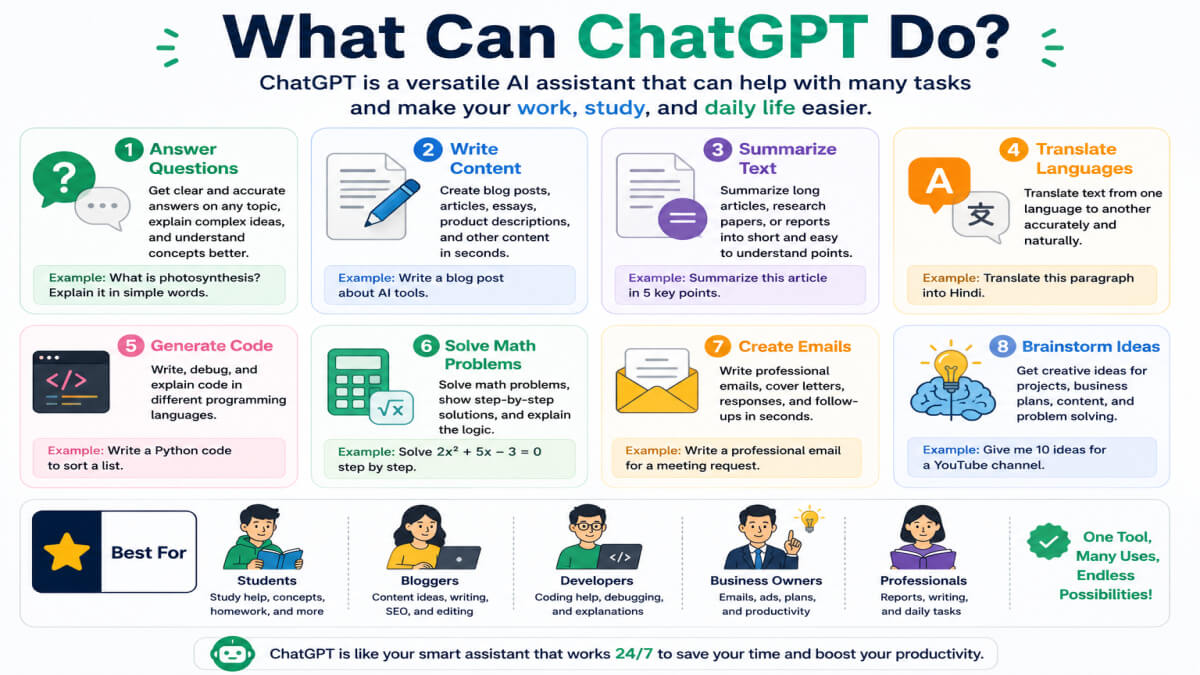
Infographic showing the main features of ChatGPT, including answering questions, writing articles, summarizing text, translating languages, generating code, solving math problems, creating emails, and brainstorming ideas.

Here are some of the most useful things ChatGPT can do.


Answer Questions

ChatGPT can answer questions on many topics, such as science, history, technology, business, and general knowledge.

Example:

You ask:

“Why is the sky blue?”

ChatGPT gives a simple explanation in easy language.


Write Articles

ChatGPT can help you write blog posts, essays, reports, product descriptions, and social media content.

Example:

You ask:

“Write a blog introduction about artificial intelligence.”

ChatGPT creates a clear and beginner-friendly introduction.

Many writers use ChatGPT to create a first draft and then edit it to match their own style.

Do you want to know How to Write Blog Posts Using ChatGPT?


Summarize Text

If you have a long article or document, ChatGPT can make it shorter while keeping the main points.

Example:

You ask:

“Summarize this 1,000-word article in 100 words.”

ChatGPT gives a short and easy-to-read summary.


Translate Languages

ChatGPT can translate text between many languages.

Example:

You ask:

“Translate ‘Good morning’ into Spanish.”

ChatGPT replies:

“Buenos días.”


Generate Code

ChatGPT can write and explain code in many programming languages, such as Python, JavaScript, HTML, and CSS.

Example:

You ask:

“Write a simple HTML page.”

ChatGPT creates the HTML code and explains how it works.


Solve Math Problems

ChatGPT can help solve basic and advanced math problems. It can also explain the solution step by step.

Example:

You ask:

“What is 25 × 8?”

ChatGPT replies:

“25 × 8 = 200.”


Create Emails

ChatGPT can write personal and professional emails in a few seconds.

Example:

You ask:

“Write a thank-you email to my manager.”

ChatGPT creates a polite and professional email.


Brainstorm Ideas

Many creators use ChatGPT to brainstorm new ideas when they feel stuck or need inspiration.

Example:

You ask:

“Give me 10 YouTube channel ideas about AI.”

ChatGPT suggests creative and unique ideas.


In Simple Words

ChatGPT can help you:

  • Answer questions
  • Write articles
  • Summarize long text
  • Translate languages
  • Generate code
  • Solve math problems
  • Create emails
  • Brainstorm new ideas

It is a useful AI assistant for learning, writing, coding, and everyday work.
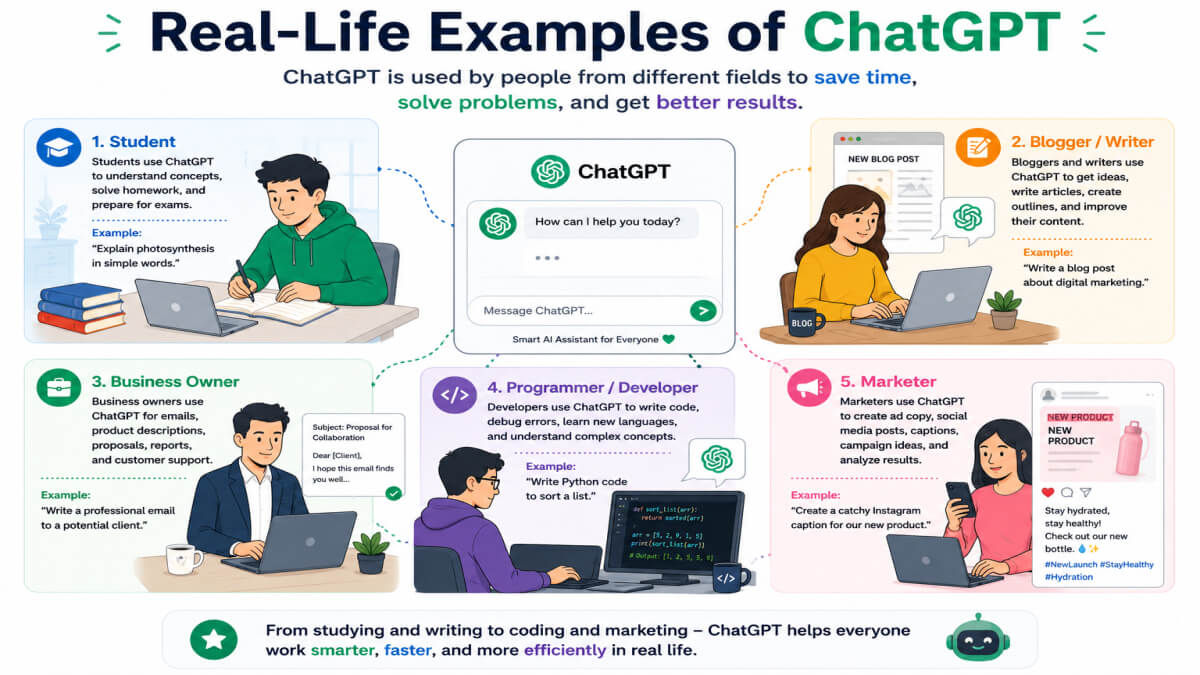

Real-Life Examples of ChatGPT

ChatGPT is useful for people from many different fields. It can help with learning, writing, coding, business, and marketing. Here are some real-life examples of how different people use ChatGPT every day.

Illustration showing a student, blogger, business owner, programmer, and marketer using ChatGPT for learning, writing, coding, marketing, and everyday work.


Student

Students use ChatGPT to learn new topics, solve homework problems, summarize notes, and prepare for exams.

Example:

A student asks:

“Explain the water cycle in simple words.”

ChatGPT gives a short and easy explanation that is simple to understand.


Blogger

Many bloggers use ChatGPT to find content ideas, create outlines, improve writing, and generate SEO-friendly titles.

Example:

A blogger asks:

“Give me 10 blog topic ideas about AI tools.”

ChatGPT suggests useful and creative blog topics in a few seconds.


Business Owner

Business owners use ChatGPT to write emails, create product descriptions, answer customer questions, and plan marketing campaigns.

Example:

A business owner asks:

“Write a product description for a wireless mouse.”

ChatGPT creates a clear and attractive product description.


Programmer

Programmers use ChatGPT to write code, fix errors, understand programming concepts, and learn new coding languages.

Example:

A programmer asks:

“Why is my Python code showing an error?”

ChatGPT explains the possible problem and suggests a solution.


Marketer

Marketers use ChatGPT to write social media posts, create ad copy, plan campaigns, and generate content ideas.

Example:

A marketer asks:

“Write a Facebook post to promote an online course.”

ChatGPT writes a simple and engaging social media post.


In Simple Words

ChatGPT helps many different people in their daily work.

  • Students learn faster.
  • Bloggers create better content.
  • Business owners save time.
  • Programmers solve coding problems.
  • Marketers create better marketing content.

No matter what your job is, ChatGPT can help you work more efficiently and save time.


Benefits of ChatGPT

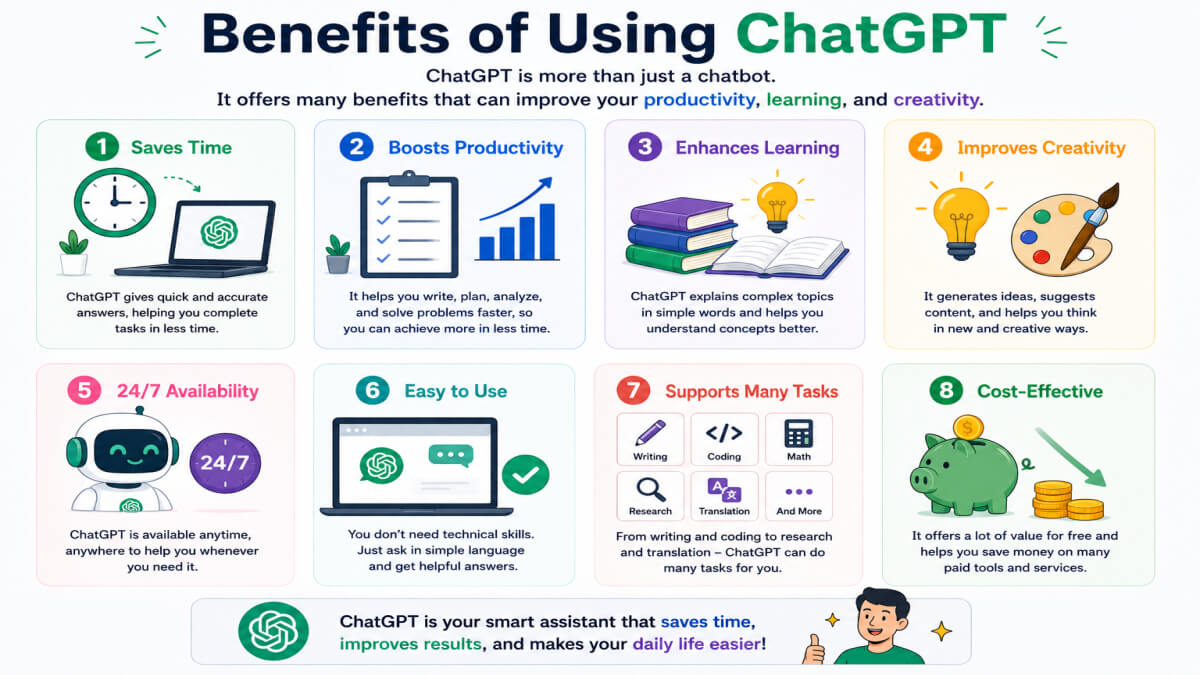
ChatGPT has become one of the most popular AI tools because it makes many daily tasks easier. Whether you want to study, write, code, or manage a business, ChatGPT can help you work faster and smarter. Many people use ChatGPT every day to save time, learn faster, and improve their productivity.

Comparison infographic showing the benefits and limitations of ChatGPT, including saves time, improves productivity, easy to use, available 24/7, supports multiple languages, can make mistakes, may provide outdated information, does not think like humans, and requires fact-checking.

Here are some of the biggest benefits of ChatGPT.


Saves Time

ChatGPT can complete many tasks in just a few seconds. Instead of spending hours searching for information or writing content, you can get a helpful answer quickly.

Example:

You ask:

“Write a 100-word introduction about artificial intelligence.”

ChatGPT creates the introduction in a few seconds.


Improves Productivity

ChatGPT helps you finish more work in less time. It can help you write, learn, organize ideas, and solve problems faster.

Example:

A blogger uses ChatGPT to create a blog outline instead of starting from a blank page. This saves time and increases productivity.


Easy to Use

You do not need any special technical skills to use ChatGPT. Just type your question or request in simple language, and ChatGPT will reply.

Example:

You ask:

“Explain climate change in simple words.”

ChatGPT gives an easy-to-understand answer.


Available 24/7

ChatGPT is available anytime. You can use it during the day or at night whenever you need help.

Example:

A student is studying late at night and needs help with a science question. ChatGPT is ready to answer, even when teachers are not available.


Supports Multiple Languages

ChatGPT can understand and generate text in many languages. This makes it useful for people around the world.

Example:

You ask:

“Translate ‘Thank you’ into French.”

ChatGPT replies:

“Merci.”


In Simple Words

Here are the main benefits of ChatGPT:

  • Saves time on daily tasks
  • Improves productivity
  • Easy for beginners to use
  • Available 24 hours a day, 7 days a week
  • Supports multiple languages

These benefits make ChatGPT a useful AI assistant for students, professionals, businesses, and anyone who wants to work more efficiently.


Limitations of ChatGPT

ChatGPT is a powerful AI tool, but it is not perfect. Sometimes it can make mistakes or give incorrect information. That is why you should always use your own judgment and check important facts before using its answers.

Here are some common limitations of ChatGPT.


Can Make Mistakes

ChatGPT tries to give helpful answers, but it can sometimes be wrong. It may misunderstand your question or provide an incorrect answer.

Example:

You ask:

“Who invented the telephone?”

Sometimes ChatGPT may give an incomplete or incorrect answer. You should check trusted sources to confirm important facts.


May Provide Outdated Information

ChatGPT may not always know the latest news, recent events, or newly released products. Some information may be old.

Example:

You ask:

“What is the newest iPhone model?”

The answer may not include the latest model if ChatGPT does not have the most recent information.


Doesn’t Think Like Humans

ChatGPT can understand language, but it does not have feelings, personal experiences, or common sense like humans.

It gives answers based on patterns in data, not real thinking.

Example:

If you ask for life advice, ChatGPT can give helpful suggestions, but it cannot understand your emotions like a real person.


Requires Fact-Checking

Before using ChatGPT’s answers for school, work, business, or important decisions, you should always verify the information.

Checking trusted websites helps you avoid mistakes.

Example:

If ChatGPT gives medical, legal, or financial information, you should confirm it with reliable sources or a qualified professional.


In Simple Words

ChatGPT has some limitations:

  • It can make mistakes.
  • Some information may be outdated.
  • It does not think or feel like humans.
  • Important information should always be fact-checked.

If you use ChatGPT wisely and verify important details, it can still be a very helpful AI assistant.


Is ChatGPT Free?

Yes, ChatGPT has a free version that anyone can use. It is a good choice for beginners who want to learn about AI and try ChatGPT for everyday tasks.

If you are just getting started with AI, the free version is enough for most everyday tasks.

If you need more advanced features, you can choose the paid version called ChatGPT Plus.

Let’s look at the difference.


Free Version

The free version of ChatGPT lets you ask questions, write content, summarize text, translate languages, and do many other tasks.

It is perfect for students, beginners, bloggers, and anyone who wants to explore AI without paying.

Example:

A student uses the free version to:

  • Learn science topics
  • Solve homework questions
  • Practice English
  • Summarize notes

The free version is enough for many daily tasks.


Paid Version (ChatGPT Plus)

ChatGPT Plus is a paid subscription that gives you access to more advanced AI models and extra features. It is designed for people who use ChatGPT more often or need higher performance.

With ChatGPT Plus, you may get:

  • Faster responses during busy times
  • Access to more advanced AI models
  • Higher usage limits
  • Extra tools and new features as they become available

Example:

A content writer uses ChatGPT Plus every day to write blog posts, create marketing content, and complete work more quickly.


Which One Should Beginners Choose?

If you are new to ChatGPT, the free version is the best place to start. It helps you learn how ChatGPT works and what it can do without spending any money.

You can switch to ChatGPT Plus later if you need advanced features or use ChatGPT for work every day.


In Simple Words

  • Free Version – Best for beginners and everyday use.
  • ChatGPT Plus – Best for people who need advanced features and use ChatGPT regularly.

Start with the free version first. If your needs grow in the future, you can upgrade to ChatGPT Plus.


ChatGPT vs Google

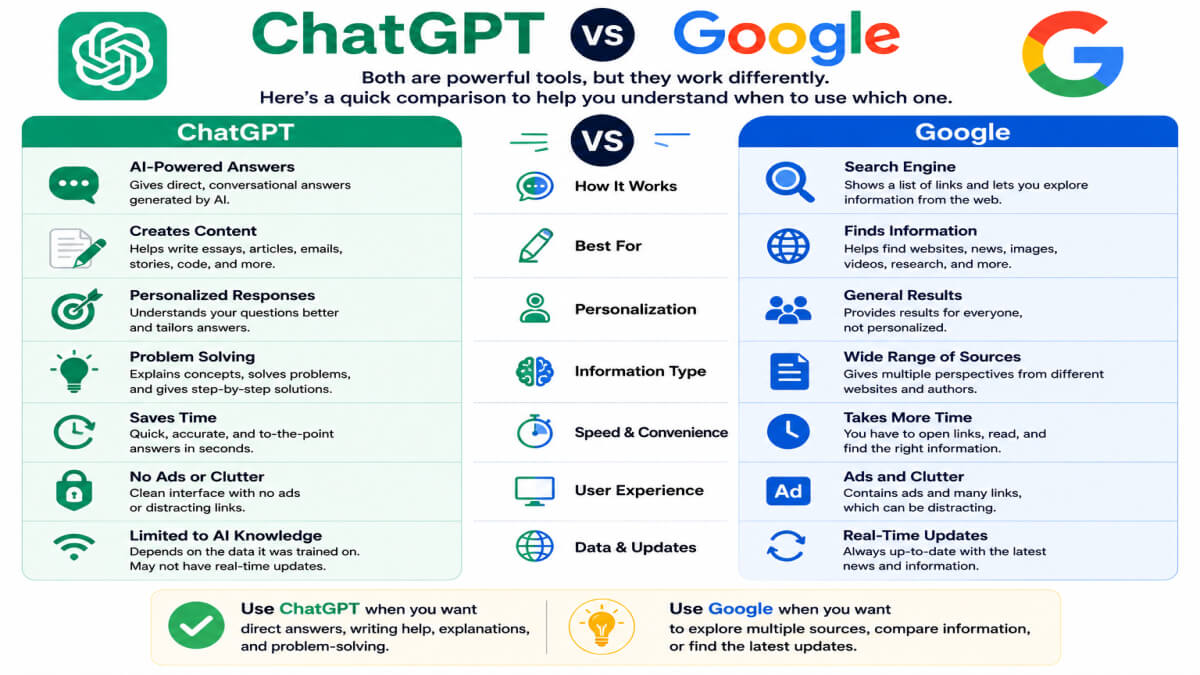
Many people ask, “Is ChatGPT better than Google?” The answer is simple: ChatGPT and Google are different tools. They are made for different purposes, and both are useful.

Many people use ChatGPT and Google together because each tool has a different purpose.

ChatGPT gives direct answers in a conversation, while Google helps you find websites and information from across the internet.

Comparison infographic showing the differences between ChatGPT and Google, including conversational answers, content creation, topic explanations, search results, website discovery, and links to information sources.

Here is a simple comparison.

ChatGPT Google
Gives conversational answers Shows search results
Creates content like articles and emails Helps you find websites
Explains topics in simple words Links to different sources for more information

ChatGPT Gives Conversational Answers

ChatGPT answers your questions like a real conversation. You can also ask follow-up questions without starting over.

Example:

You ask:

“What is artificial intelligence?”

ChatGPT explains the topic in simple words. You can then ask:

“Can you explain it for a 10-year-old?”

It will give an even simpler answer.


Google Shows Search Results

Google does not usually answer every question directly. Instead, it shows a list of websites where you can find the information.

Example:

You search:

“What is artificial intelligence?”

Google displays many websites, articles, videos, and images. You choose which source to open.


ChatGPT Creates Content

ChatGPT can create new content based on your request. It can write blog posts, emails, stories, and social media captions.

Example:

You ask:

“Write a welcome email for new customers.”

ChatGPT writes the email in a few seconds.


Google Helps You Find Websites

Google helps you discover websites where you can read articles, watch videos, compare products, or learn from different sources.

Example:

You search:

“Best AI tools for students.”

Google shows many websites that discuss AI tools.


ChatGPT Explains Topics

ChatGPT can explain difficult topics in simple language. You can even ask it to explain step by step.

Example:

You ask:

“Explain blockchain in simple words.”

ChatGPT gives a beginner-friendly explanation.


Google Links to Sources

Google helps you find information from many trusted websites. This is useful when you want to compare different opinions or verify facts.

Example:

If you search for the latest news, Google shows links from news websites where you can read the full story.


In Simple Words

Both ChatGPT and Google are useful.

  • Use ChatGPT when you want quick explanations, content writing, or help with ideas.
  • Use Google when you want to find websites, compare information, or check the latest news.

Many people use both ChatGPT and Google together to get the best results.


How to Start Using ChatGPT

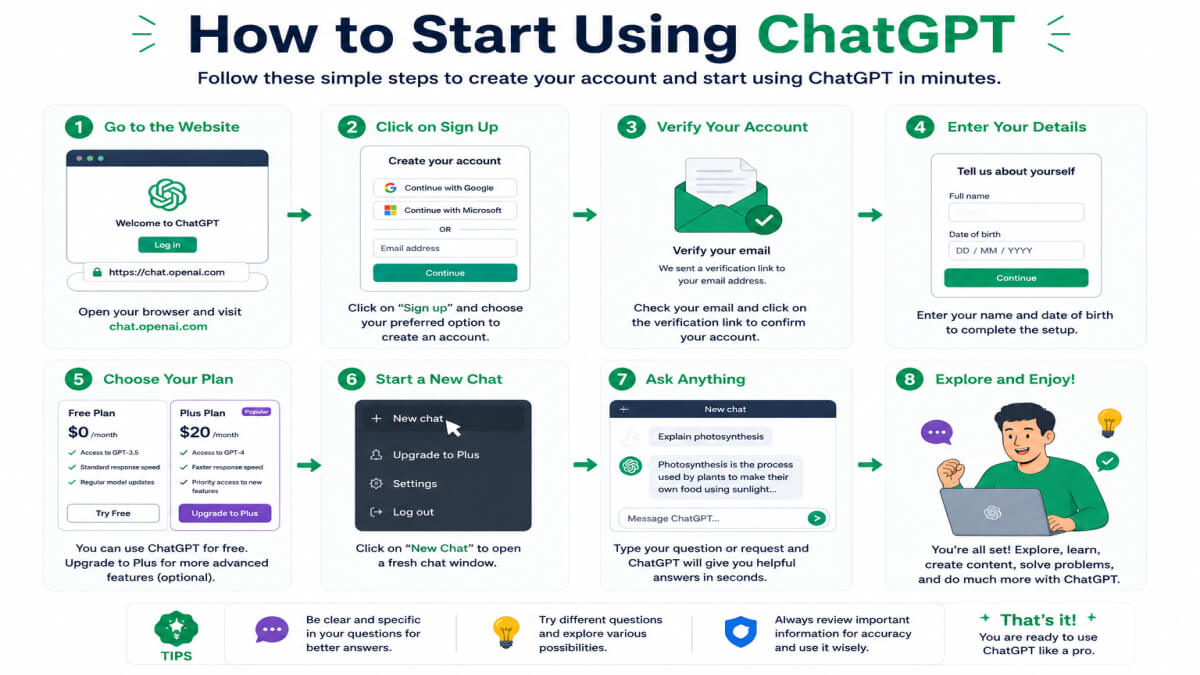
Getting started with ChatGPT is easy. You do not need any special technical skills. Just follow these simple steps to begin using ChatGPT.

Step-by-step infographic showing how to start using ChatGPT by creating an account, writing a prompt, asking follow-up questions, and refining the response.


Create an Account

The first step is to create a ChatGPT account. After signing up, you can log in and start chatting with the AI.

Example:

You create your account, log in, and open the ChatGPT chat page. Now you are ready to ask your first question.


Write a Prompt

A prompt is the message or question that you type into ChatGPT. The more clear and specific your prompt is, the better the answer will be.

Example:

Instead of asking:

“Tell me about AI.”

Ask:

“Explain artificial intelligence in simple words for beginners.”

The second prompt gives a clearer and more useful answer.


Ask Follow-Up Questions

If you need more details, you can ask another question. ChatGPT remembers the conversation and can continue helping you.

Example:

First, you ask:

“What is ChatGPT?”

Then you ask:

“Can you explain it with a real-life example?”

ChatGPT continues the conversation and gives a more detailed answer.


Refine the Response

If you are not happy with the first answer, you can ask ChatGPT to improve or change it.

You can request a shorter answer, a longer explanation, or a simpler version.

Example:

You ask:

“Make this article easier to understand.”

Or:

“Write this email in a more professional tone.”

ChatGPT updates the response based on your request.


In Simple Words

You can start using ChatGPT in four easy steps:

  1. Create your account.
  2. Write a clear prompt.
  3. Ask follow-up questions.
  4. Refine the response until you are satisfied.

The better your prompt, the better your results will be.


Tips for Getting Better Answers

The quality of ChatGPT’s answer depends on the quality of your prompt. If you write a clear and detailed prompt, ChatGPT can give a more helpful response.

Here are some simple tips to get better answers from ChatGPT.


Be Specific

Try to ask clear and specific questions. Avoid very short or confusing prompts.

Example:

Instead of asking:

“Write an article.”

Ask:

“Write a 500-word article about the benefits of artificial intelligence for students.”

The second prompt gives a much better answer.


Give Context

Tell ChatGPT why you need the answer or who it is for. This helps ChatGPT understand your request better.

Example:

You ask:

“Explain climate change for a Class 8 student.”

ChatGPT will use simple words that are suitable for a young student.


Ask Follow-Up Questions

If you need more details, do not stop after the first answer. Ask another question to continue the conversation.

Example:

First, you ask:

“What is machine learning?”

Then you ask:

“Can you explain it with a real-life example?”

ChatGPT gives a more detailed and easy-to-understand explanation.


Use Examples

If you want a practical answer, ask ChatGPT to include examples.

Examples make difficult topics easier to understand.

Example:

You ask:

“Explain digital marketing with a simple example.”

ChatGPT explains the topic and gives a real-life example to make it clear.


In Simple Words

To get better answers from ChatGPT:

  • Be specific.
  • Give enough context.
  • Ask follow-up questions.
  • Request examples whenever possible.

These simple tips will help you get more accurate, useful, and easy-to-understand answers.


Frequently Asked Questions (FAQs)

1. What is ChatGPT in simple words?

ChatGPT is an AI chatbot that can answer questions, write content, explain topics, and help with many daily tasks. You can chat with it just like you chat with a person.

Example:

You ask:

“Explain the solar system.”

ChatGPT gives a simple explanation in easy English.


2. How does ChatGPT work?

ChatGPT works by understanding your prompt and generating a response using Artificial Intelligence (AI). It predicts the most suitable words to create a helpful answer.

Example:

You ask:

“Write a thank-you email.”

ChatGPT creates a complete email in a few seconds.


3. Is ChatGPT free?

Yes, ChatGPT has a free version that anyone can use. There is also a paid version called ChatGPT Plus, which offers more advanced features.

Example:

A student can use the free version to learn new topics and complete homework.


4. Who Owns ChatGPT?

ChatGPT was developed by OpenAI, an AI research and technology company. OpenAI created ChatGPT to help people use Artificial Intelligence in a simple and useful way.

Example:

Millions of people around the world use ChatGPT for learning, writing, and work.


5. Can ChatGPT Replace Google?

No. ChatGPT and Google have different purposes.

ChatGPT helps you write content and explains topics in a conversation. Google helps you find websites, news, and information from different sources.

Example:

Use ChatGPT to write an email.

Use Google to find the official website of a company.


6. Is ChatGPT Safe?

ChatGPT is generally safe to use for learning, writing, and everyday tasks. However, you should not share personal, private, or sensitive information while using it.

Example:

Do not share your passwords, bank details, or personal identification numbers in ChatGPT.


7. Can ChatGPT Write Essays?

Yes. ChatGPT can write essays, blog posts, reports, stories, emails, and many other types of content.

You can also ask it to write in a simple, professional, or creative style.

Example:

You ask:

“Write a 500-word essay about climate change.”

ChatGPT creates a well-structured essay.


8. Can ChatGPT Make Mistakes?

Yes. ChatGPT can sometimes make mistakes or provide incorrect information. You should always check important facts before using them.

Example:

If ChatGPT gives medical or financial advice, verify the information using trusted sources or a qualified professional.


In Simple Words

Here are the answers to the most common questions about ChatGPT:

  • ChatGPT is an AI chatbot.
  • It works by understanding your prompt.
  • It has both free and paid versions.
  • It was created by OpenAI.
  • It does not replace Google.
  • It is generally safe when used responsibly.
  • It can write many types of content.
  • It can sometimes make mistakes, so always fact-check important information.

Conclusion

Now you know what ChatGPT is, how it works, its benefits, limitations, and how to use it effectively. Whether you are a student, blogger, freelancer, or business owner, ChatGPT can help you learn faster, save time, and improve your daily work.

The best way to learn ChatGPT is to start using it. Try asking simple questions, experiment with different prompts, and practice every day. The more you use it, the better your results will be.

The more you practice writing prompts, the better your results will become. Learning about AI today can help you in your studies, career, and business in the future.

At UseAiLearn, we publish simple AI guides to help beginners learn new AI skills. Keep exploring our articles and start practicing with ChatGPT today. The more you practice, the more confident you will become.

Leave a Comment

Your email address will not be published. Required fields are marked *

Scroll to Top