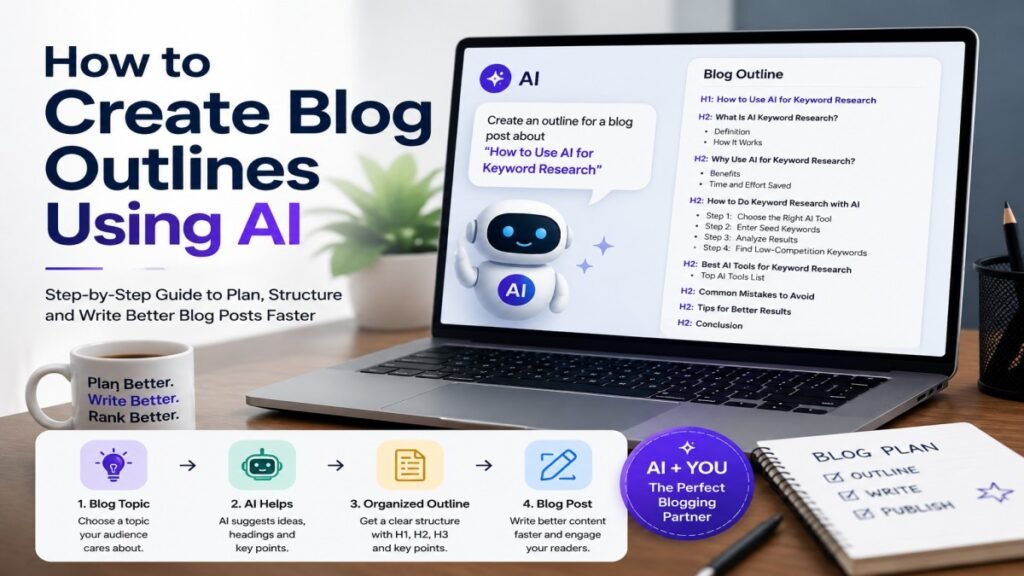
Have you ever had a good blog topic but did not know what to write first? You may know the topic, but choosing the right headings, arranging them in the right order, and covering your readers’ questions can still be difficult. A clear blog outline can make this process much easier.
Today, AI tools can help you create a blog outline using AI in just a few minutes. They can suggest headings, subheadings, important questions, and ideas to cover. But you should not copy an AI-generated outline and use it without checking it. You should review it, remove unnecessary points, and add your own ideas and experience.
When I started using AI for blog planning, I noticed that giving AI only a topic often produced a very general outline. Adding the target reader, keyword, and search intent gave me a much more useful starting point.
In this guide, UseAiLearn will show you how to create blog outlines using AI step by step. You will learn how to give AI the right information, create a useful outline, improve it for SEO, and avoid common mistakes. By the end, you will know how to use AI as a helpful blogging assistant instead of depending on it completely.
What Is a Blog Outline?
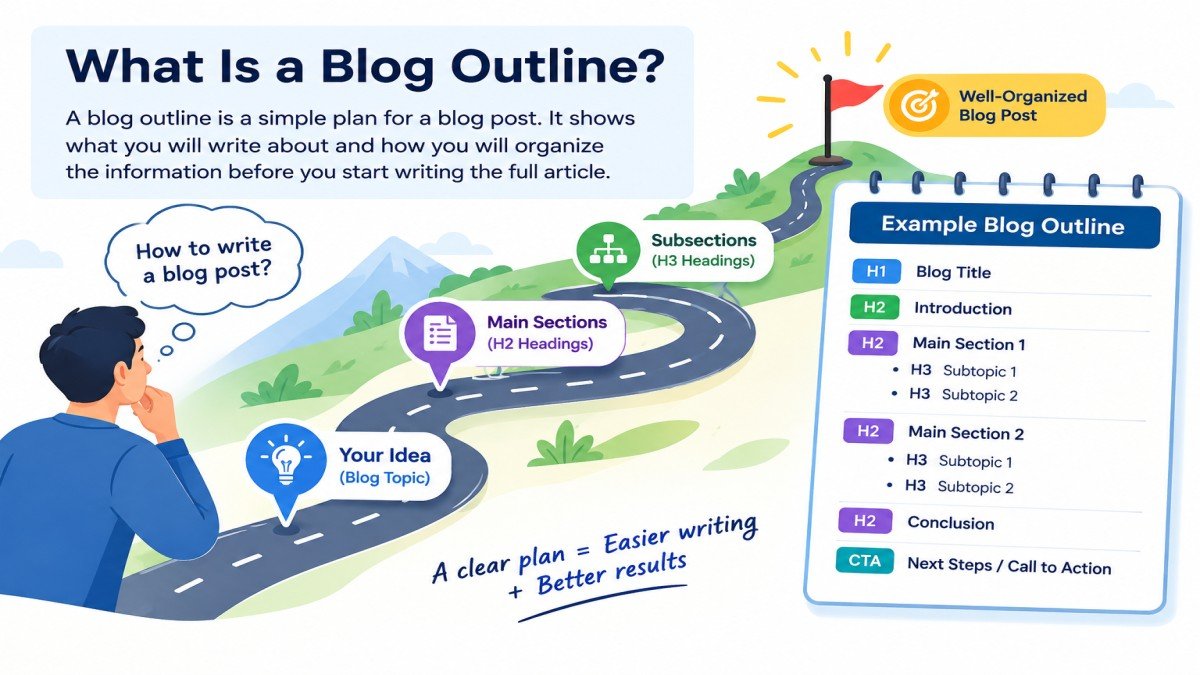
A blog outline is a simple plan for a blog post. It shows what you will write about and how you will organize the information before you start writing the full article.
Think of an outline as a roadmap for your blog post. It helps you decide which topics to cover, what order to follow, and what information your readers need.
For example, if you want to write a blog post about “How to Use AI for Keyword Research,” your outline might look like this:
- Introduction
- What Is AI Keyword Research?
- Why Use AI for Keyword Research?
- How to Do Keyword Research With AI
- Common Mistakes
- Tips for Better Results
- FAQ
- Conclusion
You do not need to write the full paragraphs at this stage. You only need to plan the main sections and important points.
What Does a Blog Outline Include?
A blog outline can include different parts depending on the topic and length of your article. A useful outline usually includes:
- Blog title: Tells readers what the article is about.
- Introduction: Explains the topic and gives readers a reason to continue.
- H2 sections: Cover the main parts of the topic.
- H3 subsections: Break larger sections into smaller and easier points.
- Key points: Show the important information you want to explain.
- Examples: Help readers understand difficult ideas through real or simple examples.
- Conclusion: Summarizes the main idea and gives readers clear next steps.
- CTA: Encourages readers to take a useful action, such as trying a tool or reading another article.
For example, an outline for “How to Create Blog Outlines Using AI” could start like this:
H1: How to Create Blog Outlines Using AI
Introduction
H2: What Is a Blog Outline?
- Simple definition
- Example
- Benefits of using an outline
H2: How to Create a Blog Outline Using AI
- Choose a topic
- Give AI the right information
- Generate the first outline
- Review and improve it
This gives you a clear structure before you begin writing the article.
Why Should You Create an Outline Before Writing?
Creating an outline before writing can make the whole writing process easier.
Better organization: An outline helps you put your ideas in a logical order. Readers can then follow your article without getting confused.
Easier writing: Instead of staring at a blank page, you already know what to write in each section.
Less repetition: An outline helps you see similar points before writing. You can combine or remove them instead of explaining the same idea multiple times.
Better coverage of the topic: Planning your sections makes it easier to notice important questions or subtopics that your readers may expect you to cover.
Easier SEO planning: You can decide where relevant keywords, questions, and related topics should fit naturally into the article. This helps you create content that is useful for both readers and search engines.
For example, without an outline, you may explain AI keyword research in the introduction and then explain almost the same thing again in a later section. With a clear outline, you can decide where the detailed explanation belongs and keep other sections focused.
In short, a blog outline gives your article a clear direction before you start writing. It saves time, improves organization, and helps you create a more useful reading experience.
Can AI Create a Blog Outline?
Yes, AI can create a blog outline quickly. It can help you plan the main sections, organize ideas, and find useful questions to answer. This can save time, especially when you are not sure where to start.
However, an AI-generated outline is a starting point, not a finished plan. You still need to check it and make changes based on your topic, audience, and experience.
What Can AI Do When Creating a Blog Outline?
AI can help with many parts of the planning process.
Suggest headings: AI can suggest relevant H2 and H3 headings based on your topic.
For example, if your topic is “How to Use AI for Blogging,” AI may suggest headings such as:
H2: What Is AI Blogging?
H3: How Can AI Help Bloggers?
H2: How to Use AI for Blog Writing
H2: Common AI Blogging Mistakes
Organize subtopics: AI can arrange related ideas into logical sections. This can help your article flow from basic information to more advanced points.
Find questions to cover: AI can suggest questions that beginners may ask about your topic.
For example:
- Can beginners use AI for blogging?
- Which AI tools are useful for bloggers?
- Should I edit AI-generated content?
Suggest examples: AI can suggest simple examples to make difficult ideas easier to understand. You can then replace or improve these examples with your own real examples when possible.
Help identify missing sections: AI can review an outline and suggest topics or questions that you may have forgotten.
Adapt an outline for a specific audience: You can tell AI who your readers are. For example, an outline for beginners may need simple explanations, while an outline for experienced bloggers can focus more on advanced SEO and content strategy.
What Can AI Not Reliably Decide on Its Own?
AI is useful for brainstorming, but it does not know your goals and experience as well as you do. You should not assume that every suggestion is correct or necessary.
Your unique angle: AI may give you a common outline that looks similar to many other articles. You need to decide what makes your article different and more useful.
Your real experience: AI does not have your personal blogging experience. If you have tested a tool, faced a problem, or found a useful method, you should add that information yourself.
Whether every suggestion is useful: AI may suggest sections that sound good but do not really help your readers. Remove anything that is unnecessary or repeated.
Whether facts are accurate: AI can sometimes provide incorrect, outdated, or incomplete information. Important facts, tool features, prices, and other changing information should be checked before you use them.
Whether the outline matches your audience: AI can suggest a general structure, but you know your readers better. A beginner audience may need more basic explanations and examples than an experienced audience.
Why Human Review Still Matters
The best approach is to use AI as a planning assistant, not as a replacement for your own judgment.
For example, AI might create ten H2 headings for your topic. After reviewing them, you may find that three headings repeat the same idea and two are not useful for your readers. You can remove those sections and add a practical example from your own experience.
This human review makes the outline more focused, useful, and relevant. It also gives you a chance to add original insights and real experience instead of relying only on generic AI suggestions.
So, AI can build the first version of your blog outline, but you should make the final decisions.
What Information Should You Give AI Before Creating a Blog Outline?
The quality of an AI-generated outline often depends on the information you give the AI. If you only provide a topic, the result may be too general. But when you give AI clear details about your topic, readers, keywords, and goals, it can create a much more useful starting outline.
Before asking AI to create your outline, give it the following information.
1. Give AI Your Topic
Start with a clear and specific topic. Avoid using a topic that is too broad.
Example:
Topic: How to Create Study Notes Using AI
This tells AI exactly what the article should focus on.
A weak topic like “AI for Students” is much broader. It could lead to an outline about AI tools, homework, exams, research, study notes, and many other things.
2. Add Your Primary Keyword
Give AI the main keyword you want to target.
Example:
Primary keyword: create study notes using AI
This helps AI understand the main search topic and keep the outline focused.
Choose a keyword that matches what your article actually helps the reader accomplish.
You do not need to ask AI to put the exact keyword in every heading. It should appear naturally where it makes sense.
3. Add Secondary Keywords
Add a few related keywords that support the main topic.
Example:
Secondary keywords:
- AI study notes
- AI note-taking tools
- how to make notes with AI
- study notes using ChatGPT
Related terms are useful for covering the topic naturally, but you don’t need to force a fixed number of secondary keywords into the article.
These related terms give AI a better understanding of the different parts of the topic. They can also help you cover related questions without forcing the same keyword throughout the article.
4. Define Your Target Audience
Tell AI who will read the article. This helps it choose the right level of explanation, examples, and language.
Example:
Target audience: Beginners and college students who have never used AI for studying.
For this audience, you may want simple explanations and step-by-step instructions. An article for experienced AI users would need a different approach.
5. Tell AI the Search Intent
Tell AI what the reader wants to achieve by searching for the topic.
Example:
Search intent: Informational and how-to
For this type of search, the outline should focus on explaining the topic and showing readers how to do it.
You can also give AI a more specific instruction, such as:
The reader wants to learn how to create useful study notes with AI and wants simple steps and examples.
This gives AI more context than simply writing “informational.”
6. Add Your Content Requirements
Finally, tell AI how you want the article to be structured.
For example:
Content requirements:
- Use simple English.
- Use clear H2 and H3 headings.
- Add practical examples.
- Include common mistakes.
- Add useful FAQs.
- Avoid repeated information.
- Do not add unnecessary sections.
You can also tell AI the approximate article length or ask it to focus on beginner-friendly explanations.
A Simple Input You Can Give AI
You can combine all the information into one instruction:
Topic: How to Create Study Notes Using AI
Primary keyword: create study notes using AI
Secondary keywords: AI study notes, AI note-taking tools, how to make notes with AI
Target audience: Beginners and college students
Search intent: Informational and how-to
Requirements: Simple English, clear H2/H3 headings, practical examples, common mistakes, FAQs, and no unnecessary sections.
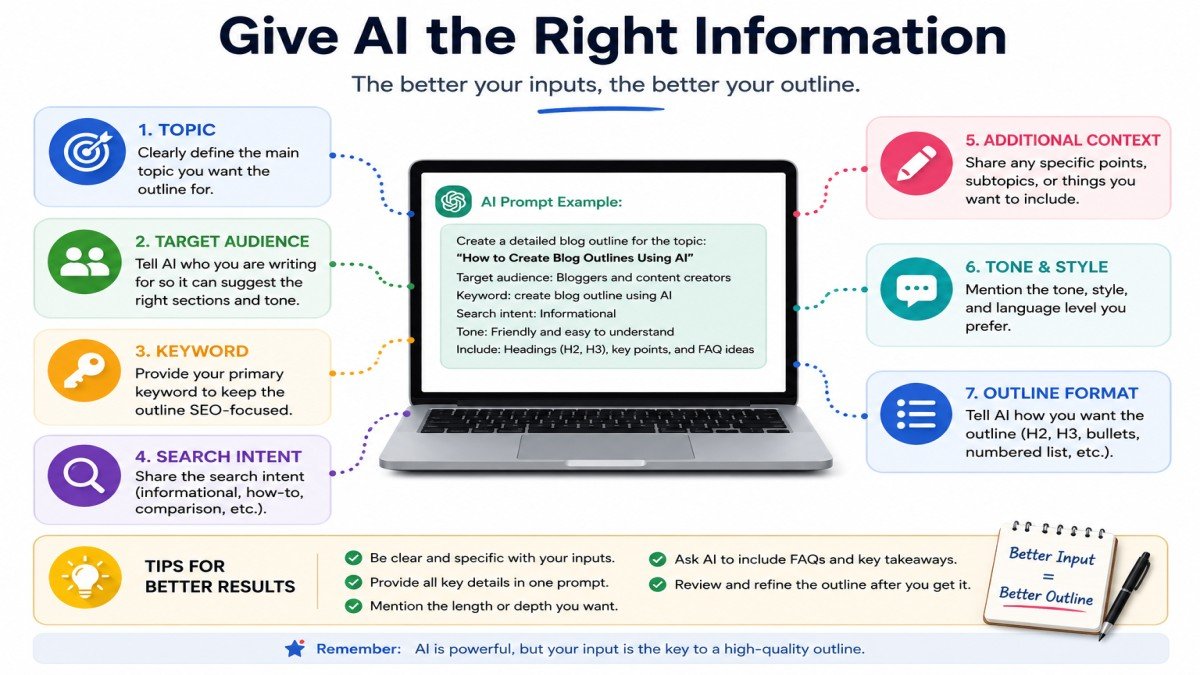
Giving AI this information before creating the outline makes your instructions clearer and gives it a better starting point. You can then review the result and adjust it to fit your readers and your own content goals.
How to Create a Blog Outline Using AI
Now that you know what information AI needs, you can use it to create a useful first outline. The process is simple, but the quality of the result depends on how clearly you plan your content and review the AI’s suggestions.
Follow these steps to create a blog outline using AI.
Step 1: Choose Your Blog Topic
Start with a clear and specific topic. A broad topic can give you an outline that covers too many unrelated ideas.
For example:
❌ AI
This is too broad. Your article could be about AI tools, AI images, AI writing, AI for students, or many other topics.
✅ How to Use AI to Write Blog Posts
This is more specific. It gives you a clear direction for the article.
A good topic should tell you what the reader will learn from the post.
Step 2: Find the Primary Keyword
Choose a primary keyword that closely matches the main topic of your article.
For example:
Topic: How to Use AI to Write Blog Posts
Primary keyword: AI blog writing
The keyword should describe what the article is actually about. Do not choose a popular keyword just because it has search traffic if it does not match your content.
You can also prepare a few related keywords before asking AI to create the outline. This gives AI more context about the topic.
Step 3: Understand the Search Intent
Before creating the outline, think about what the reader wants to do after searching for your topic.
There are four common types of search intent:
- Informational: The reader wants to learn something.
- Commercial: The reader wants to compare products, tools, or services before making a decision.
- Navigational: The reader wants to find a specific website or page.
- Transactional: The reader is ready to take an action, such as buying or signing up.
For this article, the main intent is informational and how-to because the reader wants to learn how to create a blog outline with AI.
Understanding this intent helps you avoid adding sections that do not answer the reader’s main question.
Step 4: Ask AI to Create the First Outline
Now give AI the information you prepared and ask it to create a first draft of your outline.
Your prompt can ask for:
- H1 title
- H2 headings
- H3 subheadings
- Search intent
- Primary keyword
- Secondary keywords
- Target audience
- FAQs
- Practical examples
- Missing subtopics
Here is a copy-ready prompt you can use:
Create a detailed blog outline for the topic “[Your Topic].”
Primary keyword: [Primary Keyword]
Secondary keywords: [Secondary Keywords]
Target audience: [Your Audience]
Search intent: [Search Intent]Create a clear H1, H2, and H3 structure. Cover the main questions a reader may have about this topic. Include useful examples, FAQs, and important subtopics that may be missing from my plan.
Keep the outline beginner-friendly and avoid repeated or unnecessary sections. Make sure the structure follows the search intent and uses keywords naturally.
For example, if your topic is “How to Use AI to Write Blog Posts,” AI may suggest an outline like:
H1: How to Use AI to Write Blog Posts
H2: What Is AI Blog Writing?
H2: How AI Can Help With Blog Writing
H2: How to Write a Blog Post Using AI
H3: Choose a Topic
H3: Create an Outline
H3: Generate a First Draft
H3: Edit and Improve the Draft
H2: Common AI Blog Writing Mistakes
H2: FAQ
H2: Conclusion
This is only a first version. Do not start writing the full article immediately.
Step 5: Review the AI-Generated Outline
Take a few minutes to review the outline before using it.
Ask yourself:
- Is anything important missing?
- Are any sections saying almost the same thing?
- Do the headings follow a logical order?
- Does each section answer a different question?
- Does the outline match the search intent?
- Are keywords being forced into headings?
- Is the outline longer than necessary?
For example, AI may suggest both “Benefits of AI Blog Writing” and “How AI Helps Bloggers.” If both sections contain almost the same information, you can combine them.
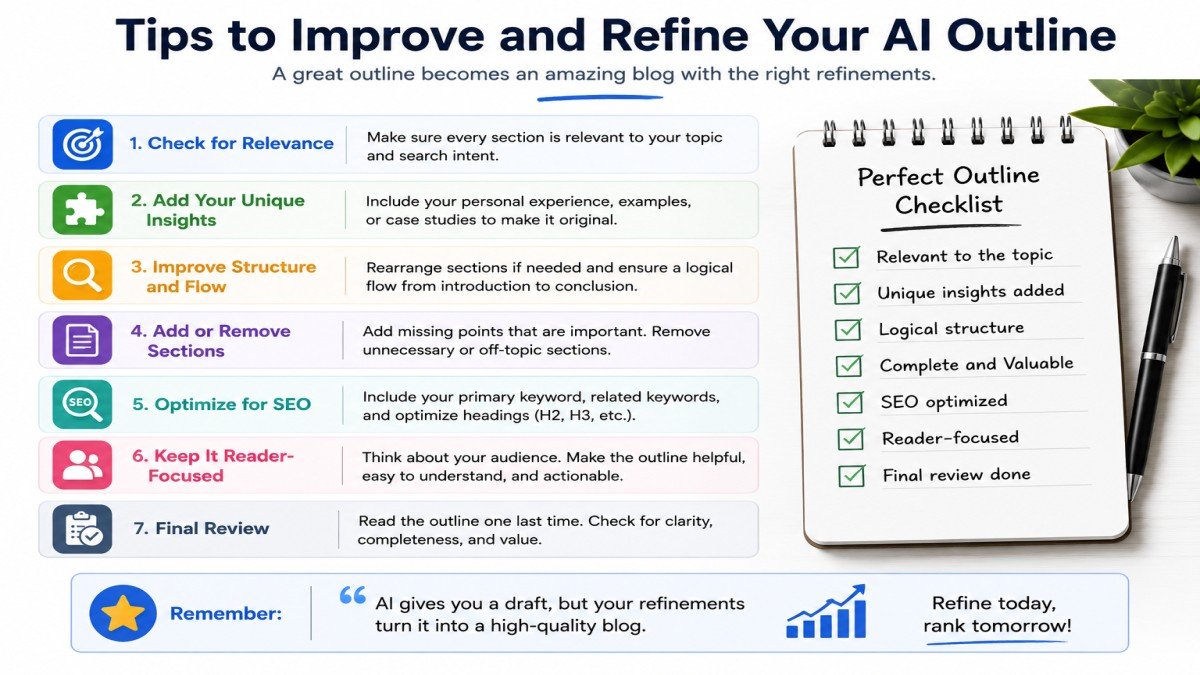
This review step helps you turn a general AI suggestion into a focused outline for your actual readers.
Step 6: Improve the Outline With a Second AI Prompt
You do not have to accept the first outline as your final version. You can give the outline back to AI and ask it to improve the structure.
For example:
Review this blog outline. Remove repeated sections, identify important missing topics, improve the order of the headings, and make sure each section answers a different reader question. Keep only useful sections and do not add filler.
After AI gives you the revised version, review it again.
The goal is not to make the outline longer. The goal is to make it clearer, more complete, and more useful.
Step 7: Add Your Own Experience and Examples
Finally, add information that AI cannot provide from your personal experience.
Depending on your topic, you can include:
- Personal experience
- Original examples
- Screenshots
- Real workflows
- Practical tips
- Updated information
- Lessons you learned while using a tool
For example, if you have used an AI writing tool to create a blog outline, you can explain what worked well, what did not work, and how you changed the AI-generated result.
This makes the content more useful and gives readers something beyond a general AI-generated outline.
The final outline should therefore be a mix of AI assistance and human judgment. AI can help you start faster, while you decide what is actually worth including.
Best AI Tools for Creating Blog Outlines
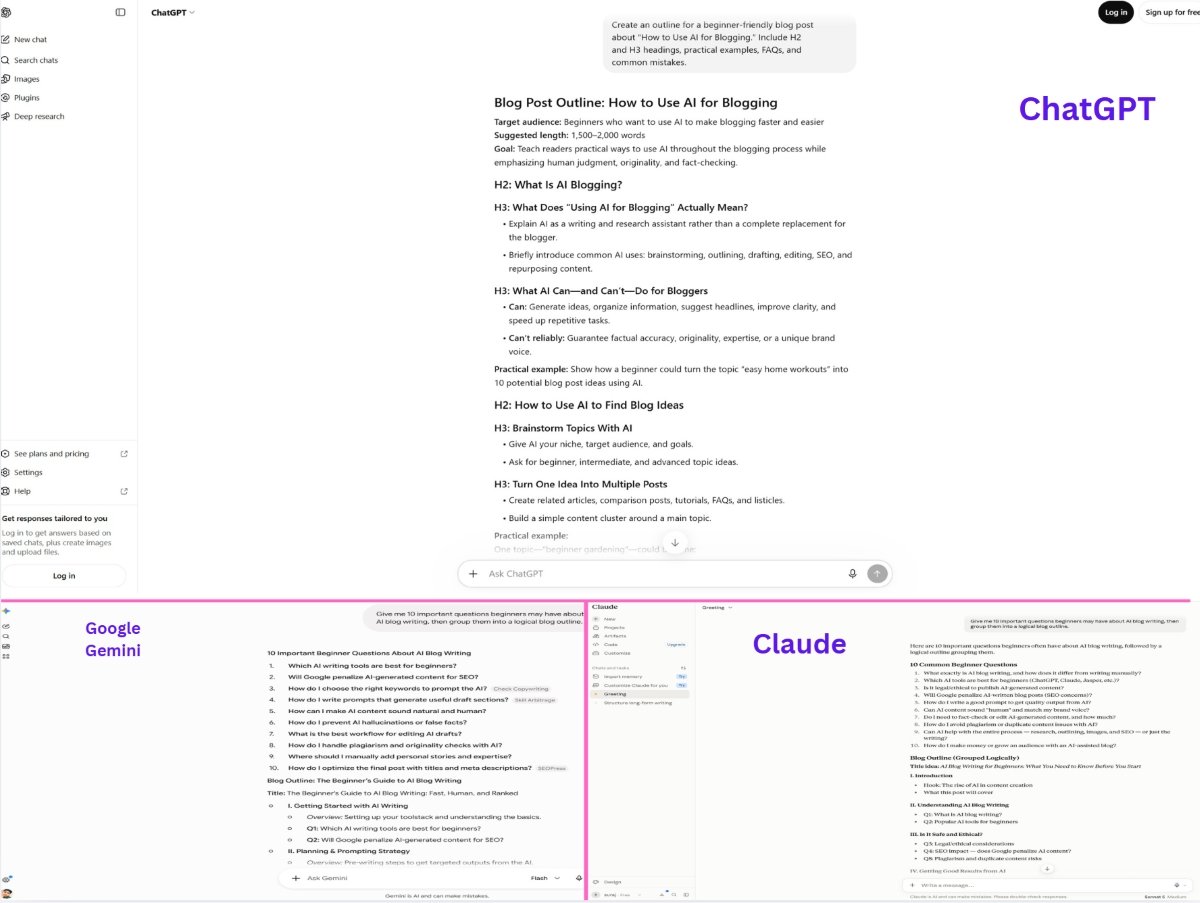
You do not need a special AI tool just to create a blog outline. General AI assistants can also help you brainstorm topics, organize ideas, and create a first outline. The best choice depends on how much control and detail you want.
Here are some useful options:
| AI Tool | Best For |
|---|---|
| ChatGPT | Custom outlines and detailed prompts |
| Google Gemini | Brainstorming and topic planning |
| Claude | Detailed content structures |
| HubSpot AI | Creating and refining blog outlines |
| AI outline generators | Quick first drafts |
ChatGPT
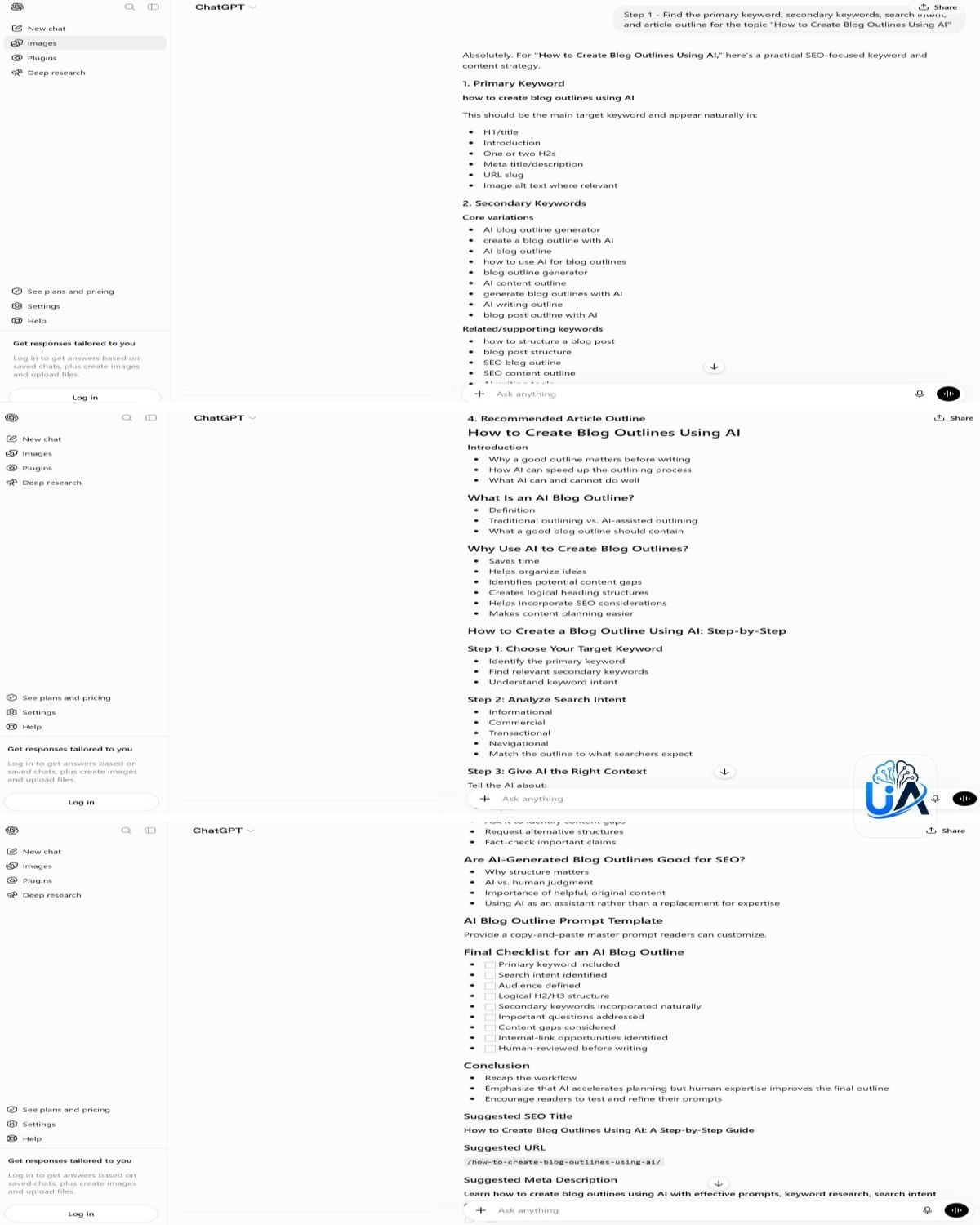
ChatGPT is a good choice if you want to create a custom outline with detailed instructions. You can provide your topic, keywords, audience, and content requirements, then ask it to organize the information into H2 and H3 headings.
For example, you can ask:
Create an outline for a beginner-friendly blog post about “How to Use AI for Blogging.” Include H2 and H3 headings, practical examples, FAQs, and common mistakes.
ChatGPT can also help you review and improve the outline instead of stopping after the first result. OpenAI recommends treating AI output as something to review and refine rather than as a final authority.
Google Gemini
Google Gemini can be useful for brainstorming and planning content. You can give it a topic and explain your audience and desired structure.
For example:
Give me 10 important questions beginners may have about AI blog writing, then group them into a logical blog outline.
Google’s current Gemini guidance also recommends giving the AI clear instructions, relevant context, and a specific format to get more useful results.
Claude
Claude can be another option when you want to work on a detailed content structure. You can give it a topic, audience, keywords, and instructions, then ask it to organize the ideas into sections.
For example, you could ask it to create an outline for a long beginner guide and identify sections that may be missing.
The important thing is not which tool creates the longest outline. A shorter outline with clear and useful sections is often better.
HubSpot AI
HubSpot’s AI content tools can help with blog planning and outline refinement. Its current Content Hub materials describe an AI blog post workflow that can generate topics, titles, targeted keywords, and refine a blog outline before the final content is created.
For example, a blogger can start with a topic and keyword, review the suggested structure, and refine it before moving to the full article.
AI Blog Outline Generators
There are also dedicated AI outline generators. These tools are mainly useful when you want a quick first draft of your article structure.
For example, you might enter:
Topic: How to Create Blog Outlines Using AI
The tool may return a list of headings and subheadings that you can edit.
These tools can save time, but you should still review the result. A dedicated generator may not fully understand your unique audience, experience, or content goals.
Which AI Tool Should You Choose?
There is no single best tool for every blogger.
If you want more control over prompts and structure, ChatGPT or Gemini can be good choices. If you want to work with a detailed content structure, Claude may be useful. If you want a more blog-focused workflow, HubSpot’s AI tools are another option.
You can also test more than one tool with the same topic and compare the outlines. But remember that the quality of the final article depends more on your instructions, review, and original input than on simply choosing a particular AI tool.
Features, pricing, and free-plan limits can change over time, so check the official website of a tool before relying on a specific feature or plan.
How to Create an SEO-Friendly Blog Outline With AI
A good blog outline can help you plan content that is easier for readers to follow and easier to optimize for search engines. AI can help you organize keywords, questions, and headings, but the final structure should always focus on the reader.
The goal is not to put a keyword in every heading. The goal is to cover the topic clearly and naturally.
Include the Primary Keyword Naturally
Your primary keyword should clearly connect with the main topic of your article.
For example, if your primary keyword is “how to create a blog outline using AI,” you could use it naturally in the title and in a relevant heading.
Example:
H1: How to Create a Blog Outline Using AI
You do not need to repeat the exact phrase in every H2 and H3. Use it only where it fits naturally.
Use Secondary and Related Keywords
Secondary and related keywords can help you cover different parts of the main topic.
For example, an article about creating blog outlines with AI might naturally use terms such as:
- AI blog outline
- blog outline generator
- AI content planning
- SEO blog outline
- H2 and H3 headings
- search intent
Instead of forcing these terms into headings, use them where they make sense in the content.
For example:
H2: How AI Can Help With Content Planning
This heading can cover related ideas without repeating the primary keyword.
Match Headings With Search Intent
Your headings should help answer the questions behind the reader’s search.
For example, someone searching “how to create a blog outline using AI” probably wants practical steps.
A useful structure might be:
- What Is a Blog Outline?
- What Information Should You Give AI?
- How to Create an Outline Using AI
- How to Improve an AI-Generated Outline
- Common Mistakes
This structure follows a clear learning path instead of adding unrelated SEO sections.
Cover Related User Questions
Think about the questions a reader may have before, during, and after using your method.
For this topic, readers may ask:
- Can AI create a complete blog outline?
- Which AI tools can create outlines?
- What prompt should I use?
- How do I make an outline SEO-friendly?
- Should I edit an AI-generated outline?
You can use these questions as headings when they deserve a full explanation, or answer them briefly inside a relevant section.
This helps you cover the topic more completely without adding unnecessary sections.
Use a Clear H2 and H3 Structure
Use H2 headings for the main sections and H3 headings for related points under them.
For example:
H2: How to Create a Blog Outline Using AI
H3: Choose Your Topic
H3: Find the Primary Keyword
H3: Ask AI to Create the First Outline
This makes the article easier to scan and helps readers quickly find the information they need.
Plan Internal Links Before Writing
While creating your outline, look for places where another useful article from your website could help the reader.
For example, if your article discusses keywords, you might plan an internal link to a related guide about keyword research using AI tools.
You do not need to add links everywhere. Only link when the other article gives the reader useful information that supports the current section.
For UseAiLearn, you could create a simple note in your outline:
Internal link: Link to the related AI keyword research guide when discussing primary and secondary keywords.
Planning these links early can make the final article easier to organize.
Include FAQ Questions
Add useful questions that readers may still have after reading the main sections.
For example:
- Can ChatGPT create an SEO-friendly blog outline?
- How many headings should a blog outline have?
- Should AI-generated outlines be edited?
- Can an AI outline help improve blog SEO?
Choose questions that are genuinely relevant to the topic. Do not add FAQs only to include more keywords.
Focus on Topic Coverage, Not Keyword Repetition
A strong SEO outline helps you cover the important parts of a topic. It does not require the same keyword to appear in every heading.
For example, these headings would feel unnatural:
- How to Create a Blog Outline Using AI
- Benefits of Creating a Blog Outline Using AI
- Tips for Creating a Blog Outline Using AI
- Mistakes When Creating a Blog Outline Using AI
A better structure uses natural variations:
- What Is a Blog Outline?
- Why Use AI for Blog Planning?
- How to Create an Outline With AI
- Common Mistakes to Avoid
This approach keeps the outline readable while still giving search engines clear information about the topic.
Example: Creating a Blog Outline With AI
The easiest way to understand this process is to see a real example. Let’s say you want to write a beginner-friendly article about using AI for keyword research.
The goal is not to accept whatever outline AI gives you. Instead, you use the AI outline as a starting point and then improve it based on your readers and the purpose of your article.
Blog Topic
Topic: How to Use AI for Keyword Research
Suppose your target readers are beginner bloggers who know little about keyword research and want to use AI tools to find useful keywords.
Information Given to AI
Before creating the outline, you give AI some basic information:
Topic: How to Use AI for Keyword Research
Primary keyword: AI keyword research
Secondary keywords:
- keyword research using AI
- AI keyword research tools
- find keywords with AI
- AI SEO tools
Target audience: Beginner bloggers and website owners
Search intent: Informational and how-to
You can also add a simple instruction:
Create a beginner-friendly blog outline that explains how to use AI for keyword research. Include practical steps, examples, common mistakes, useful tools, and FAQs. Avoid repeated or unnecessary sections.
AI-Generated Outline
AI might create an outline like this:
H1: How to Use AI for Keyword Research
H2: What Is Keyword Research?
H2: What Is AI Keyword Research?
H2: Benefits of AI Keyword Research
H2: Best AI Keyword Research Tools
H2: How to Use AI for Keyword Research
H3: Find Keyword Ideas
H3: Analyze Search Intent
H3: Find Long-Tail Keywords
H2: AI Keyword Research Tips
H2: Common Mistakes
H2: FAQ
H2: Conclusion
This is a reasonable starting point, but it may not be the best final outline.
For example, “What Is Keyword Research?” and “What Is AI Keyword Research?” could overlap. The outline also has a separate “AI Keyword Research Tips” section that may repeat ideas from the main step-by-step section.
Improved Final Outline
After reviewing the AI version, you can make it more focused:
H1: How to Use AI for Keyword Research
Introduction
H2: What Is AI Keyword Research?
- Simple explanation
- How it differs from traditional keyword research
H2: Why Use AI for Keyword Research?
- Faster brainstorming
- Finding related topics
- Understanding search intent
H2: How to Use AI for Keyword Research
H3: Find Keyword Ideas
H3: Find Long-Tail Keywords
H3: Group Related Keywords
H3: Understand Search Intent
H3: Review and Select the Best Keywords
H2: Best AI Tools for Keyword Research
H2: Common AI Keyword Research Mistakes
H2: Frequently Asked Questions
H2: Conclusion
The improved version removes overlapping sections and gives the main step-by-step process more space.
Notice that you do not need to repeat every related keyword in the headings. The keywords can be used naturally throughout the relevant sections.
What Changed From the AI Version?
The AI outline was useful, but the human review made it more focused.
For example:
- Two similar definition sections were combined.
- The main process was divided into clear steps.
- Repeated tips were removed.
- Related keyword ideas were grouped into one useful section.
- The structure was kept focused on the reader’s main goal.
This is why you should treat an AI-generated outline as a first draft. The final outline should reflect what your readers actually need, not simply everything the AI suggests.
Common Mistakes When Using AI to Create Blog Outlines
AI can make blog planning faster, but it does not automatically create the perfect outline. Many beginners make simple mistakes when they depend too much on the first AI result.
Here are some common mistakes to avoid.
Giving AI Only the Topic
If you give AI only a topic, the outline may be too general.
For example:
Topic: AI for Blogging
This topic covers many areas, so AI may create a broad outline about AI writing, images, SEO, content ideas, and other subjects.
Instead, give AI more context, such as your primary keyword, audience, and search intent.
Copying the First AI Outline
The first outline AI generates is not always the best one. It may contain repeated sections, unnecessary headings, or topics that do not fit your readers.
For example, AI might suggest both:
- Benefits of AI Blogging
- How AI Helps Bloggers
If both sections contain almost the same information, you can combine them.
Always review the first version before using it.
Stuffing Keywords Into Headings
Adding the same keyword to every heading can make your outline look unnatural.
For example:
❌ How to Create a Blog Outline Using AI
❌ Benefits of Creating a Blog Outline Using AI
❌ Tips for Creating a Blog Outline Using AI
❌ Best Ways to Create a Blog Outline Using AI
A better structure uses natural variations:
✅ What Is a Blog Outline?
✅ Why Use AI for Blog Planning?
✅ How to Create an Outline With AI
✅ Common Mistakes to Avoid
Use keywords where they make sense instead of forcing them into every heading.
Adding Too Many H2 Sections
More headings do not always mean better content.
If a short article has 15 or 20 H2 sections, the reader may find it difficult to follow. Some sections may also contain only a few sentences.
For example, instead of creating separate H2 sections for AI Benefits, AI Advantages, and Why Use AI, you may combine them if they cover the same idea.
Keep the main sections focused and give each one a clear purpose.
Ignoring Search Intent
An outline can contain useful information and still fail to answer what the reader actually wants.
For example, someone searching “how to create a blog outline using AI” wants practical steps. If your outline mostly talks about the history of AI or lists dozens of AI tools, it is not meeting the main purpose of the search.
Make sure the most important information appears where readers can find it easily.
Repeating the Same Information
AI may sometimes suggest different sections that explain the same idea.
For example:
- Why Review an AI Outline?
- Benefits of Reviewing an AI Outline
- Why You Should Check an AI Outline
These could easily become one focused section.
Before writing, look for sections with similar purposes and combine them when needed.
Publishing AI Content Without Review
An AI-generated outline or article can contain errors, outdated information, weak examples, or ideas that do not fit your audience.
For example, an AI tool may mention a feature that a software company no longer offers. If you publish that information without checking it, your article may mislead readers.
Always review AI-generated content, check important facts, and add your own examples or experience where possible.
A Simple Rule to Remember
Use AI to speed up the planning process, but do not let it make every decision for you.
A strong workflow is:
AI generates → You review → You remove → You improve → You finalize
This simple process can help you create a cleaner and more useful blog outline.
AI Blog Outline vs. Manual Blog Outline
You can create a blog outline with AI or build one yourself. Both methods can work well, but they have different strengths.
An AI outline is usually faster and can give you many ideas quickly. A manual outline gives you more direct control over your ideas, experience, and writing approach.
Here is a simple comparison:
| Feature | AI Outline | Manual Outline |
|---|---|---|
| Speed | Very fast | Slower |
| Brainstorming | Can suggest many ideas quickly | Depends on the writer |
| Personal experience | Needs human input | Strong |
| Editing required | Usually needed | Usually less |
| SEO planning | Can assist | Controlled by the writer |
| Best approach | AI + human review | Human-led |
Example: Using AI
Suppose you want to write about “How to Use AI for Blogging.”
You can give AI your topic, keywords, audience, and requirements. It may create several H2 and H3 ideas within seconds.
You can then remove repeated sections and add your own examples.
This is useful when you want to save time or are struggling to find enough ideas.
Example: Creating an Outline Manually
You can also start with the same topic and create the structure yourself:
- What Is AI Blogging?
- How AI Can Help Bloggers
- How to Use AI for Blog Writing
- Common Mistakes
- Tips for Better Results
This approach gives you complete control from the beginning. It can work especially well when you already know the topic and have plenty of ideas.
Which Method Is Better?
There is no single method that is best for every writer.
If you are starting with a blank page, AI can help you brainstorm and create a first structure quickly. If you have strong knowledge or experience with the topic, creating the outline yourself may feel more natural.
For many bloggers, the most practical approach is to combine both methods.
Let AI suggest ideas and organize the first version. Then use your own knowledge to remove weak sections, add useful examples, and make the final decisions.
The key idea is simple:
AI should help you build the outline, not replace your judgment.
Tips for Getting Better Blog Outlines From AI
A few simple changes to your instructions can make AI-generated blog outlines more useful. You do not need complicated prompts. You just need to give AI clear information and review the result carefully.
Here are some practical tips.
1. Give AI Enough Context
Do not give AI only a short topic. Include the information it needs to understand your goal.
For example:
Topic: How to Use AI for Keyword Research
Audience: Beginner bloggers
Goal: Create a practical how-to guide
The more useful context you provide, the easier it is for AI to create a focused outline.
2. Define the Audience
Tell AI who will read the article.
For example:
Write for beginners who have never used AI for keyword research.
This can help AI suggest simpler explanations and more suitable examples.
3. Provide the Primary Keyword
Give AI your main keyword so it understands the central search topic.
For example:
Primary keyword: AI keyword research
Use the keyword naturally rather than asking AI to repeat it in every heading.
4. Explain the Search Intent
Tell AI what the reader wants to learn or do.
For example:
Search intent: Informational and how-to. Readers want to learn how to find useful keywords with AI.
This helps AI focus the outline on the reader’s actual goal.
5. Ask for Real User Questions
Tell AI to think about questions a real beginner may ask.
For example:
Add questions beginners may have before, during, and after using AI for keyword research.
AI might suggest:
- Can AI find long-tail keywords?
- How accurate are AI keyword suggestions?
- Which keywords should I choose?
You can then decide which questions deserve a full section.
6. Tell AI to Remove Repeated Topics
Ask AI to check for similar sections before giving you the final outline.
For example:
Remove or combine any sections that explain the same idea.
This can prevent an outline from becoming unnecessarily long.
7. Ask for Missing Subtopics
AI can also review your outline and look for important topics you may have missed.
Try:
Review this outline and suggest important subtopics that a beginner would expect to see.
Do not automatically add every suggestion. Keep only the topics that genuinely help your readers.
8. Review the Final Outline Yourself
Even after AI improves the outline, read it yourself.
Check whether the sections are useful, logical, and relevant to your audience. Remove anything that feels unnecessary.
9. Add Original Examples
AI can suggest examples, but your own examples can make the outline more useful.
For example, if you have used an AI tool for keyword research, you can plan a section around your actual workflow or results.
10. Fact-Check Important Claims
Before writing or publishing the article, verify important information.
This is especially important for:
- AI tool features
- Prices
- Free-plan limits
- SEO recommendations
- Product or software changes
- Statistics
AI can sometimes provide information that is outdated or incorrect, so important claims should be checked against reliable sources.
A Simple Tip to Remember
Think of AI as a fast brainstorming partner. Give it enough information, ask it to improve the outline, and then use your own judgment to decide what stays.
A useful process is:
Give context → Generate → Review → Improve → Fact-check → Finalize
Frequently Asked Questions
Can AI create a complete blog outline?
Yes. AI can create a complete first outline with H2s, H3s, questions, and key points. You should still review and improve it.
What is the best AI tool for creating blog outlines?
There is no single best tool. ChatGPT, Gemini, Claude, and dedicated outline tools can all help. Choose one based on your needs.
Can ChatGPT create an SEO-friendly blog outline?
Yes. Give it your topic, keywords, audience, and search intent, then ask it to create a clear structure.
How do I prompt AI to create a blog outline?
Give AI your topic, primary keyword, secondary keywords, audience, search intent, and content requirements. Then ask for an H2 and H3 structure.
Should I edit an AI-generated blog outline?
Yes. Review it for repeated, missing, irrelevant, or inaccurate points before using it.
Can AI-generated outlines help with SEO?
Yes. AI can help organize keywords, related topics, questions, and headings. But SEO also depends on the quality and usefulness of the final content.
How many H2 headings should a blog post have?
There is no fixed number. Use enough H2s to cover the topic clearly without making the article difficult to follow.
Is it okay to use AI-generated outlines for blog posts?
Yes. An AI-generated outline can be a useful starting point. Add your own ideas, experience, examples, and judgment before writing the article.
Conclusion
Creating a blog outline with AI can save time and make writing easier, but the best results come from combining AI with human judgment. Start with your topic, keyword, and search intent, use AI to create an outline, then review it and improve the structure before writing.
Try this process with your next blog post. Give AI your topic, audience, primary keyword, and search intent. Generate an outline, remove repeated or unnecessary sections, add your own ideas, and then start writing.
For more simple and practical AI tips for blogging, visit UseAiLearn and keep learning how to use AI more effectively.