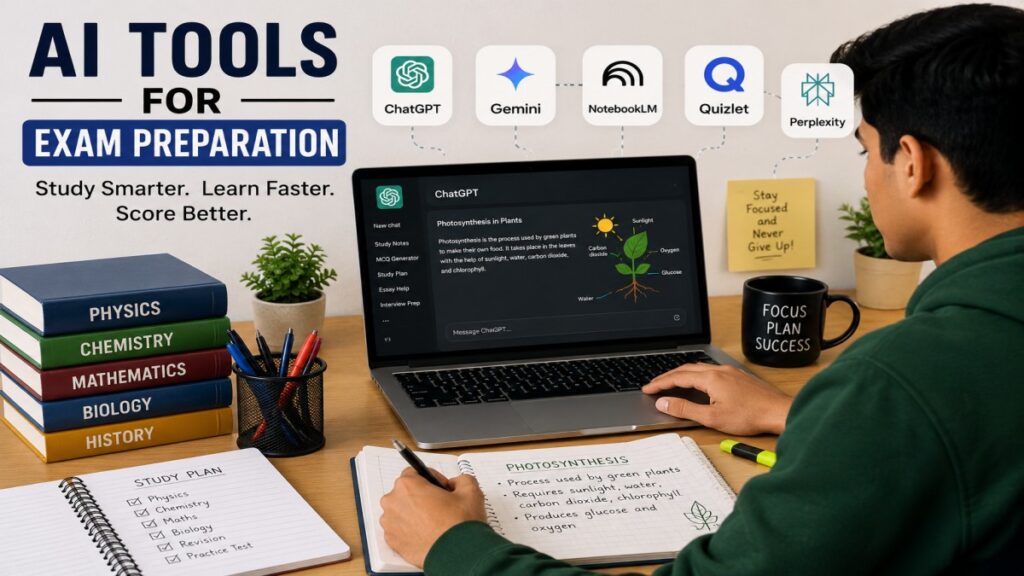
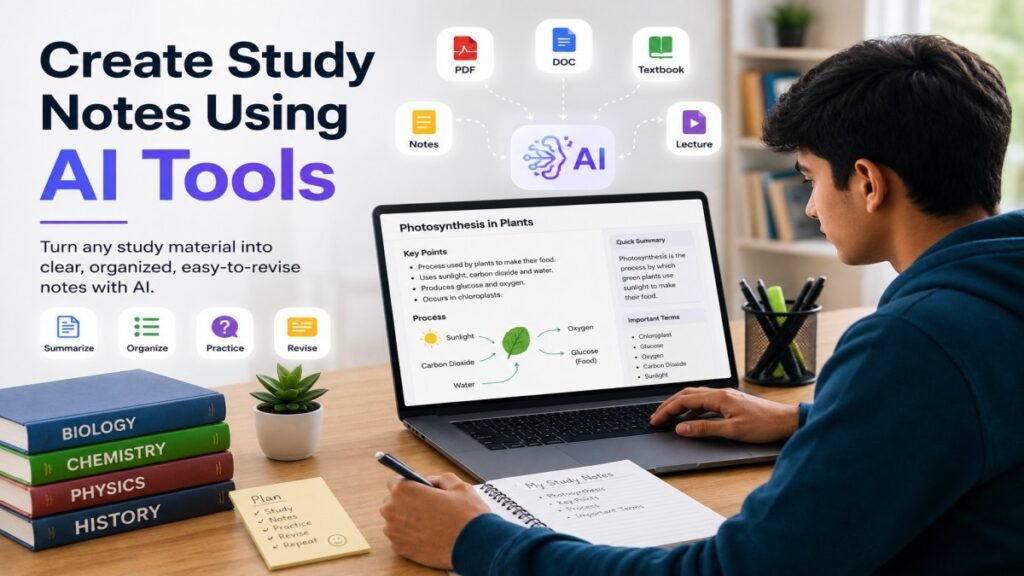
Studying can be difficult when your notes are long, confusing, or not well organized. This is where AI can help. Today, students can use AI tools to turn textbooks, PDFs, class notes, and other study materials into clear and easy-to-read notes.
Learning how to create study notes using AI tools can save time and make revision easier. AI tools can summarize long topics, find important points, explain difficult ideas, and organize information in a simple way. You can also use an AI note maker to create study notes based on your learning needs.
In this guide, UseAiLearn will show you how to create useful AI study notes step by step. You will also learn which AI tools can help, how to write better prompts, and how to check AI-generated notes before using them for exams.
What Are AI Study Notes?
AI study notes are simple notes created or improved with the help of artificial intelligence. Instead of reading a long chapter and writing every important point by yourself, you can give the study material to an AI tool and ask it to create short and clear notes.
AI can work with different types of study materials, such as:
- Text from a textbook
- PDF files
- Class notes
- Lecture transcripts
- Articles or study guides
- Questions and answers
For example, imagine you have a 20-page chapter about the French Revolution. You can give the chapter to an AI tool and ask:
“Create simple study notes from this chapter. Include the main events, important dates, key people, and causes.”
The AI may turn the long chapter into sections such as:
- Causes of the French Revolution
- Important events
- Key people
- Important dates
- Results of the Revolution
This makes the topic easier to read and revise.
How AI Creates Study Notes
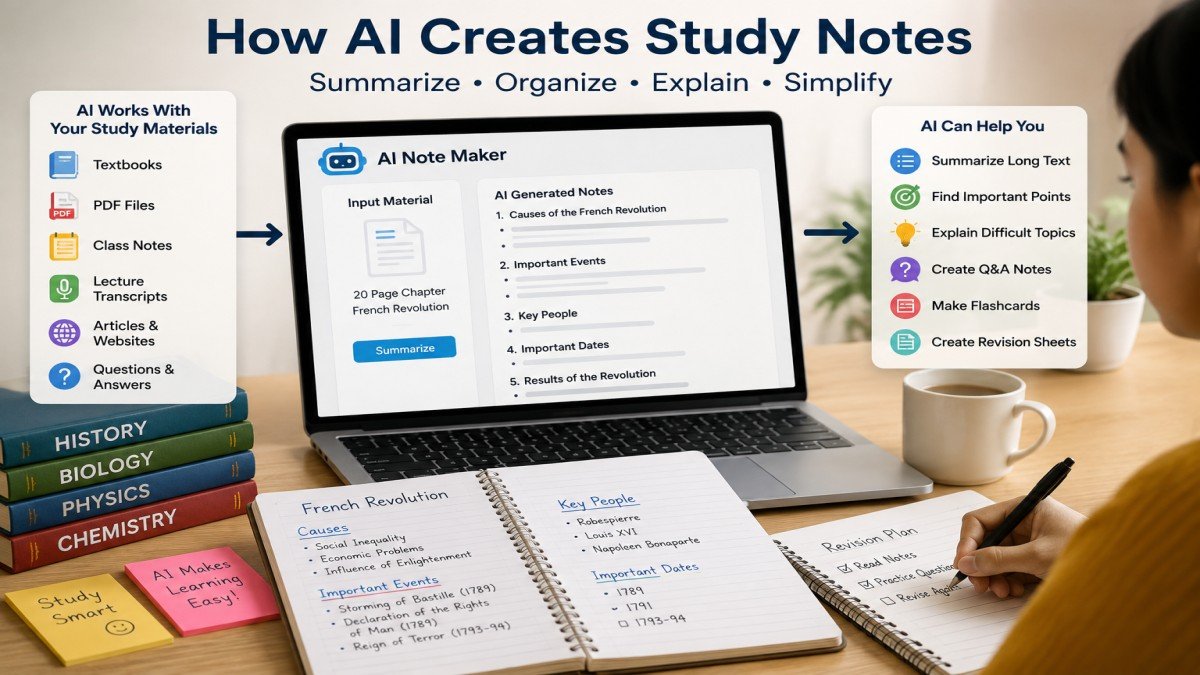
AI tools can understand the information you provide and organize it into a useful format. Depending on your prompt, an AI tool can:
- Summarize long text
- Find important points
- Explain difficult topics in simple words
- Create bullet-point notes
- Make question-and-answer notes
- Create revision sheets
- Suggest flashcards
For example, if you are studying biology, you can ask an AI tool:
“Explain photosynthesis in simple English and create five important revision points.”
The result may include a short explanation followed by five key points. You can then read, edit, and save the notes for later revision.
Are AI Study Notes the Same as Your Own Notes?
Not exactly. AI-generated notes are a starting point, not a replacement for learning.
AI can sometimes miss important details or give incorrect information. Therefore, you should compare the notes with your textbook, teacher’s material, or another trusted source.
The best approach is to use AI to save time and organize information, while you remain responsible for understanding and checking the content.
Benefits of Creating Study Notes Using AI
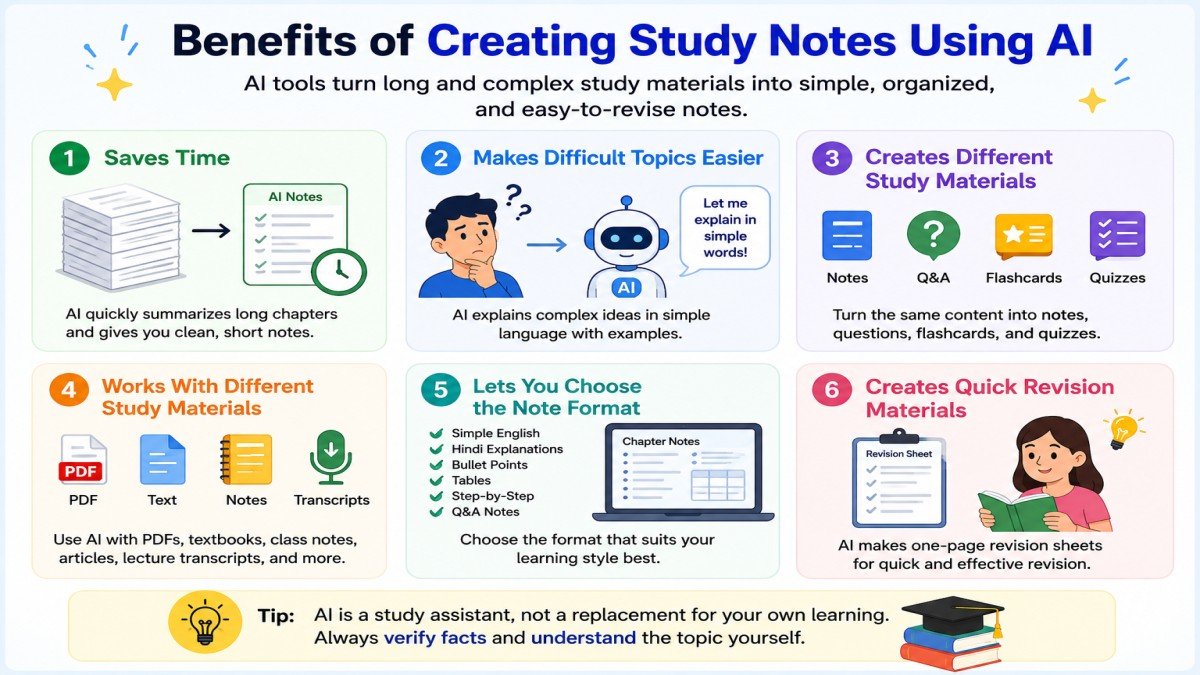
Creating study notes with AI can make studying faster and more organized. It can help you understand difficult topics, organize information, and prepare useful revision materials. However, you should use AI as a study assistant, not as a replacement for your own learning.
Here are the main benefits of using AI for study notes.
1. Saves Time
Making notes from a long chapter can take a lot of time. AI can help you find the main ideas and turn long information into shorter notes.
Example:
If you have a 30-page chapter, you can ask an AI tool to summarize it and list the most important points. You can then use these notes for revision.
You can ask:
“Create a one-page revision sheet from this chapter. Include only the most important points.”
You can then use the sheet for quick revision.
2. Makes Difficult Topics Easier
AI can explain difficult topics in simple language. You can also ask for examples or step-by-step explanations.
Example:
If you do not understand a science topic, you can ask:
“Explain this topic in simple English with a real-life example.”
This can help you understand the topic before making your final notes.
3. Creates Different Study Materials
AI can turn your study material into more than just notes. You can create questions, answers, flashcards, and quizzes from the same material.
Example:
After creating notes about World War II, you can ask:
“Create 10 multiple-choice questions from these notes.”
This gives you a simple way to test what you remember.
4. Works With Different Study Materials
Depending on the tool and its supported features, you can use AI with different types of study materials, such as PDFs, text, class notes, and lecture transcripts.
Example:
If you have a long PDF about a history topic, you can give it to a suitable AI tool and ask for clear study notes based on the material.
5. Lets You Choose the Note Format
Different students may prefer different ways of studying. AI can help you change the same information into a format that works better for you.
AI can organize information into headings, bullet points, tables, or question-and-answer formats. This can make your notes easier to read and review.
For example, you can ask for:
- Simple English
- Hindi explanations
- Bullet-point notes
- Step-by-step explanations
- Question-and-answer notes
- Flashcards
- Tables
This flexibility can make your study material easier to understand and revise.
Example:
For a history chapter, AI can organize information into:
- Causes
- Important events
- Key people
- Important dates
- Results
This structure can make important information easier to find during revision.
Tips: AI-generated notes can sometimes contain incorrect information, miss important details, or misunderstand the source material. Always check important facts with your textbook, teacher’s notes, or another trusted source.
Use AI to save time and organize information, but make sure you understand the topic yourself.
Best AI Tools to Create Study Notes
Many AI tools can help you create study notes, but you do not need to use all of them. The best choice depends on your study material and what you want to do with it.
For example, some tools are useful for general study help, while others are better for working with your own PDFs, documents, or organized notes.
I am sharing five useful AI tools for creating study notes-
1. ChatGPT
ChatGPT is a general AI tool that can help you create, simplify, and organize study notes. It supports common document formats such as PDF, DOCX, PPTX, TXT, and several spreadsheet formats.
You can use it to summarize chapters, explain difficult topics, create questions, make flashcards, and turn study material into different note formats.
Example prompt:
“Create simple study notes from this chapter. Use short headings, bullet points, important dates, key terms, and examples. Keep the language easy for a school student.”
Best for: General study notes, explanations, summaries, questions, and revision materials.
2. Google Gemini
Google Gemini can analyze uploaded documents, spreadsheets, images, videos, and other supported files. It can provide summaries, answers, and insights based on the material you upload.
This can be useful when your study material is stored in different file types.
Example prompt:
“Summarize this study material into simple notes. Include the main ideas, important facts, key terms, and examples.”
You can also ask Gemini to explain one difficult section instead of summarizing the whole file.
Best for: Analyzing and summarizing different types of study materials.
3. Microsoft Copilot
Microsoft Copilot can help you work with documents and ask questions about your study material in supported Microsoft experiences. It can be useful if you already use Microsoft 365, Word, or OneDrive.
Example prompt:
“Create short study notes from this document. Include the main ideas, important facts, definitions, and five questions for revision.”
Best for: Students who already use Microsoft tools for their study materials.
4. NotebookLM
NotebookLM is designed to work with the sources you provide. You can add PDFs, Google Docs, Google Slides, websites, public YouTube videos with captions, audio files, and other supported sources.
It can answer questions based on your sources and create materials such as study guides and mind maps. Its responses can also include citations that help you check where information came from.
Example prompt:
“Create a study guide from these sources. Include important dates, key people, main events, important terms, and 10 exam questions.”
Best for: Students who want to study from their own textbooks, PDFs, class materials, and other sources.
Important: For YouTube sources, NotebookLM supports public YouTube videos with captions and imports the video’s transcript as a source.
5. Notion AI
Notion AI is built into the Notion workspace. It can help you create, edit, summarize, and organize information without moving between different apps.
You can use it to organize study notes by subject, chapter, or exam.
Example prompt:
“Turn this lesson into clear study notes. Add headings, key points, important terms, and a short revision summary.”
Notion offers limited complimentary AI responses for users to try, while continued AI access depends on the current plan.
Best for: Organizing digital study notes in one workspace.
AI Study Notes Tools Compared
| AI Tool | Main Strength (Best For) | Study Material Support |
|---|---|---|
| ChatGPT | Flexible notes, explanations, questions, and revision. (General study help) | Common documents and supported files |
| Google Gemini | Analyzing and summarizing different file types. (File-based study help) | Documents, spreadsheets, images, videos, and more |
| Microsoft Copilot | Working with documents in supported Microsoft experiences. (Microsoft users) | Supported Microsoft files and experiences |
| NotebookLM | Answers and study materials based on your sources. (Source-based studying) | PDFs, Docs, Slides, websites, YouTube, audio, and more |
| Notion AI | Keeps AI features inside your Notion workspace. (Note organization) | Depends on your Notion workflow |
Note: AI tools can change their features, file limits, pricing, and free access over time. Check the tool’s official website before relying on a specific feature.
Which Tool Should You Start With?
There is no single AI tool that is best for every student.
- For general study notes: ChatGPT is a flexible choice for summaries, explanations, questions, and different note formats.
- For studying from your own sources: NotebookLM is a strong option because it is designed around the sources you provide.
- For different types of uploaded files: Gemini can analyze many types of study materials.
- For Microsoft users: Copilot can be convenient when your study files are already in Microsoft tools.
- For organizing digital notes: Notion AI can be useful if you already use Notion.
Our Simple Recommendation
If you are a beginner, start with ChatGPT for general study tasks. If you have a large collection of PDFs, textbooks, or other source materials, try NotebookLM as well.
You do not need to use several AI tools at the same time. Choose one that fits your study material, learn how to use it well, and always check important information before using AI-generated notes for exams.
How to Create Study Notes Using AI Tools (Step-by-Step)
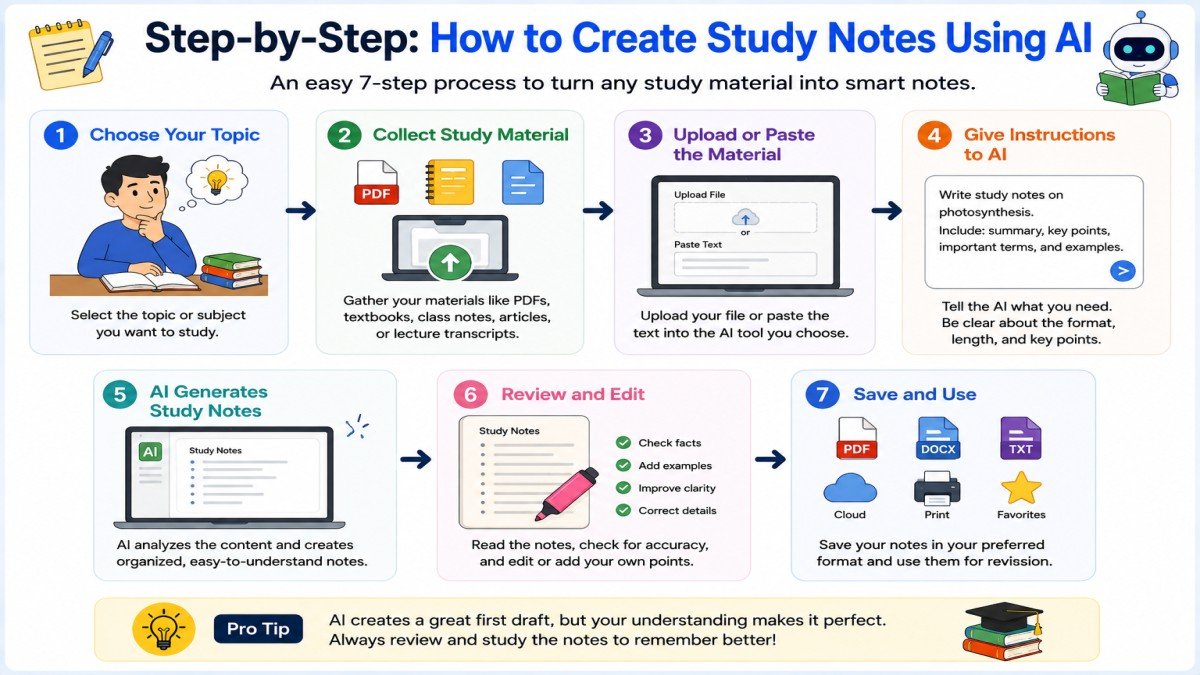
Creating study notes with AI is simple. You do not need advanced AI skills. You only need your study material, a suitable AI tool, and a clear prompt.
Follow these steps to create useful and easy-to-revise study notes.
Step 1: Choose the Right AI Tool
First, choose an AI tool based on your study needs.
Choose a tool based on your study material. For example, ChatGPT is useful for general study help, while NotebookLM can be useful when you want to work from your own sources.
Step 2: Collect Your Study Material
Next, collect the material you want to turn into notes.
It can be:
- A textbook chapter
- PDF notes
- Class notes
- Lecture text
- An article
- A study guide
For example, suppose you have a 25-page chapter about the Indian Independence Movement. Instead of asking AI to make random notes about the topic, give it the actual chapter or your class material.
This helps the AI create notes based on the information you are studying.
Step 3: Upload or Paste Your Material
Open your chosen AI tool and upload your file if the tool supports it. You can also paste the text into the chat.
For example, if you are using ChatGPT, you can upload a supported study document and then tell the AI what you want.
If your chapter is very long, you may need to work with it in smaller sections, depending on the tool and its current file or context limits.
Step 4: Write a Clear Prompt
This is one of the most important steps.
Do not simply write:
“Make notes.”
Instead, tell the AI exactly how you want the notes.
For example:
“Create simple study notes from this chapter. Use short headings and bullet points. Include important dates, key people, important events, and difficult terms with simple explanations. Do not remove important facts.”
A clear prompt gives the AI better instructions and can produce more useful notes.
Step 5: Ask AI to Organize the Notes
After creating the first version, you can ask AI to improve the structure.
For example:
“Organize these notes into Causes, Important Events, Key People, Important Dates, Results, and Key Terms.”
This can turn a large amount of information into a clean study format.
You can also ask for a table when it is useful.
For example:
“Create a table of the important events and their dates.”
This makes important information easier to find during revision.
Step 6: Make the Notes Easier to Understand
If a topic is difficult, do not just memorize the AI-generated notes. Ask the AI to explain the difficult part.
For example:
“Explain this topic in simple English as if you are teaching a beginner. Give one real-life example.”
You can also ask:
“Explain this paragraph in Hindi and then give the main points in English.”
This can help you understand the topic before making final revision notes.
Step 7: Add Questions and Flashcards
Once your notes are ready, use AI to test your knowledge.
For example, ask:
“Create 10 important questions from these notes. Give the answers at the end.”
You can also ask:
“Create 15 flashcards from these notes. Put the question on one side and the answer on the other.”
This turns your notes into an active study tool instead of something you only read.
Step 8: Check the AI-Generated Notes
Never assume that AI-generated notes are always correct.
AI can sometimes:
- Give incorrect information
- Miss an important detail
- Mix up dates or names
- Misunderstand the source
- Give an incomplete explanation
Compare important information with your textbook, teacher’s notes, or another trusted source.
For example, if AI says that an important historical event happened in a certain year, check that date in your textbook before using it in exam preparation.
Step 9: Personalize Your Final Notes
After checking the information, make the notes your own.
You can:
- Remove unnecessary information
- Add points your teacher mentioned
- Highlight important topics
- Add your own examples
- Mark topics that you need to revise again
The final notes should help you understand and remember the topic.
Step 10: Use the Notes for Revision
Your final AI-assisted notes can now be used for revision.
A simple revision process can be:
Read → Understand → Test Yourself → Find Weak Areas → Revise Again
For example, you can read your notes today, answer the practice questions tomorrow, and review the difficult topics again before your exam.
Quick Example
Imagine you have a long chapter about Photosynthesis.
You can follow this process:
Study material: Biology chapter on Photosynthesis
Prompt:
“Create simple study notes from this chapter. Explain photosynthesis in easy English. Include the definition, process, important terms, and key points. Use bullet points and a short summary.”
Then you can ask:
“Create 10 exam questions from these notes.”
Finally, check the notes with your textbook and add anything important that is missing.
This simple process can help you turn a long chapter into organized notes and useful revision material.
Best Prompts for Study Notes
A clear prompt helps an AI tool understand what you want. You do not need complicated instructions. Simply tell the AI what material you are using, what you want it to do, and how you want the result to look.
Here are some useful prompts you can copy and change for your own study needs.
1. Prompt to Create Simple Study Notes
“Create simple study notes from this chapter. Use short headings and bullet points. Include the main ideas, important facts, and key terms. Use easy English and keep the important information.”
Best for: Turning a long chapter into clear and simple notes.
2. Prompt to Explain a Difficult Topic
“Explain this topic in very simple English as if you are teaching a beginner. Break it into small steps, explain difficult words, and give one simple real-life example.”
Best for: Understanding difficult science, history, or other study topics.
3. Prompt to Create Exam-Focused Notes
“Create exam-focused notes from this chapter. Include important definitions, facts, dates, formulas, and key points. Organize the notes so I can use them for exam revision.”
Best for: School, college, and exam revision.
4. Prompt to Create Questions and Answers
“Turn this chapter into 15 important questions and answers. Start with easy questions and then include more difficult ones. Keep the answers clear, short, and easy to understand.”
Best for: Testing your understanding after reading a chapter.
5. Prompt to Create Flashcards
“Create 20 flashcards from these study notes. Write one question and one short answer for each flashcard. Focus on important facts, definitions, names, dates, formulas, and key terms.”
Best for: Quick revision and memory practice.
6. Prompt to Create MCQs
“Create 15 multiple-choice questions from this chapter. Give four options for each question. Provide the correct answer and a short explanation after each question. Use only information from the study material I provided.”
Best for: Practicing for exams and checking your knowledge.
Tip: Ask the AI to use only your study material when possible. This can reduce the chance of adding unrelated information.
7. Prompt to Create a One-Page Revision Sheet
“Turn this chapter into a one-page revision sheet. Include only the most important concepts, facts, definitions, dates, and formulas. Use short bullet points and simple language.”
Best for: Quick revision when an exam is close.
8. Prompt to Test Your Understanding
“Ask me 10 questions about this topic one at a time. Do not show the answer before I respond. After each answer, tell me whether I am correct. If I make a mistake, explain the correct answer in simple English.”
Best for: Active recall and checking what you actually remember.
How to Write Better Study Prompts
You can make your prompts better by including four simple things:
1. Give the context
Tell the AI what you are studying.
2. Give a clear task
Tell it exactly what you want it to do.
3. Choose the format
Ask for bullet points, tables, questions, flashcards, or short paragraphs.
4. Tell it your level
For example, ask for Grade 6–7 English if you want very simple explanations.
Example of a Weak Prompt
“Make notes about photosynthesis.”
This prompt is too general.
Example of a Better Prompt
“Create simple Grade 7 study notes about photosynthesis. Explain the meaning, process, important terms, and key points. Use short headings, bullet points, and one simple real-life example.”
The second prompt gives the AI much clearer instructions, so the result is more likely to match your needs.
For example, conceptually:
Student has a 20-page biology chapter → creates notes → asks AI to explain difficult terms → generates 10 questions → answers without looking → checks mistakes → adds teacher’s important points → creates final one-page revision sheet.
Important Tip
Do not blindly copy AI-generated notes. Read them, compare important facts with your textbook or trusted sources, and add your own understanding.
The goal is not just to create notes with AI. The goal is to use AI to understand, remember, and revise your study material better.
Example: Turn a Chapter into Study Notes Using AI
One of the best ways to understand AI study notes is to see a simple example.
Imagine you are studying a history chapter about the Industrial Revolution. You have a long paragraph in your textbook and want to turn it into short notes.
Tip: Do not upload private, sensitive, or copyrighted material to an AI tool unless you have permission to use it. Check the tool’s current privacy and data settings before uploading personal or confidential files.
Step 1: Start With the Original Paragraph
Here is a simple example of a textbook-style paragraph:
The Industrial Revolution began in Britain in the late 18th century. New machines changed the way goods were produced. Factories started using machines instead of depending only on hand work. The textile industry grew quickly because machines made it possible to produce cloth faster. Many people moved from villages to towns to find factory jobs. This growth of factories changed work, cities, transportation, and everyday life.
This paragraph contains useful information, but it is not the easiest format for quick revision.
Step 2: Ask AI to Create Study Notes
You can give the paragraph to an AI tool and use a prompt like this:
“Turn this paragraph into simple study notes. Use short headings and bullet points. Include the important time period, place, changes, industries, and effects. Use simple English.”
The AI may create notes like these:
AI-Generated Notes
Industrial Revolution
- Began in Britain
- Started in the late 18th century
- New machines changed production
- Factories began using machines
- Textile production grew quickly
- Machines helped produce cloth faster
- Many people moved from villages to towns
- People moved to find factory jobs
- Factories changed:
- Work
- Cities
- Transportation
- Daily life
These notes are shorter and easier to read than the original paragraph.
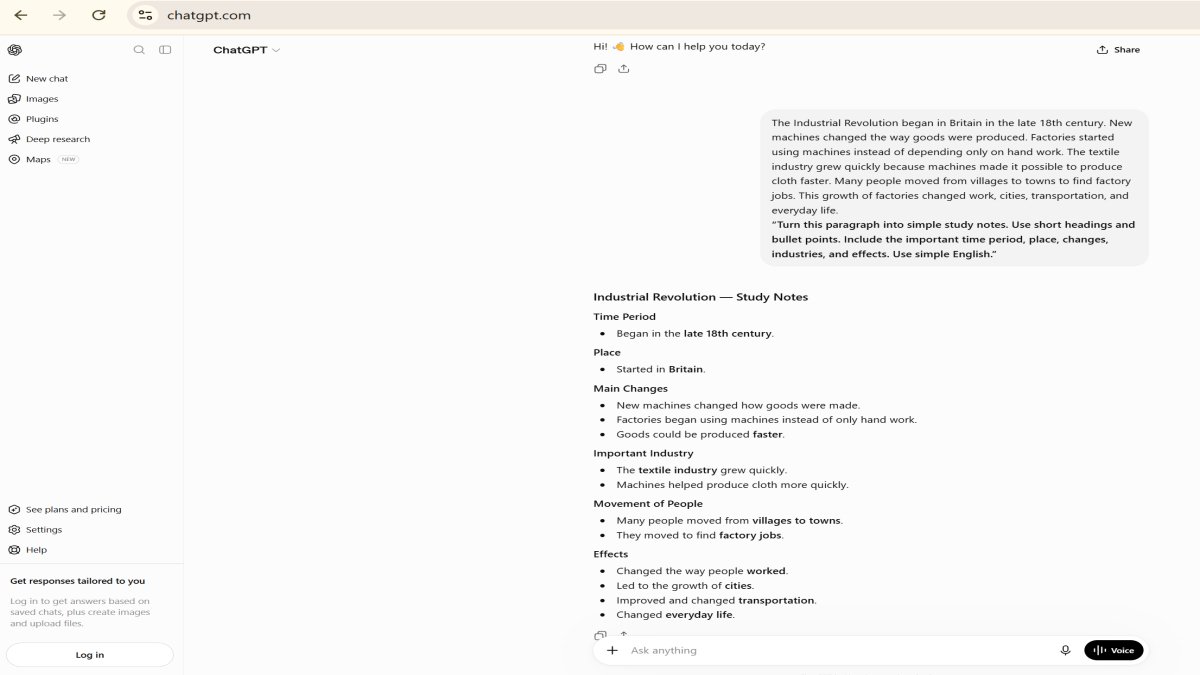
However, we can make them even better for revision.
Step 3: Improve the AI-Generated Notes
AI-generated notes should not always be treated as the final version. Read them carefully and add important details that you need for your exam.
For example, you can organize the notes like this:
Final Improved Notes
Industrial Revolution
When?
- Began in Britain in the late 18th century.
What changed?
- New machines changed the way goods were produced.
- Factories began using machines instead of depending mainly on hand work.
Important Industry
- The textile industry grew quickly.
- Machines helped produce cloth faster.
Effect on People
- Many people moved from villages to towns.
- They moved mainly to find factory jobs.
Major Effects
- Changed the way people worked.
- Increased the growth of factories and towns.
- Changed transportation.
- Changed everyday life.
Quick Revision Point:
The Industrial Revolution changed production, work, cities, and daily life through the increased use of machines and factories.
What Is the Difference?
The three versions have different purposes:
| Version | Main Purpose |
|---|---|
| Original paragraph | Gives detailed information |
| AI-generated notes | Makes the information shorter and easier to read |
| Final improved notes | Organizes the information for better understanding and revision |
The final version is usually more useful for exam preparation because the information is divided into clear sections.
Step 4: Make the Notes Even More Useful
After creating the final notes, you can ask AI to create practice questions.
For example:
“Create 5 important exam questions from these notes. Give short and clear answers.”
You can also ask:
“Create 10 flashcards from these notes for quick revision.”
This turns one chapter into several useful study materials.
Important Tip
Do not simply copy the AI-generated notes and start memorizing them. Compare them with your textbook or class notes. Check important dates, names, facts, and definitions.
You can then add your teacher’s important points and your own understanding to create the final notes.
The best process is:
Original Material → AI Notes → Check and Improve → Final Notes → Practice Questions → Revision
This way, AI helps you save time while you still do the important part: understanding and learning the topic.
Tips to Make AI Study Notes More Effective
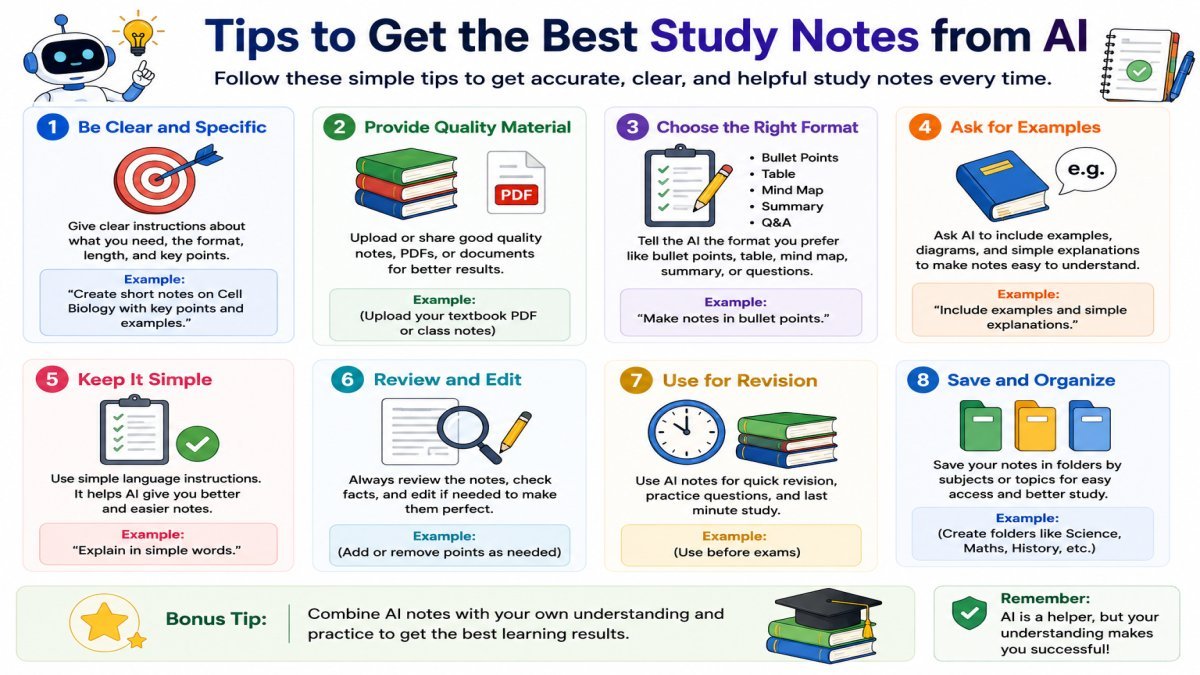
AI can help you create study notes quickly, but good notes should help you understand and remember the topic.
Here are some simple tips to make AI study notes more useful.
1. Use Your Own Words
After AI creates your notes, read them and rewrite important points in your own words. This can help you understand the topic instead of only memorizing AI-generated sentences.
Example:
AI note:
“Photosynthesis is the process by which green plants convert light energy into chemical energy.”
Your own note:
“Plants use sunlight to make their food.”
The second version is simpler and may be easier for you to remember.
You do not need to rewrite every sentence. Focus on important concepts that you need to understand.
2. Highlight Important Points
Not every piece of information in a chapter is equally important. Highlight key facts, definitions, dates, formulas, names, and terms that you need to remember.
Example:
In a history chapter, you might highlight:
- Important dates
- Names of important people
- Major events
- Causes and results
- Important terms
This makes it easier to find important information during revision.
3. Add Diagrams and Visuals
Some topics are easier to understand with diagrams, charts, timelines, or simple drawings.
For example, if you are studying the water cycle, a diagram can show:
Evaporation → Condensation → Precipitation → Collection
If you are studying history, a timeline can help you remember events in the correct order.
You can ask an AI tool:
“Suggest a simple diagram or flowchart that can help me understand this topic.”
However, make sure the diagram is correct before using it in your notes.
4. Review Regularly
Creating notes once is not enough. You need to review them regularly so that you remember the information for a longer time.
A simple review plan could be:
- Day 1: Read and understand the notes.
- Day 2 or 3: Test yourself with questions.
- After one week: Review the difficult points.
- Before the exam: Do a final revision.
You can also ask AI to create a short quiz from your notes before each revision session.
Example prompt:
“Create 10 questions from these notes. Ask me one question at a time and do not show the answer until I respond.”
5. Verify Facts
This is one of the most important tips when using AI for study notes.
AI can sometimes provide incorrect information, miss details, or misunderstand a topic. Therefore, check important facts before using the notes for exams.
Pay special attention to:
- Dates
- Names
- Formulas
- Definitions
- Statistics
- Scientific facts
- Historical events
Example:
If an AI-generated history note says that an event happened in 1947, check the date in your textbook or another trusted source before memorizing it.
Bonus Tip: Add Your Teacher’s Important Points
Your teacher may explain something in class that is not included in the AI-generated notes. Add those points to your final notes.
For example, your teacher may say:
“This topic is important for the exam.”
Mark that point in your notes so you remember to revise it.
A Simple Formula for Better AI Study Notes
You can remember this simple process:
Create → Understand → Personalize → Check → Review
AI can help you create notes, but your own understanding makes those notes valuable.
The goal is not to create the shortest notes possible. The goal is to create notes that help you understand, remember, and revise the topic easily.
How to Check AI-Generated Study Notes
AI can make study notes faster and easier, but AI-generated notes are not always perfect. They may contain incorrect information, leave out important details, or misunderstand the study material.
That is why you should always check AI-generated notes before copying them.
1. Do Not Copy Notes Without Understanding
One common mistake is copying AI-generated notes and memorizing them without understanding the topic.
For example, a student may ask AI to explain photosynthesis and copy the answer into a notebook. If the student cannot explain the process in their own words later, the notes have not helped them learn.
Better approach: Read the AI explanation, understand the main idea, and then write important points in your own words.
2. Check Important Information
AI can sometimes provide incorrect dates, names, definitions, formulas, numbers, or explanations.
Before using AI-generated notes for an exam, compare important information with your:
- Textbook
- Teacher’s notes
- Class materials
- Trusted reference sources
This is especially important for facts that you need to remember exactly.
3. Check for Missing Details
A summary is shorter because some information is removed. Sometimes, the missing information may be important for your class or exam.
For example, a textbook may include a diagram, solved example, explanation, or important detail that an AI summary does not include.
After creating AI notes, compare them with your main study material and add anything important that is missing.
4. Do Not Depend Only on AI
AI should support your learning, not replace your textbook, teacher, or your own thinking.
If you use AI for every task, you may spend less time reading, solving problems, and practicing on your own.
A better approach is:
Read → Understand → Use AI for Help → Check → Practice → Review
For example, try solving a question yourself first. Then use AI to check your answer or explain your mistake.
5. Keep Useful Textbook Examples
Textbook examples can help you understand difficult ideas and may also be useful for exam preparation.
For example, a mathematics textbook may explain a formula with a solved problem. An AI summary may mention the formula but leave out the complete example.
Keep important examples in your final notes. You can also ask AI:
“Explain this textbook example step by step without removing the important information.”
6. Do Not Ask AI to Do All the Learning
AI can create notes, questions, quizzes, and other study materials, but you still need to do the learning yourself.
Try to think about a question or solve a problem before asking AI for the answer. Then use AI to check your work, explain difficult parts, or help you understand your mistakes.
A Simple Rule to Remember
Use this simple process when creating study notes with AI:
Read → Understand → Ask AI → Check → Add Missing Points → Practice → Review
This approach helps you save time while keeping your learning active. The goal is not to let AI do all the studying. The goal is to use AI as a study assistant while you remain responsible for understanding and learning the topic.
Pros and Cons of AI Study Notes
AI study notes can make studying faster and more organized, but they also have some limitations. The key is to use AI to support your learning instead of depending on it completely.
Pros and Cons at a Glance
| Pros | Cons |
|---|---|
| Saves time | May contain incorrect information |
| Makes long information easier to review | May leave out important details |
| Keeps study material organized | Needs fact-checking |
| Creates revision materials, questions, and flashcards | Copying notes without understanding can hurt learning |
| Can explain topics in different ways | May not follow your teacher’s exact requirements |
Quick Takeaway
AI study notes are most useful when they help you understand, organize, practice, and revise. Do not simply copy them. Check important information and make sure you can explain the topic in your own words.
Can AI Replace Traditional Note-Taking?
AI can make note-taking faster, but it cannot completely replace traditional note-taking. AI can help you process and organize information, while making your own notes can help you think about the topic and understand it better.
What AI Can Do
AI can reduce the time you spend on some parts of note-taking. It can help you:
- Summarize long study material
- Organize information into clear sections
- Explain difficult ideas in simple words
- Turn notes into questions or flashcards
- Create quick revision materials
This can be especially helpful when you have a large amount of study material.
Why Your Own Notes Still Matter
Making your own notes is not only about writing information. It also makes you read, select, think, and decide what is important.
When you write a topic in your own words, you may understand and remember it better. You can also add points from your teacher, class discussions, textbook examples, or your own understanding.
For example, after studying a history topic, you may use AI to organize the information first. Then you can select the important points and write them in a short format that is easy for you to remember.
The Best Approach: Use Both
You do not have to choose between AI notes and traditional notes. You can use them together.
A simple process is:
Read → Use AI for Help → Check → Add Your Own Points → Practice → Revise
For example:
- Read the chapter or study material.
- Use AI to summarize or organize difficult information.
- Check the AI output with your textbook or class material.
- Add important points in your own words.
- Use the final notes for practice and revision.
This approach can save time without removing your active role in learning.
AI Notes vs Your Own Notes
| Feature | AI Study Notes | Your Own Notes |
|---|---|---|
| Speed | Very fast | Takes more time |
| Organization | Can organize information quickly | You organize it yourself |
| Explanation | Can explain difficult topics | Based on your own understanding |
| Personal style | Can be customized | Fully personal |
| Learning through writing | Limited | Can help you process the topic |
| Teacher’s points | May miss them | Easy to add |
So, Can AI Replace Traditional Note-Taking?
No, not completely.
AI is useful for saving time and organizing study material, but your own reading, thinking, understanding, and writing are still important parts of learning.
The best approach is to use AI as a study assistant, not as a replacement for your own learning. Let AI help with time-consuming tasks, while you make sure you understand the topic and create notes that work for you.
Quick Summary
AI study notes can help you turn long study material into shorter, clearer, and more organized notes. They are useful for understanding difficult topics, preparing for exams, and doing quick revision.
Here is a quick summary of what we have learned:
| Topic | Quick Answer |
|---|---|
| What are AI study notes? | Notes created or improved with the help of an AI tool. AI can summarize, explain, organize, and turn study material into different formats. |
| Best AI tools | ChatGPT, Google Gemini, NotebookLM, Microsoft Copilot, and Notion AI. |
| Best use cases | Summarizing chapters, creating revision notes, explaining difficult topics, making flashcards, creating MCQs, and organizing information. |
| Who should use them? | School students, college students, exam candidates, and anyone who wants help organizing or understanding study material. |
| Important tip | Do not copy AI notes blindly. Understand the topic, check important facts, and add information from your textbook and teacher. |
Frequently Asked Questions (FAQs)
Here are some common questions students ask about creating study notes with AI tools.
1. Are AI study notes accurate?
AI study notes can be useful, but they are not always 100% accurate. AI can sometimes make mistakes, leave out important information, or misunderstand a topic.
Example:
AI may give you the wrong date for a historical event. Always check important facts with your textbook, teacher’s notes, or another trusted source.
Simple answer: AI notes can help, but always verify important information.
2. Which AI tool is best for creating study notes?
There is no single best tool for every student.
- ChatGPT — general study help
- NotebookLM — your own sources
- Gemini — supported files
- Copilot — Microsoft users
- Notion AI — digital note organization
For most beginners, ChatGPT is a good all-round option. If you mainly study from your own PDFs and source material, NotebookLM is a strong choice.
3. Can ChatGPT make study notes from PDFs?
Yes. ChatGPT can work with supported PDF files and help summarize, explain, and organize information from them. File and usage limits can depend on your plan and current ChatGPT features.
Example:
You can upload a supported textbook PDF and ask:
“Create simple study notes from this PDF. Include the main ideas, important terms, definitions, and key points.”
Always check the generated notes against the original PDF.
4. Are AI study notes free?
Some AI tools offer free access, but free plans may have limits on messages, file uploads, AI responses, or other features. These limits can change over time.
For example, you may be able to create study notes for free but reach a usage limit after several requests.
Before depending on a specific feature, check the tool’s current pricing and free-plan information.
5. Can AI create notes from YouTube videos?
Yes, some AI tools can work with YouTube videos or their transcripts. For example, NotebookLM supports public YouTube URLs as sources when the video has a transcript.
Example:
If you watch a 45-minute educational video, you may be able to add the video to a supported AI tool and ask:
“Create study notes from this video. Include the main ideas, important terms, and examples.”
The exact features depend on the AI tool and the video.
6. Should I trust AI-generated notes for exams?
You should not trust AI-generated notes blindly for exams.
AI can make mistakes or leave out information that your teacher expects you to know.
Before using AI notes for exam preparation:
- Compare them with your textbook.
- Check important facts and definitions.
- Add your teacher’s important points.
- Review textbook examples and diagrams.
- Practice questions yourself.
AI should help you prepare, but it should not be your only source.
7. Can AI summarize textbooks?
Yes, AI tools can help summarize supported textbook material, especially when you provide the relevant text or a supported digital file.
For example, you can ask:
“Summarize this chapter in simple English. Keep the important definitions, examples, key points, and important facts.”
However, a summary may leave out details. So, use the original textbook when you need complete information.
8. Which AI tool is best for college students?
The best tool depends on how a college student studies.
ChatGPT can be useful for general explanations, summaries, questions, and revision.
NotebookLM can be especially useful when a student has lecture notes, PDFs, research material, and other sources that they want to study together.
Notion AI can be useful for students who want to organize subjects, assignments, and digital notes in one workspace.
For example, a college history student could use NotebookLM to work with several course PDFs and create a study guide, while using ChatGPT to explain difficult concepts in simple language.
Final FAQ Tip
AI can make studying faster, but good learning still requires reading, thinking, practicing, and reviewing.
Use AI to support your study process, not to replace it.
Conclusion
AI tools can make studying easier, faster, and more organized. You can use tools like ChatGPT, Gemini, NotebookLM, Copilot, and Notion AI to create study notes using AI, summarize chapters, explain difficult topics, and prepare questions for revision.
But AI should not replace your own learning. Always read and understand the topic, check important facts, and compare AI-generated notes with your textbook or teacher’s notes. Before an exam, review your AI-generated notes carefully and make sure they include the important information you need.
A simple approach is:
Read → Use AI → Check → Improve → Practice → Revise
Start with one AI tool and use clear prompts. Make the final notes in a format that is easy for you to understand and remember.
For more simple, practical, and beginner-friendly AI tutorials, visit UseAiLearn and keep learning how to use AI more effectively.